
Ataccama 17.2.0 Release Notes
Send data quality alerts to ServiceNow, apply DQ rules directly to JSON, and connect AI clients to ONE in Ataccama Cloud with zero setup; in MDM, data stewards get a rebuilt Web App and AI agents that help resolve matching tasks.
Release date |
October 23, 2026 |
Upgrade notes |
|
Products |
ONE Data Quality & Catalog, ONE MDM, ONE RDM, ONE Runtime Server, ONE Desktop |
Downloads |
|
Security updates |
Release Highlights
Create ServiceNow Tickets from Monitoring Projects ONE DQ&C
Data quality issues reach your teams in the ServiceNow workflows they already use, and you can track each ticket’s state directly in the project.
Read more ↓
Data Quality Rules on Semi-Structured Data ONE DQ&C
Validate JSON objects and arrays directly using the new JSON rule input type and json.* functions, with no need to flatten them into separate columns first.
Read more ↓
Pushdown Processing Optimizations ONE DQ&C
Pushdown profiling and data quality evaluation on Snowflake, Databricks, BigQuery, and IOMETE now run faster on fewer resources; on Databricks, profiling views is even faster than on the legacy Spark cluster.
Read more ↓
DQ&C MCP Server Available by Default ONE DQ&C
In Ataccama Cloud, connect Claude, Gemini CLI, Codex CLI, or another MCP client to Ataccama ONE without any setup on the platform side, and read per-rule results of monitoring project runs from your AI client.
Read more ↓
New MDM Web App Interface ONE MDM
A rebuilt interface for data stewards: record preview and editing in a side panel, pinned columns, filter groups, shareable links, and a task pool for your roles, with the legacy interface one click away.
Read more ↓
ONE
Create ServiceNow Tickets from Monitoring Projects
Bring data quality issues into the ServiceNow workflows your teams already use. Monitoring project notifications can now create and update ServiceNow tickets, such as incidents or problems. Repeated issues don’t flood your queue: each notification keeps one open ticket, updates it on later runs, and opens a new one once the previous one is finished.
Your team keeps control of the ticket lifecycle in ServiceNow. From ONE, you can follow each ticket on the new ServiceNow alerts tab, which shows the ticket number and state, with a direct link to the ticket in ServiceNow. To see the tickets of all monitoring projects in one place, use the new ServiceNow Alert Items screen.
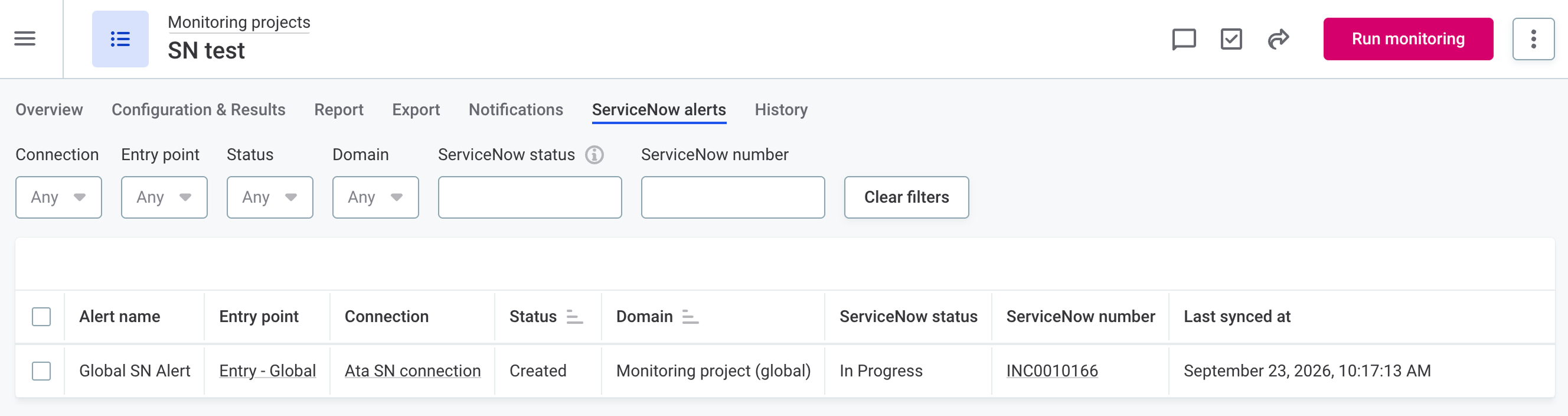
To get started, connect your ServiceNow instance, choose the table for your tickets, and decide what goes into each field, for example, the project name or the measured data quality. Then turn on ServiceNow in your general or specific notifications.
For details, see ServiceNow Integration.
Data Quality Rules on Semi-Structured Data
Apply data quality rules directly to nested data, such as JSON objects and arrays, without flattening it into separate columns first. Previously, semi-structured values were treated as plain strings and nested data had to be transformed before ONE could process it.
Use the new JSON rule input type and the new json.* functions in your rule expressions to read fields inside a JSON object, evaluate every item of an array, or verify that a required field is present.
Support is limited to data quality evaluation: JSON attributes are not profiled and can only be exported as string.
In addition, you can turn on native support for semi-structured data on BigQuery connections by enabling Process semi-structured columns as JSON on the connection.
This allows you to import JSON, ARRAY, and STRUCT columns as JSON attributes and use them as rule inputs, both on Data Processing Engines (DPEs) and in pushdown.
For details, see Structured values (JSON) and BigQuery Connection.
If your expressions use str.jsonParse, str.toObject, or str.toArray, see the upgrade notes for their replacements.
DQ&C MCP Server Available by Default
Connect Claude, Gemini CLI, Codex CLI, or another MCP client to Ataccama ONE without any setup on the platform side: the Data Quality & Catalog (DQ&C) MCP server is now deployed and enabled by default in Ataccama Cloud environments.
The server URL has changed: it is now your Ataccama ONE hostname followed by /mcp, for example one.example.com/mcp, instead of a separate mcp- subdomain.
If you connected an AI client before upgrading, update the server URL in your client.
See DQ&C MCP server URL changed.
Other improvements:
-
The server can run in read-only mode. In this mode, the server exposes only the read tools and tells the AI assistant that it is read-only.
-
A new tool returns the pass and fail results of each rule applied to a catalog item in a specific monitoring project run, so an assistant can add a check, run the project, and read the outcome in one conversation.
-
Data quality results report not-applicable records separately instead of counting them as failures.
For details, see Data Quality & Catalog MCP Server.
Amazon Bedrock AgentCore for the DQ&C MCP Server
Agents running in Amazon Bedrock can now use the DQ&C MCP server as a tool source through an Amazon Bedrock AgentCore Gateway. The Gateway connects to the MCP server with a service account, so interactive clients such as Claude, Gemini CLI, and Codex CLI are not affected.
For setup instructions, see Connect Amazon Bedrock AgentCore to the DQ&C MCP Server.
Pushdown Processing Optimizations
Pushdown processing on Snowflake, Databricks, BigQuery, and IOMETE is now faster and uses fewer resources. Profiling re-runs source views and SQL less often, data quality evaluation writes less intermediate data, and both handle connection limits and transient errors more gracefully. On Databricks, profiling views is now faster than on the legacy Spark cluster.
These optimizations don’t apply to Azure Synapse because of differences in how it reads data.
-
Profiling: For views, SQL catalog items, and sliced tables, pushdown profiling now copies the source into a temporary table once when the column statistics need more than one query. Every subsequent query reads that copy instead of re-running the view or SQL; plain tables are still read directly.
In addition, on Databricks, two further optimizations apply:
-
On tables with more than one million rows, variance and standard deviation are now estimated from a 10% sample of rows, while all other statistics still use every row. This keeps the query on Databricks' Photon engine and sharply reduces the cost of profiling numeric columns. To change the row threshold and the sample size, or to turn sampling off, see Databricks query pushdown processing.
-
The unique, distinct, and not-null counts are computed in a single pass, which reads fewer rows.
-
-
Data quality: DQ jobs write far less intermediate data. Rules are now evaluated once into a narrow results table that holds only the rule outcomes, not the source’s other columns. Aggregations, invalid samples, and exports are all built from this table, and only the sampled or exported records are joined back to the source for their full rows.
The table is written only when something reads it more than once, such as drillthrough, export, or a filter breakdown. An aggregation-only job reads the source once and writes no table.
-
Concurrency and resilience:
-
By default, profiling runs as many queries in parallel as the connection pool has connections, so tasks no longer queue waiting for a free connection. When the pool is full, a query now waits instead of failing, in both profiling and DQ.
-
Profiling retries are bounded and configured per data source type. Errors that a retry can’t fix, such as a missing permission or an unset working database, are no longer retried.
-
Error messages are capped in size, so oversized rejected statements don’t pollute the log.
-
For new configuration options, see DQ pushdown processing and Pushdown profiling retry configuration. For more details about how pushdown works, see SQL Pushdown Processing.
More Functions Supported in Pushdown
Rules that use the functions case, decode, nvl, min, max, safeMin, safeMax, countif, countDistinctif, countUnique, first, concatenateif, random, word, and wordCount can now be evaluated in pushdown on BigQuery, Databricks, IOMETE, Snowflake, and Azure Synapse.
On Azure Synapse, word is not supported.
On Snowflake, countif, countDistinctif, countUnique, first, and concatenateif require Legacy pushdown to be turned off, while the other functions work in both pushdown implementations.
For the full list, see Supported functions and operators.
Snowflake Lookups
Check values against reference data stored in Snowflake without copying the data into ONE. A Snowflake lookup points to one column of a Snowflake table, and rules that use it match values directly in Snowflake, so the reference data never leaves the warehouse.
After you create a Snowflake lookup, you can reference it in rules using the new is in lookup table and is not in lookup table conditions or the new isInLookupTable function.
Rules that use Snowflake lookups can be evaluated only in pushdown, on catalog items from the same Snowflake connection as the lookup.
For details, see Snowflake lookups.
See Where Lookups Are Used
Keep your lookup list tidy and change lookups without breaking the rules that depend on them.
The new Occurrence tab of each lookup shows which rules and DQ firewalls use it. This way, you can spot lookups that are no longer needed and see the impact of changes before you make them.
Invalid Record Export for Non-Pushdown Sources
Send records that fail DQ evaluation to a database table, now also for catalog items evaluated without pushdown. Previously, invalid record export in monitoring projects was available only for pushdown processing on BigQuery, Databricks, IOMETE, and Snowflake.
The records are written to a table in a relational database of your choice, such as PostgreSQL, MySQL, Microsoft SQL Server, Oracle, or Amazon Redshift. Ataccama ONE can create the table for you, or you can export to an existing table.
To set up the export, select Add invalid record export in the three-dot menu of the catalog item in your monitoring project.
For details, see Non-pushdown sources.
Profile and Monitor the Data Behind Your Power BI Reports
Check the quality of the data your Power BI reports are built on. Each table of a dataset imported from Power BI now becomes its own catalog item, with its columns as attributes. You can document, preview, profile, and monitor these tables like any other table.
Profiling and data quality evaluation require additional Power BI and CData licensing.
Data Slices Improvements
Relative Date Windows
Data slices on date attributes can now cover a window relative to the date on which the slice is used, such as the last seven days or the previous month. The window is recalculated every time the slice is used, so you don’t need to update the slice.
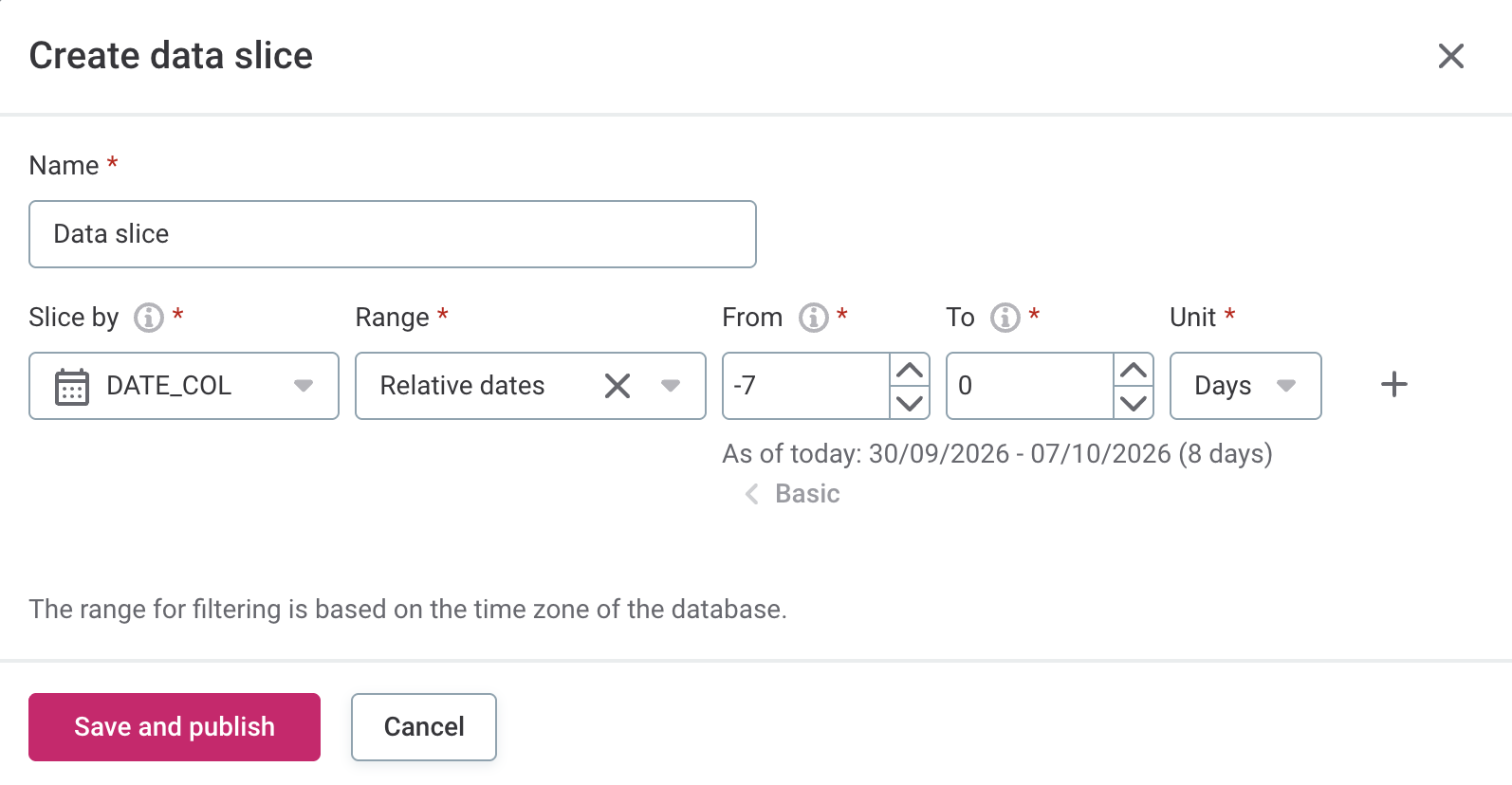
When you set the date range of a slice, select Relative dates. For details, see Slice by a relative date window.
Generic JDBC Connections
Previously, data slices were available only for a fixed set of databases, such as PostgreSQL, Snowflake, and Databricks. You can now also use them on other JDBC connections, including connections that use custom drivers, if the driver configuration declares the SQL dialect of the database. On these connections, data slices are experimental and turned off by default.
For details, see Supported databases.
Explain Permissions on Any Asset
A new report shows which operations you can and can’t perform on an asset, and which share, stewardship assignment, or governance role decides your access, so you no longer need to check each setting separately.
To open the report, select Explain permissions in the three-dot menu of any asset.
Users with the MMM_admin identity provider role can also run the report for any other user, for example, to troubleshoot why that user can’t see an asset.
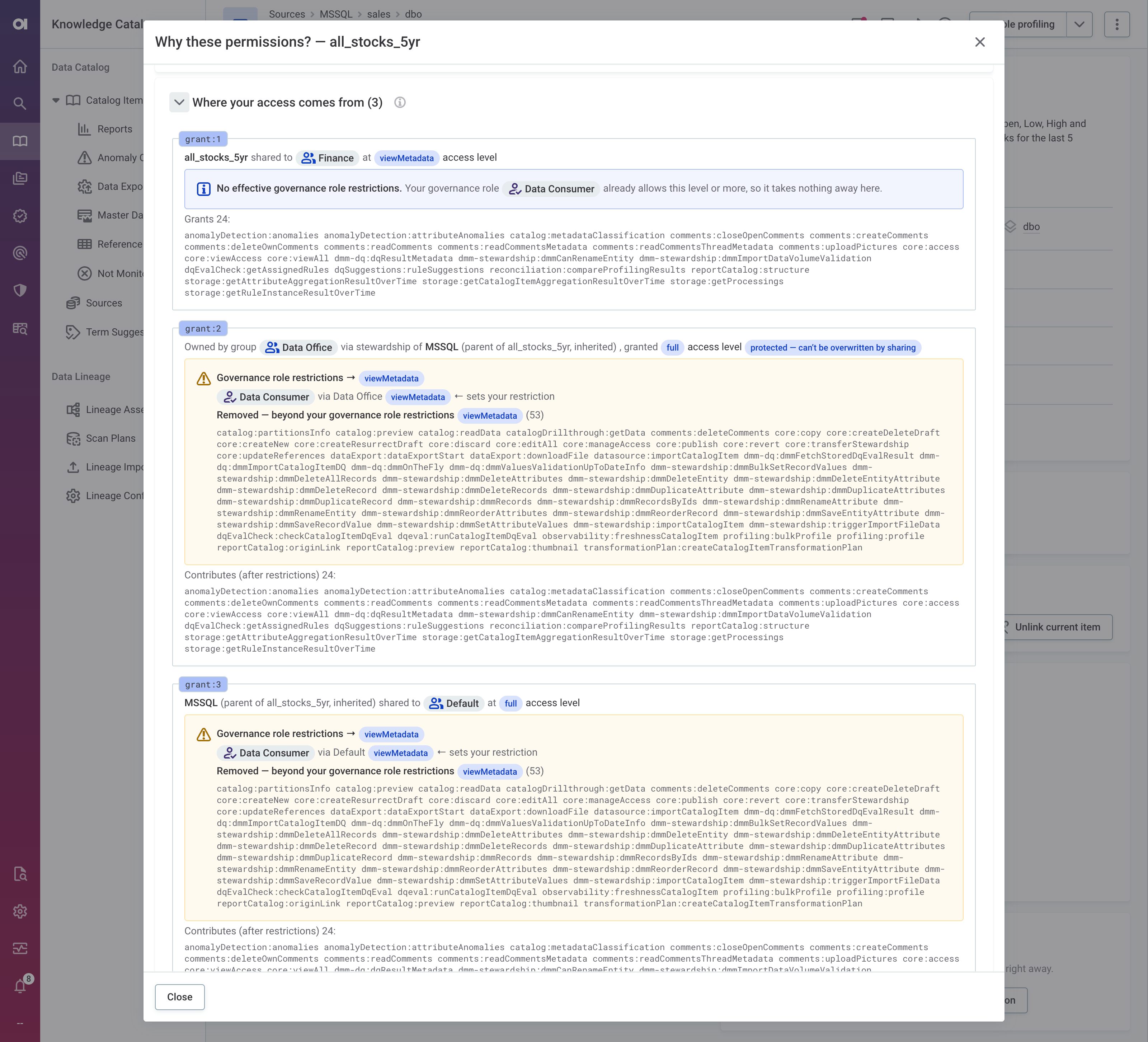
For details, see Explain permissions.
View Only the Term Suggestions You Can Approve
By default, the Term Suggestions screen now shows only the suggestions you can accept or reject, so you no longer scroll past ones you can’t act on. You can still see all pending suggestions by turning off the Only suggestions I can approve switch.
For details, see View only suggestions you can approve.
Term Detection Requires Shared Access to the Term and the Catalog Item
Detection rules now assign a term to an attribute or a catalog item only if at least one user without the MMM_admin identity provider role has access to both the term and the catalog item.
Previously, a term could be assigned across user groups with no users in common, so only administrators could review the assignment. As a result of this change, each new automatic assignment can be reviewed by at least one user who isn’t an administrator. Teams that keep their terms and data separate also no longer receive each other’s terms.
For details, see Access required for automatic assignment and Fewer automatic term assignments.
Easier Navigation in Large Catalog Items
Catalog items with many attributes, wide tables, or long names are now easier to scan and work with.
-
Relationships tab: Items with more than 10 attributes open with the attribute list collapsed, so the graph stays readable. To expand the list, select the arrow next to the item name.
-
Data tab: Column headers stay visible as you scroll down. In wide tables, the application header and catalog item tabs stay in place when you scroll sideways.
-
Long names are shortened, with the full name available in a tooltip. This applies to the sidebar in catalog item listings, the Relationships graph, and the items table on the monitoring project Configuration & Results tab.
Reports with a Custom Preview Now Show the Live Preview
Reports with a custom preview now show the custom image on the Reports screen and the live preview when opened. Previously, the custom preview replaced the live preview everywhere.
After the upgrade, the live preview is shown for all connections, so reports that previously showed only a custom preview now show the live preview to anyone who can open the report, regardless of their access to the connection. If a source holds reports whose content shouldn’t be visible in ONE, for example, because it is sensitive, clear the new Keep live preview with custom thumbnail connection setting to keep showing only the custom preview.
Configurable Retention for Profiling Results
Keep storage under control by setting how long profiling results of catalog items are kept. Previously, they were stored indefinitely.
Set the retention period globally for all catalog items, or set a stricter limit for individual catalog items.
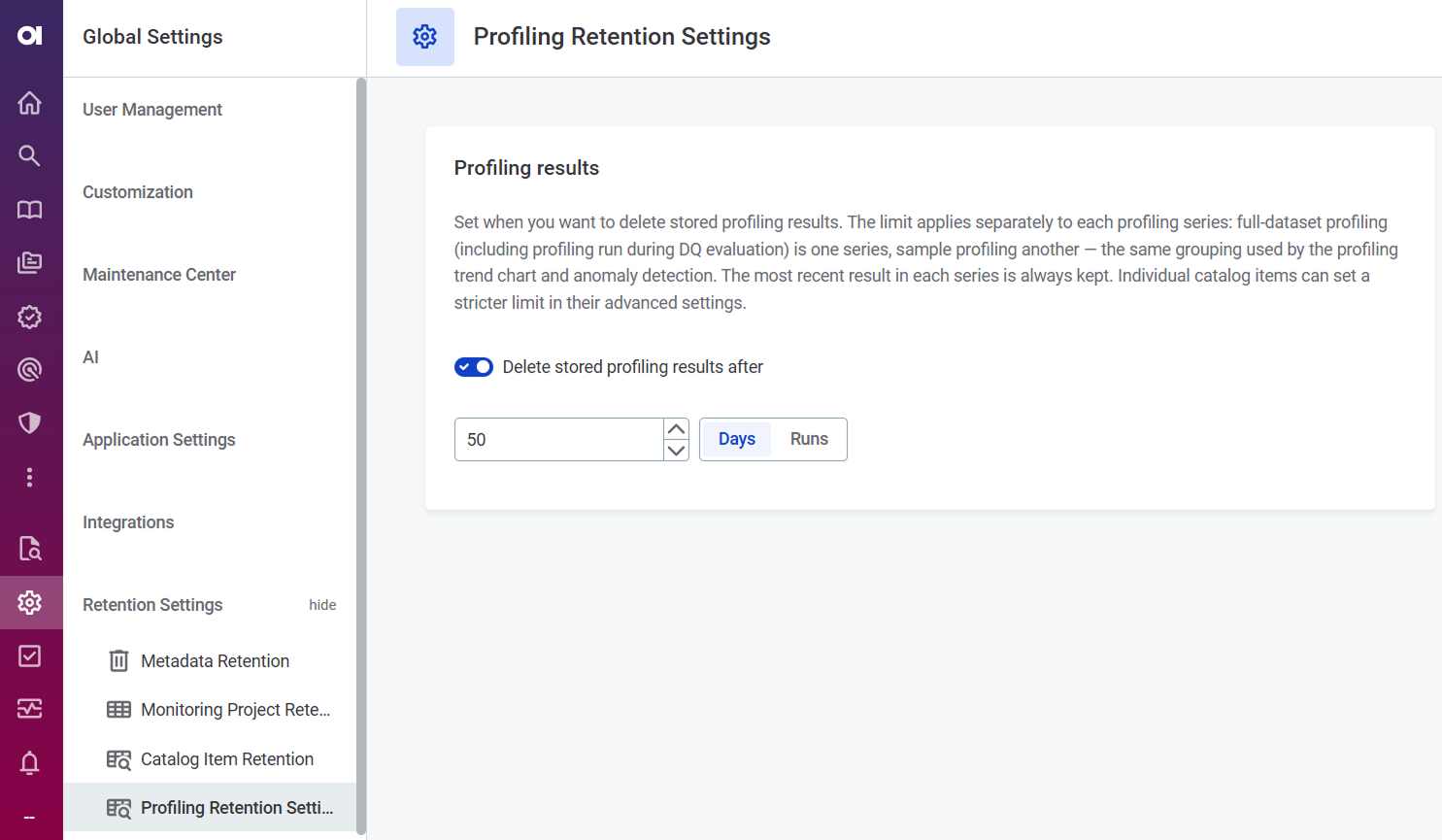
For details, see Profiling Results Retention.
Faster Data Observability Dashboard
The data observability dashboard now loads faster in large environments. Issue counts, observability status, and monitoring results are no longer recalculated each time you open the dashboard. Instead, they are calculated on a schedule, nightly by default, and stored as materialized computed content. The dashboard then loads the stored values.
The dashboard shows when the values were last refreshed, and you can refresh them on demand instead of waiting for the next scheduled run. Administrators can enable, disable, or reschedule materialization for each computed content node in Global Settings > Metadata Model and monitor materialization jobs in Processing Center.
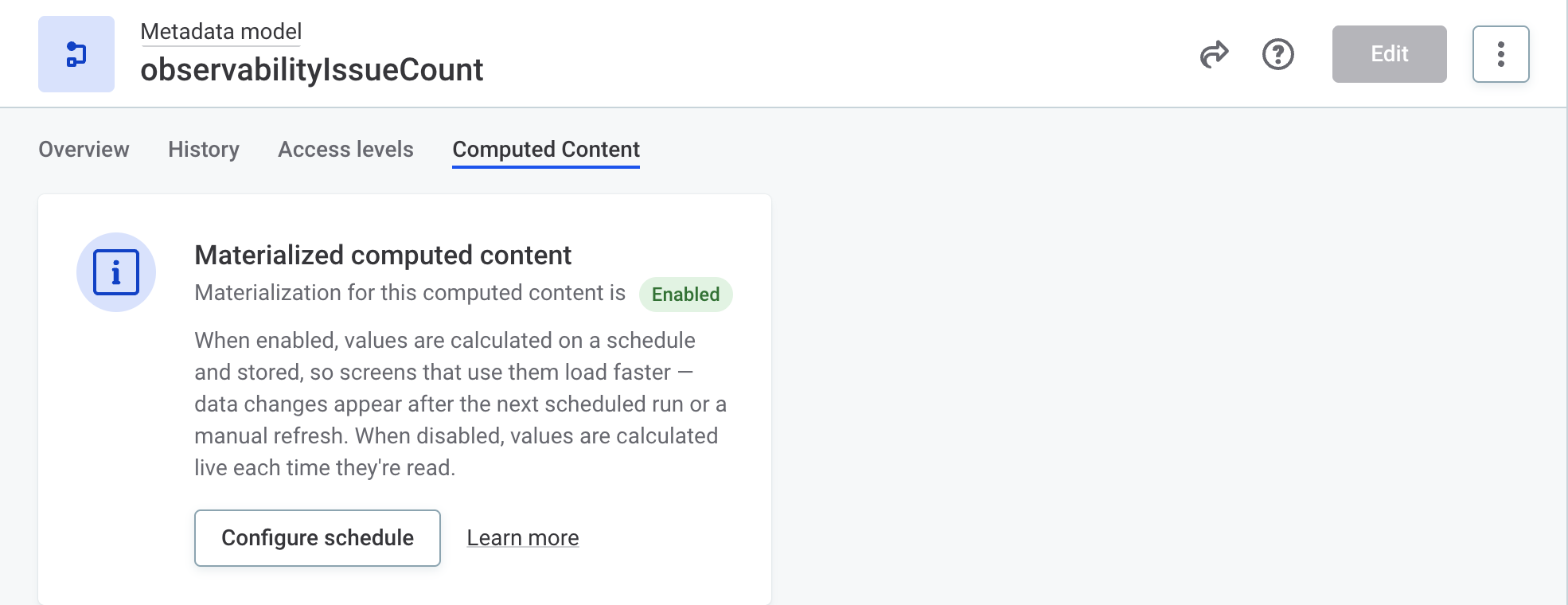
For details, see Materialized Computed Content.
Preflight Checks for Lineage Scans
Lineage scans on Snowflake, Databricks, MS SQL, Power BI, Tableau, and BigQuery now start with preflight checks that verify connectivity, credentials, and permissions before any metadata is extracted. All problems are reported at once, so you can fix them together instead of one scan at a time.
If a required check fails, the scan stops before extracting metadata. Checks of optional features that improve the results or extend the scan scope are reported as warnings and don’t stop the scan.
You can also run the checks on their own, without extracting any metadata. On the Scan Plans screen, open the three-dot menu of the plan and select Run preflight check.
See Preflight checks.
Import Lineage from a ZIP File
Import lineage data to ONE from a ZIP file stored in Amazon S3, Azure Data Lake Storage (ADLS) Gen2, or a local file system used by the standalone lineage scanner. ONE only reads from your storage and imports the most recently modified ZIP file in the configured location.
Asset Promotion Improvements
In 17.2.0, asset promotion brings reference remappings, a clearer import report, and a number of improvements to how assets are matched, exported, and imported. See also Fixes.
Reference Remappings
When promoting assets to another environment, you can now redirect a reference to a different target asset — for example, point imported rules to a different stewardship group.
To do this, define rules in the new Reference remappings field of the Export Import Mapping. Each rule uses regular expressions to match an exported reference and specifies which existing asset in the target environment the reference should resolve to instead. Unlike Scalar remappings for references, which transform individual string values, reference remappings apply to the referenced asset as a whole.
For details, see Reference remappings.
Easier-to-Read Import Report
The Import Report now presents import issues as problems to resolve, with suggestions on how to fix them, rather than as a list of raw errors.
-
Unresolved and ambiguous references are shown as a breadcrumb from the root asset down to the referenced asset, with every level that couldn’t be found marked as NOT FOUND. This way, you can see which asset is missing or duplicated in the target environment without decoding a reference key.
-
Ambiguous matches list the existing assets that matched the imported asset. When two imported assets match the same existing asset, the report now identifies the duplicate imported asset instead of reporting an ambiguous match.
-
Issues from drafts that failed validation during import are grouped under Discarded drafts.
-
Unknown asset types or properties in the archive are reported with a short message naming the missing element, instead of a long exception message.
On the Imports tab, you can also filter import jobs by their status, such as Review needed, Published, Discarded, or Failed, using the new Status filter.
For details, see Validation results.
Fix Validation Issues That Block Metadata Imports
Users with the MMM_admin identity provider role can now fix validation issues caused by orphaned metadata nodes directly from the validation run that reported them.
An orphaned node is a node whose parent or referenced node no longer exists.
Besides showing up in validation runs, a single orphaned node can make metadata imports fail, even from unrelated data sources.
Previously, removing these nodes was a manual task, done one node at a time.
You can fix all issues at once or only the ones you select. Only orphaned nodes are deleted, and their previous versions stay in the node history. If you script the cleanup through the GraphQL API, you can preview the outcome before anything is deleted.
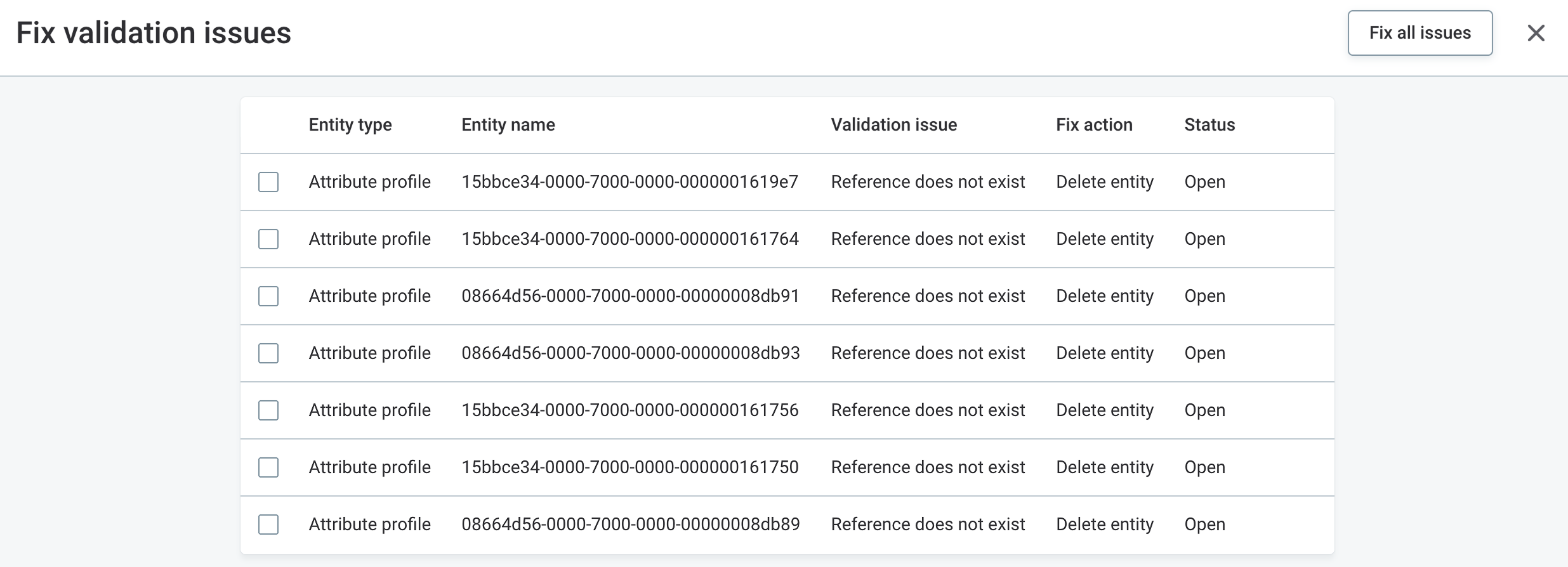
For details, see Fix Validation Issues Automatically.
Most Used Assets Searchable First During Reindexing
When you run a full search reindex or search recovery, the assets you use most now become searchable first.
Assets are reindexed in this order:
-
Catalog items
-
Monitoring projects
-
Terms
-
Rules
-
Sources
-
Lookup items
-
All other searchable asset types
During search recovery, search also keeps working on the existing index instead of returning errors while the rebuild runs.
The new order applies automatically and changes only which assets become searchable first, not how long the whole reindex takes. In self-managed deployments, you can change the order using a new Metadata Management Module (MMM) property. See Reindexing order.
Attributes Audited as Part of Their Catalog Item
Reading a catalog item together with its attributes now writes a single audit record for the catalog item instead of one record per attribute. Changing attributes together with their catalog item also writes a single record for the catalog item. The same applies to attribute profiles, which are audited as part of their catalog item profile. Attributes and attribute profiles read or changed on their own are audited as before.
This behavior is controlled using the new auditCoveredByParent property on the audit:auditEnabled trait, which you can also set on other entity types.
See Entity traits.
Warning When Editing JDBC Connection Strings
When you edit the JDBC connection string of an existing connection, ONE now warns you that catalog items already imported through that connection might no longer be profiled. See Edit connection.
Environment-Wide Limit on Concurrent Jobs
Jobs now queue instead of competing for resources: Data Processing Module (DPM) enforces a limit on how many jobs can run at the same time across all DPEs that DPM supervises. Jobs above the limit wait in the queue and start as soon as a slot is free. The new License tab in the DPM Admin Console shows the limit in force and how long jobs have been waiting, so you can tell when the limit is holding jobs back. See License.
In Ataccama Cloud, the limit is set for each environment according to your contract and no action is needed on your side. If you run hybrid DPEs on your own infrastructure, you no longer need to install a license file on them once both the platform and the DPE are on 17.2.0 or later.
In self-managed deployments, the limit is granted by your DPM license. Make sure your license grants a limit before you upgrade. Otherwise, DPM doesn’t start. See DPM license and concurrent job limit.
Azure AD Workload Identity for Azure Key Vault
Azure Key Vault secret management services can now authenticate using Azure AD Workload Identity. If your DPE runs in a Kubernetes cluster with Workload Identity enabled, select Azure AD Workload Identity as the authentication method of the key vault integration. The option has no additional fields: the key vault is accessed with the workload identity configured for your DPE.
For details, see Azure Key Vault Integration.
Self-Managed DPE Secrets in an External Secret Store
Your self-managed DPE on Kubernetes can now read its secrets from an external secret store, such as Azure Key Vault, instead of the Helm values file. The secrets are mounted into the DPE pod through the Secrets Store CSI Driver, so the values file no longer contains any secrets and nothing is stored in Kubernetes Secrets. To move an existing self-managed DPE to Azure Key Vault, you can use a migration script that uploads the secrets and generates the new values file for you.
For details, see External Secret Store for Self-Managed DPE.
MDM
New MDM Web App Interface
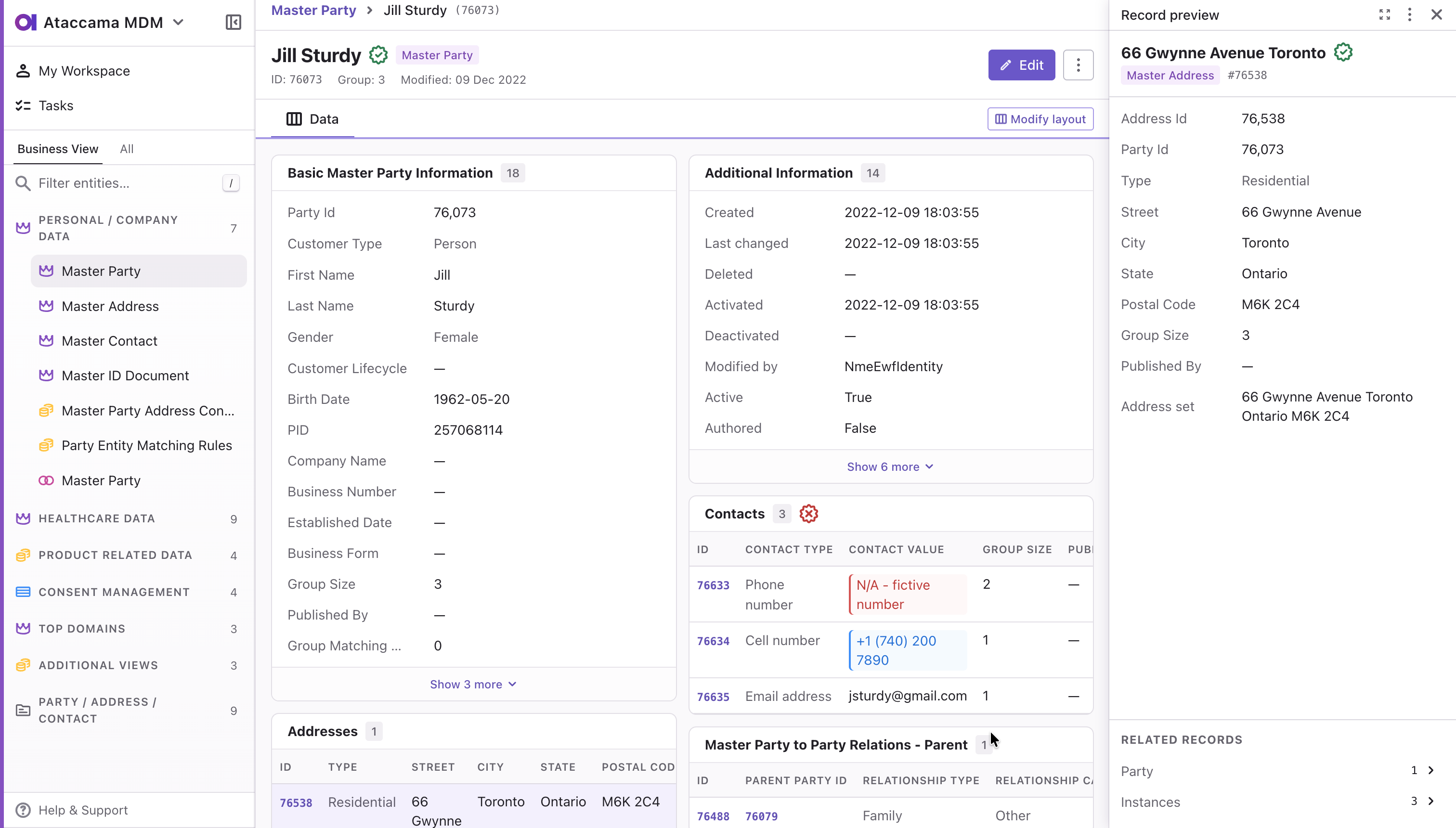
The MDM Web App has a new default interface — rebuilt from the ground up on a modern technology stack, with usability and the day-to-day work of data stewards in mind. Improvements include:
-
Record preview in the side panel: Preview and edit a record without leaving the page — select it in a listing or from a record detail.
-
Breadcrumb navigation: Drill down from a listing to a record and back without internal tabs.
-
Pinned columns and compact rows: Keep key columns in view while scrolling wide tables, and fit more records on screen.
-
Filter groups: Combine
ANDandORconditions to build precise filters.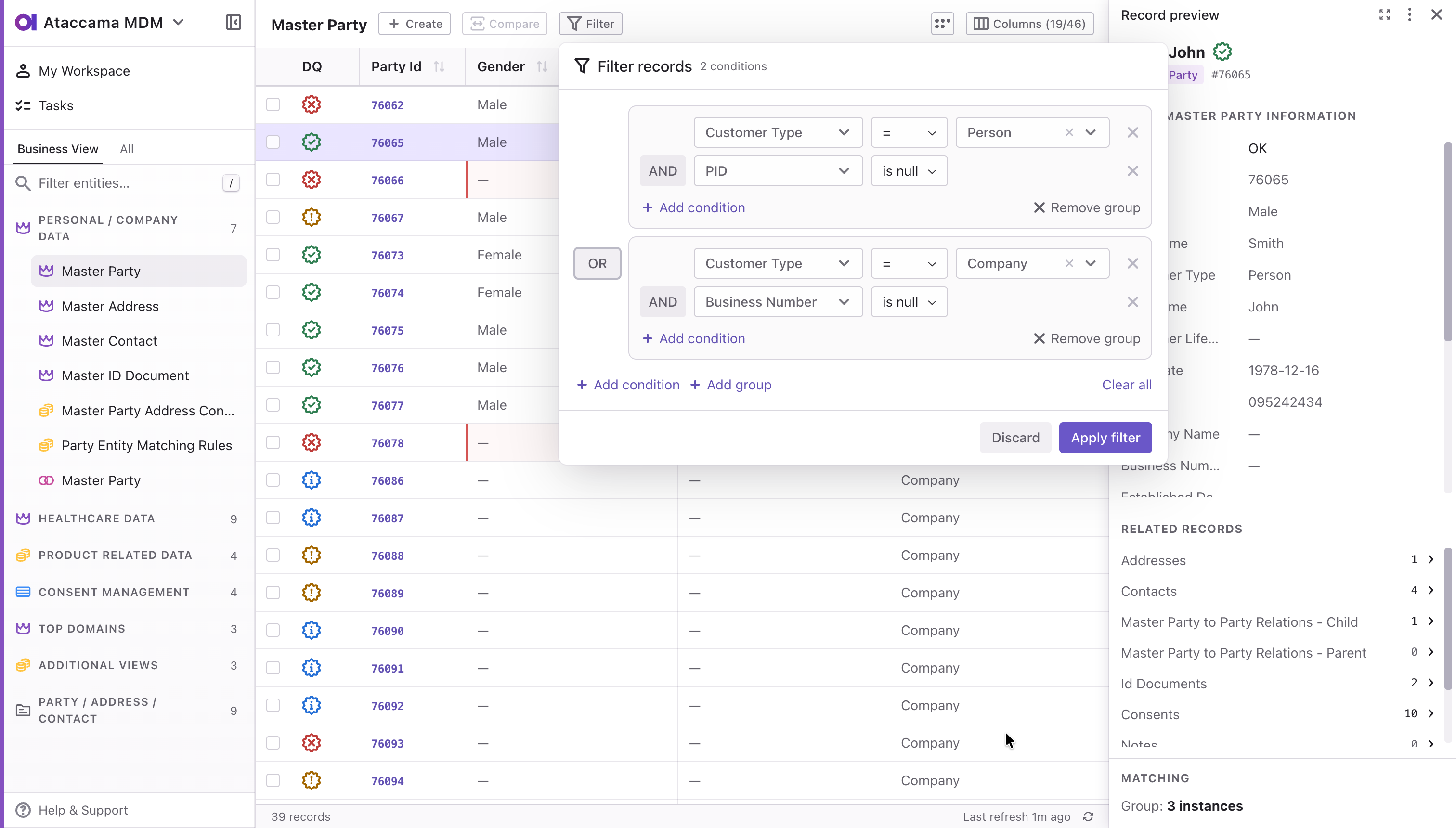
-
Shareable links: Copy a link that opens the exact record or listing you’re looking at.
-
My Workspace: See your assigned tasks plus the unassigned ones for your roles, and pick up work for your team.
-
Search in the navigation panel: Quickly find the entity you need regardless of its type.
The legacy interface remains available — switch to it from the app menu at any time — and both interfaces work with the same data and tasks. See New MDM Web App interface.
To learn more, see Get Started.
AI Agents Resolve Matching Proposals and Work with Tasks
The MDM MCP Server now goes beyond reading data. Connected AI agents can review matching proposals, explain why automated matching did or didn’t merge records, and act on what they find: create matching proposals or manual match tasks, record merges and splits in a draft, comment, reassign, and move tasks through the workflow for a steward to approve.
Agents can optionally make final decisions too: reject matching proposals and publish drafted changes to master data. These autonomous resolution tools are off by default in self-managed deployments and on by default in Ataccama Cloud. Every call runs under the permissions of the connected user, so a four-eyes workflow constrains an agent the same way it constrains a steward.
You can see what agents are doing and keep them from overwhelming the server: MCP tool calls are tracked in MDM monitoring metrics, and the rate limiter can cap MCP requests separately from REST and SOAP. See MCP Server tool calls and MCP requests.
For details, see What agents can do.
REST API Improvements
The REST API now covers the operations previously available only through the SOAP native services, allowing you to move your integrations from SOAP to REST without losing functionality.
-
Partial updates:
PATCHchanges only the attributes in the request and keeps the rest. -
Bulk delta imports: Write several entities in one request — a person with their addresses and contacts — with child-set synchronization.
-
Manual match operations: Merge, split, rematch, isolate, and un-isolate records.
-
Cleansing and validation: Run configured normalizations and validations on values without saving anything.
-
Traversal with preload and filters: Read a record together with its related records in one request, such as a complete person detail.
-
Identify in mixed style: Check whether a master record draft would be a duplicate before creating it.
-
Batch orchestration: Start load, multi-load, and export operations.
-
Targeted purge: Purge specific instance or master records by entity and ID.
-
Usability improvements: Case-insensitive filter matching, RFC 7807 problem details in error responses, and a new MDM Server property that aligns timestamps with ISO 8601 time zone offsets.
The REST API also introduces a stricter security model:
-
Every call now requires the
MDM_rest_api_accessorMDM_adminrole. -
nme-security.xmlpermissions apply to every endpoint, including operational ones, so you can configure access in a more granular way.
See REST API and REST API Scenarios, which walks through migrating a SOAP integration.
For upgrade details, see REST API security.
Matching Proposals in the Streaming Event Handler
The Streaming Event Handler can now publish matching proposal events, with a matching proposal entity as the publisher root. If you kept the Async Event Handler only because of matching proposal entities, you can now migrate. See Matching proposal root.
ONE Runtime Server
Store Credentials in a Vault
Configure ONE Runtime Server to read secrets from an external secret management service instead of storing them in the runtime configuration file.
The following providers and authentication options are supported:
-
Azure Key Vault: Authentication with Azure AD client credentials or Azure AD managed identity.
-
AWS Secrets Manager: Authentication with access key credentials, optionally combined with an assume role configuration.
-
HashiCorp Vault: Authentication with Google service account key credentials, Google Compute Engine credentials, or HashiCorp JWT credentials.
-
CyberArk Secrets Manager: Authentication with a PFX or Cert client certificate.
Platform Changes
PostgreSQL 18 Support
ONE components now support PostgreSQL 18 as the recommended database version across the platform (DQ&C, MDM, RDM). When upgrading self-managed, on-premises deployments to version 17.2.0, upgrade to PostgreSQL 18 for optimal performance and support.
PostgreSQL 17 remains available under limited support. For details, refer to Supported Third-Party Components.
End of Support for MANTA Lineage
Importing lineage metadata from MANTA into ONE is no longer supported. Lineage metadata previously imported from MANTA is kept in ONE, but you can no longer import or update lineage from MANTA.
To extract lineage from your data sources, use built-in lineage scanners or import lineage from a supported third-party tool.
If your self-managed installation includes MANTA, decommission the integration after the upgrade as described in the ONE Upgrade Guide.
End of Support for Excel 5.0 and Excel 95 Files
The Excel File Reader step no longer reads .xls files saved in the Microsoft Excel 5.0 or Excel 95 format (BIFF5).
This applies wherever the step runs: in ONE Desktop and ONE Runtime Server plans, and in ONE jobs that process Excel files from file-based sources, such as profiling and data quality evaluation.
Plans that read such a file fail with an error stating that the file is in the Excel 5.0/95 format (BIFF5), which is no longer supported.
In ONE Desktop, the error is reported already during plan validation.
The same check applies to template files in the Excel File Writer step.
Files saved by Excel 97 and later (BIFF8 .xls) and all .xlsx files are not affected.
To keep processing an affected file, open it in Microsoft Excel and save it as an Excel 97-2003 workbook (.xls) or an Excel workbook (.xlsx).
Fixes
ONE
Click here to expand
- Rules
-
-
In the Test rule dialog,
DateTimevalues are displayed in the same time zone in both the test values and the rule conditions. -
On the catalog item Data Quality tab, rules with a configuration problem, such as an unmapped input or an input of the wrong data type, are now marked with a warning icon that explains the problem.
-
When creating a rule, the Stewardship field shows only the groups you’re a member of, and their parent and child groups. If you have the
MMM_adminidentity provider role, you can select any group. Existing rules keep their current owner group. See Stewardship groups for new rules. -
Catalog item attributes whose data type was stored in lowercase or mixed case, such as
stringinstead ofSTRING, no longer cause errors or get skipped when generating ONE expressions with AI, applying DQ rules to attributes, deploying DQ firewalls, profiling, or exporting data. See Attribute data types are stored in uppercase.
-
- Lookups
-
-
You can no longer delete a lookup that is used in a published rule. Previously, deleting it broke the rule and resulted in failed DQ jobs. See Delete lookups.
-
- Monitoring projects
-
-
After upgrading to 17.1.0, monitoring projects whose post-processing plan includes a Database Output step no longer fail validation with
There is no attribute named 'not_applicable_rules' in the catalog item. The not-applicable result columns are now added only when the project has a rule that can produce a not-applicable result, so existing plans validate and run without changes. -
Renaming a result in a DQ dimension applies to monitoring projects even without republishing the affected rules. Previously, after such a rename, monitoring projects could fail during pushdown processing or produce incorrect DQ results. Deployed DQ firewalls affected by the change are redeployed automatically.
-
When importing a monitoring project configuration into another monitoring project, post-processing plans are now copied even when a catalog item is mapped to a different one than in the source project.
-
Monitoring project transformation or remediation plans with a ONE Data Reader step no longer fail with an
Eager fetching violatederror at runtime. -
In historical runs of a monitoring project, the second and later pages of the Items to monitor list on the Configuration & Results tab load correctly instead of appearing empty.
-
On the monitoring project Overview tab, the Restore rules action is now deactivated when there are no attributes to restore.
-
Improved logging of Microsoft Teams notification delivery to help troubleshoot failed webhook calls.
-
- Pushdown processing
-
-
On the catalog item Data Quality tab, rules that aren’t supported in pushdown and are therefore skipped during DQ evaluation are now shown as deactivated, matching the existing behavior in monitoring projects.
-
Pushdown compatibility warnings on rules, rule variables, and terms are displayed to all users with access to the item, not only to admins.
-
The Add data remediation plan option is no longer offered on catalog items with pushdown enabled, since data remediation plans cannot run on pushdown.
-
The Legacy pushdown option is no longer displayed as enabled on the connections detail page when pushdown processing is disabled for the connection.
-
Pushdown processing can now profile tables with over two billion records.
-
Snowflake profiling and DQ statements that run longer than a few minutes no longer fail with a driver
NullPointerExceptionafter repeated re-execution. -
DQ pushdown on BigQuery with invalid-record sampling no longer fails with an out-of-memory error on tables with millions of rows.
-
Monitoring projects with several large lookups on Databricks pushdown no longer fail with
ConcurrentAppendExceptionduring lookup maintenance. -
is nullconditions on complex columns, such asMAP, no longer fail on Databricks pushdown. -
concatenateifwith an empty separator works in pushdown. Previously, BigQuery rejected the generatedSTRING_AGGwith aNULLargument. -
BigQuery profiling no longer logs
Access forbidden to file …/protobuf-java-*.jarerrors in secured environments.
-
- Transformation plans
-
-
The attribute selection in the Join and Delete attributes transformation plan steps now consistently displays all newly added input attributes. Previously selected attributes that no longer exist on the input are marked with a warning so you can remove them.
-
- Data slices
-
-
Data slices with a custom date range ending on the maximum date,
9999-12-31, work as expected, and records with this date are included in the slice. Previously, depending on the database and column data type, jobs using such a slice failed with a date conversion error, or returned no records when the dates were stored as text or numbers. -
A data slice with a custom date range can no longer be saved when the From date is later than the To date, and the tooltip explains why. Previously, such a slice could be saved but selected no records.
-
The tooltip on a deactivated Create data slice action now states the actual reason, such as a missing connection or an unavailable connection driver, instead of always saying that the connection doesn’t support data slices.
-
- DQ firewalls
-
-
When a DQ firewall fails to deploy, all users the firewall is shared with receive an in-app notification. Previously, the failure was shown only on the firewall’s detail page.
-
DQ firewalls handle heavy load more reliably, with a lower risk of running out of memory and responding with
504 Gateway Timeouterrors. They now size their JVM heap at 70% of the available memory instead of using a fixed default.
-
- Reconciliation projects
-
-
In reconciliation project results, the Compare view displays the profiles of the compared attributes side by side.
-
When selecting sources in reconciliation projects, the structure of the catalog item source loads reliably. Previously, it could fail to load, especially for sources with many nested levels or after switching between sources, and the selected item had to be removed and added again.
-
- Anomaly detection
-
-
The profile inspector opened from a monitoring project shows all attributes with anomaly detection enabled, including those for which anomaly detection has not produced results yet.
-
Anomaly Detector installed from the Linux package no longer crashes repeatedly on startup on RHEL 9 and other Enterprise Linux 9 systems, for example after an operating system update. Deployments using the container image were not affected.
-
- Profiling & metadata import
-
-
When importing metadata for a Microsoft Excel file, you can now configure how many rows are used to detect the column data type (by default: the first 50 rows of the sheet). See How column data types are detected.
-
Full profiling and Full profile & DQ evaluation runs on a catalog item now form a single profiling history. Previously, each run type was tracked separately, so the history graph displayed only one type of run and anomaly detection for one type could not use the results of the other.
-
Removing an attribute from a catalog item, for example after its column was deleted in the data source, no longer discards that attribute’s results from previous profiling runs. Profiling history keeps showing the attribute as it was at the time of each run.
-
Failed profiling jobs show the actual cause of the failure instead of only the generic
Unexpected error occurred, job failed in the transaction roll-back.message. -
Exporting profiling and DQ insights to a Microsoft Excel file no longer fails when a catalog item has attributes whose names differ only in letter case.
-
Profiling no longer fails for columns whose name contains
].
-
- Sources & connectors
-
-
Metadata import from Snowflake no longer fails for the entire schema with a
No enum constant net.snowflake.client.jdbc.SnowflakeTypeerror when a table contains a column type the driver doesn’t recognize, such asROWINDEX. Such columns are instead skipped and a warning is logged. -
Salesforce connections using OAuth no longer fail to log in with an
Unrecognized field "token_format"error after the Salesforce External Client App is reconfigured or recreated. -
The Salesforce connector’s REST API version is now configurable using the
-Dsalesforce.apiVersionJVM system property. The default remains50.0. -
BigQuery connections using OAuth user credentials no longer fail to connect when the client secret is stored in an external vault (Azure Key Vault, HashiCorp Vault, AWS, or CyberArk).
-
Browse and preview results are no longer cached for data sources configured with user impersonation, so results always reflect the requesting user’s own credentials.
-
Table and column previews while browsing a database connection use the interactive credentials, as the preview of imported catalog items already did, instead of requiring default credentials.
-
Browsing a database no longer retrieves primary and foreign key metadata that isn’t needed to list table and column names, so browsing works for users without permissions on that metadata.
-
Fixed out-of-memory errors when browsing schemas with a very large number of tables. Table details are now loaded only for the page being viewed, and very large browse results are temporarily stored on disk instead of in memory.
-
When browsing a file system source, import settings set on a folder are applied to the catalog items imported from that folder, so attribute names and data previews are correct.
-
Saving a folder import setting in Connection Import Settings no longer fails to publish with a
FOLDER_SETTING_FORMATSconstraint violation when the setting had a leftover draft. -
The credentials detail shows the credential type, so you can tell which of several similar types, for example for Amazon S3, a connection uses.
-
In the SAP OData connection settings, the OAuth credentials section shows its correct label.
-
Catalog item preview now works for Tableau reports hosted on the default site, where the site content URL is empty.
-
Long error messages from DPE, such as those from certain ADLS connection test failures, are no longer replaced with a generic
RST_STREAM closed stream. HTTP/2 error code: PROTOCOL_ERRORerror. These messages are now truncated so the actual cause is shown.
-
- Data processing
-
-
Metadata import, data observability, and profiling now read from the correct source when jobs run at the same time on two or more connections of the same database type, for example, two PostgreSQL connections. Previously, this could return tables, schemas, or results belonging to a different source.
-
Long-running JDBC operations no longer fail intermittently with a
NoClassDefFoundError, typically on Azure MS SQL connections using service principal authentication. -
In Ataccama Cloud environments, DPE no longer runs out of memory and becomes unavailable with a
There is no available data processing engine.error after browsing several different sources. -
In Ataccama Cloud environments, job engines are sized correctly for all environment sizes, so memory-heavy jobs such as profiling Parquet files are no longer terminated without notification.
-
Jobs stuck in DPE, either accepted but never started or canceled but never confirmed, are now automatically failed after a configurable timeout instead of blocking the queue indefinitely.
-
A single job event that can’t be saved no longer blocks event synchronization for that DPE. Previously, an event containing a NUL character (for example, from a data source driver’s error message) could prevent all later events, including job completions, from synchronizing until DPE was restarted.
-
Jobs no longer get stuck in the
RUNNINGorKILLINGstate when they lose their engine assignment. Previously, the status update failed and was retried forever, and the job held its allocation until the Metadata Management Module was restarted. -
In Ataccama Cloud environments, when the container of an autoscaled job engine is terminated, for example because it ran out of memory, the job fails right away with the actual cause instead of after an hour with
The timeout for reconnection of the engine has expired. -
Finished jobs are correctly removed from the Data Processing Module (DPM) database once they expire. Previously, in 17.1.0, the cleanup failed, so the database kept growing and the log filled with
cleanExpiredJob status=FAILUREwarnings. -
DPM recovers from a brief unavailability of its database without a restart.
-
DPE recovers its connection to DPM after a connection failure under heavy job load, instead of staying disconnected and making DPM report as not ready until a restart.
-
Profiling no longer starts with a delay of several minutes after a metadata import in environments with millions of catalog items. The import status in ONE now matches the DPM Admin Console.
-
Job failure reasons are now limited to 8,000 characters, keeping the beginning and end of the message. This prevents failing jobs from bloating database storage and slowing down full-text job search, and the full output remains available in the job log.
-
Structure check on spreadsheet sources from local file systems now always reflects the file’s current schema. Previously, results could be incorrect for up to a few minutes after the file was browsed or profiled.
-
Monitoring projects on catalog items from a local file system with Spark post-processing plans no longer incorrectly fail model validation.
-
Monitoring projects that combine a Spark Writer post-processing plan with another transformation plan no longer fail with
Step cannot run locally [Spark Writer]. Previously, the job was incorrectly run locally instead of on Spark. -
DQ evaluation on a source processed on Spark no longer incorrectly runs on zero records while reporting success. Previously, such jobs could finish successfully with all DQ results empty (N/A) and write an empty target table.
-
Spark processing no longer fails in environments that use unique encryption keys for secrets.
-
Concurrent Databricks jobs on a shared cluster no longer fail with a
Plan file does not existerror. -
Multipart uploads to Amazon S3 no longer fail with
The request content has fewer bytes than the specified content-lengthwhen the AWS SDK retries a part.
-
- Deployment
-
-
Logging out of the DPM Admin Console no longer fails with an invalid redirect URI error.
-
In self-managed deployments, the Keycloak
start.shscript sources an optionalconf/start.sh.localfile, so customizations such as reading the database password from AWS Secrets Manager survive upgrades. -
Hybrid DPE now connects with encryption enabled in Ataccama Cloud environments. Previously, required encryption properties were missing from its configuration, so the connection failed.
-
The generated
values.ymlfor Kubernetes hybrid DPE deployments includes the image pull secret under the correct name. -
Encrypted values (
crypted:AES:…) are accepted when properties are passed as environment variables, not only inapplication.properties. -
In Ansible deployments, the DPE log file rollover size is configurable instead of fixed at 10 MB.
-
- ONE Data
-
-
Saving records in a ONE Data table no longer fails with an error when a rule assigned to the table is outdated, for example after you edit a rule that is already assigned. The outdated rule is marked with a warning and skipped until you update it, and the other rules on the table continue to be evaluated.
-
Repeated data remediation runs no longer affect user access to data remediation output tables in ONE Data.
-
Date values entered or pasted into ONE Data are now interpreted consistently across supported date formats.
-
- Business glossary
-
-
Updated permission checks for data protection classification.
-
On the term Settings tab, detection rules removed from the term are no longer shown as selected in the Add Rules dropdown and can be assigned again. Assigned rules also no longer lose their names and types in the Detection Rules section after you select Request review and publish. Previously, both issues needed a page refresh to clear.
-
Accepting a term suggestion without publishing it no longer makes saving and publishing the asset fail with the
REFERENCED_OBJECT_DOES_NOT_EXISTerror after the suggestion is deleted, for example, when term suggestions are refreshed. If this still happens after the upgrade, contact Ataccama Support.
-
- Search & filtering
-
-
Search no longer returns empty results after an upgrade when the search configuration references properties that no longer exist in the model. Such references are now skipped and reported, and all remaining content is indexed as usual.
-
When you delete a custom property that is indexed in a search configuration, the stale reference is now removed automatically when the model change is applied, so it no longer causes repeated
Unknown propertyerrors in the logs. Existing stale references are cleaned up during the upgrade to 17.2.0. -
Full-text search now returns correct results when searching for assets whose names contain underscores (
_). -
The Terms screen now loads when its search configuration indexes a computed content property as a child node. Previously, publishing this configuration could prevent the screen from loading and showed a
Renderer for column "name" not founderror instead. -
When listing the terms by relationship on screens under Terms, such as Business Terms, the Published, Unpublished, and All tabs are shown only when full-text search is enabled. Previously, selecting one of these tabs locked the listing results until the page was reloaded.
-
- Workflows & tasks
-
-
Stewardship changes now follow the Review workflow configured for the asset type, like other edits of an asset: you publish them yourself, or, if the asset requires review, they create a review request. For asset types that are published directly, without drafts, such as sources and connections, stewardship changes are still published immediately. See Stewardship changes follow the Review workflow.
-
Improved authorization for review requests and data access requests: only authorized approvers can approve or reject a request, and requesters can no longer close or delete pending approval tasks. Publishing an asset governed by an approval workflow directly via API requires an approved review request. See Review and Request Data Access workflows apply to ONE API clients.
-
The Request review and publish bulk action is also available on the Catalog Items > Unpublished page, so you can request a review for multiple catalog items in a single review request. The action was already available for terms, monitoring projects, and rules.
-
Submitting a review request for a catalog item with many related assets no longer fails with the
Exceeded limit on max bytes to buffer : 5242880error. See The Workflow service memory limit uses a new property. -
In monitoring projects, a review request could become stuck with no way to approve or reject it when a second review request was created against the same underlying task. Such invalid review requests are now rejected at creation.
-
Task descriptions created via API, for example by a JSON Call step in a post-processing plan, keep their line breaks when displayed in the task detail. Previously, line breaks were visible only when editing the task.
-
The I’m assignee filter on the Tasks Overview screen shows tasks assigned to a group you’re a member of, not only tasks assigned to you directly, consistent with the Tasks widget on the home page.
-
- Asset promotion
-
-
Imported assets that matched an existing draft with identical content in the target environment are now included in the import and published together with it. Previously, they were left out, so publishing the import either kept the old published version of the asset without any warning or failed with
Parent entity must be published first.As a result, the import now also includes existing drafts that it only matched, including drafts someone created manually in the target environment. Publishing the import publishes these drafts with any unrelated edits they contain, and reverting the import or deleting its job discards them. See Drafts included in an import.
-
Deleting an import job that hasn’t been published now also discards the drafts the import created. Previously, the drafts stayed in the target environment with no way to publish, discard, or inspect them, and they affected how later imports of the same assets were matched.
-
Exported archives now include assets that are referenced only indirectly, through other referenced assets. Previously, the export finished without a warning, and the import reported unresolved references if the missing assets didn’t exist in the target environment.
-
Run validations only in the Drafts data state now applies the same ID mappings as the actual import, so its report matches what the import would do. Previously, the validation matched assets by name only and could report assets as new or references as unresolved when the import would have matched them by ID.
-
A failed import no longer ends with an empty validation report and an unrelated error about
/jobsinstead of the actual validation issues. When an import is rolled back, the job now statesImport was rolled back, nothing was imported. -
The downloadable import report now includes all errors, not just the first page.
-
Unexpected errors during import are easier to diagnose: their details are recorded in the validation report and in the application log.
-
Importing an asset that matches an existing asset of a different type by ID or keys no longer fails. Assets are matched only to assets of the same type.
-
Importing a rule whose condition uses a lookup built from a catalog item no longer fails.
-
Validating a rule that uses a lookup existing only as a draft, for example when exporting a monitoring project, now reports that the lookup is unpublished and must be published first, instead of
Reference data lookup with id or name used in the rule not found.
-
- Usability & display
-
-
Catalog item pages no longer fail with
Error occurred during layout renderfor manually created file catalog items. -
Users with view-only permissions on a catalog item can no longer open edit mode. Previously, edit mode was accessible even without edit rights, although changes could not be saved.
-
Custom previews on report catalog items no longer disappear after you refresh the page. Previously, the preview could stop loading once its cached download link expired.
-
On attribute pages with a customized layout that includes the Relationships widget, the relationship picker shows the full path of each candidate attribute instead of just a name, so attributes with identical names can be distinguished.
-
The Ataccama ONE version under My Account > Version Information shows the exact patch version, for example,
17.2.0-patch1instead of17.2.0.
-
- Performance & stability
-
-
Reduced load on the MMM database when indexing catalog items for search in environments with many catalog items, for example after importing or profiling sources that change many catalog items at once. As a result, new and updated catalog items now appear in search results faster.
-
Term suggestion processing no longer retries updates it can never process. Such updates are logged once and set aside, so they no longer flood the logs with errors or keep the MMM database under sustained load.
-
Reduced database load from term suggestion queries in large environments.
-
Reduced log noise from expected permission denials, such as the pushdown availability checks that run automatically when rules are listed. These
OPERATION_NOT_ALLOWEDevents are now logged as warnings. Denials from actions a user explicitly attempted are still logged as errors.
-
- API & integrations
-
-
Data quality results over a time range can be retrieved through the GraphQL API with only a start date or only an end date specified. Previously, such requests failed with an internal error.
-
When retrieving data quality results through the DQ&C MCP server, the overall data quality result is returned separately and no longer appears as an
Unnamed dimension. -
The overall data quality result displayed in Atlan is now rounded the same way as in ONE, so both show the same value.
-
The DQ&C MCP server tools that return catalog item details and attribute profiling now use the latest profile of the catalog item and state when it was taken. Previously, they returned the first profile, even after the catalog item was profiled again.
-
AI clients connected to the DQ&C MCP server stay signed in when their access token expires. Previously, you had to sign in again every time the token expired.
-
- Security
-
-
Security improvements in DQ firewalls. See also gRPC reflection turned off by default on DQ firewalls.
-
After signing in, you are always returned to a page within the application.
-
Upgraded third-party dependencies in DPE, DPM, and the DPE JDBC drivers for enhanced security.
-
MDM
Click here to expand
- Matching
-
-
Matching no longer merges records that don’t match under the same master record when a large key group is processed in parallel. Previously, repeated runs of the same data produced a different, non-deterministic number of master records.
-
Matching with constraint rules no longer runs out of memory on large matched groups. Match pairs that don’t fit in memory are written to temporary files, so very large groups use additional temporary disk space instead.
-
Master records that lose their authored nature are no longer offered as match candidates, and their rows in the authored-master key table are removed when the nature changes. Rows orphaned before this fix are not cleaned up automatically.
-
MDM master records no longer lose their column override values after a parallel-write conflict on the same master record. Previously, the overridden value could be replaced by the newly consolidated value while the override itself appeared unchanged.
-
The Prepare subtask in merge actions is now faster. Previously, it applied an unnecessary override-table join that could severely slow down loads after upgrading from 13.x to 15.x or later.
-
- Streaming event handler
-
-
The streaming event handler now publishes instance records of second-layer entities (for example, address instances under an address master) even when the intermediate master entity has no changes of its own.
-
The streaming event handler no longer fails publishing with a
NullPointerExceptionwhen a child entity in a traversing plan has an empty reference to the root entity (for example, a shared entity linked to a different parent). Such records are published only through the traversing plan that reaches them via the parent they are linked to. -
Activating a streaming event handler in the MDM Web App Admin Center now retries publishing sessions that crashed, the same way the asynchronous event handler does. Previously, the handler deactivated itself again and the only way to recover was to remove the crashed tasks, which discarded their events.
-
MDM streaming event handlers no longer fail to persist large JSON payloads on Oracle and SQL Server databases for new tables. Previously, payloads larger than 4000 bytes failed with an
ORA-12899error on Oracle. Existing tables require a manual DDL migration. -
The history event handler no longer fails with a
NullPointerExceptionwhen metadata such as the modifying user is missing, which previously blocked downstream history events. -
In ONE Desktop, the generated streaming event handler configuration no longer combines the names of two relationships when a related entity has more than one relationship to the publisher root. Previously, MDM Server failed to start with
Relationship '…' not found.
-
- MDM Web App Admin Center
-
-
The MDM Web App Admin Center now shows the full deployed version of MDM Server, including the patch number, so you can tell at a glance which patch your environment runs.
-
Event handler task details now open while the task is publishing, instead of failing with
Unable to retrieve the event handler task details. -
The batch load and export Run actions are grayed out on read-only and high-availability (HA) passive nodes. Previously, the actions stayed available and the operation failed only after it was started.
-
The Download operation plan in XML link on the Operation Plan page downloads the plan again, instead of redirecting to the Load Operations page.
-
In the stop server dialog, the View all link for running workflows opens the list of running workflows, instead of the Load Operations page.
-
- MDM Web App
-
-
Users without an MDM role can no longer call the REST API, and listing or changing event handlers and terminating running tasks over the REST API now require the operational permissions, consistent with the Admin Center. See REST API security.
-
Creating tasks no longer fails when Keycloak groups have a description set, which previously left the assignee list empty.
-
MDM Web App now works correctly when deployed under a servlet context path (
server.servlet.context-path, orglobal.mdm.contextPathin cloud deployments). Login, MDM Web App Admin Center, links, and images resolve under the configured path. See MDM Web App Application Properties. -
In the legacy interface:
-
String values with several consecutive spaces are displayed as stored, instead of with the spaces collapsed into one.
-
Opening the SQL expression help from the advanced filter no longer returns an HTTP 401 error for authenticated users.
-
-
- Project configuration in ONE Desktop
-
-
Workflow transitions in GUI Configuration no longer fail validation with
You cannot use disabled stepfor newly created workflow steps. The per-step Enable option was removed in an earlier version, but the validation still checked it. -
Data navigation folders whose names contain digits, such as
Bank 1, are now generated. -
Content generators normalize entity, layer, and relationship names consistently, so labels, enrichments, autocorrects, custom actions, data samples, and search filters are generated for entities with mixed-case names. Technical names used in file names and identifiers, such as workflow, custom action, and dataset names, are now validated.
-
MDM Server no longer fails to start with
batch export plan … contains input 'eh_subtasks' which does not map to the provided datawhen Enable Event Handler Status is selected in Task Information Export. -
In the MDM example project, the
full_reprocess_operation_rematchoperation now rematches with the Remove manual matches strategy, and the generated technical documentation shows the correct Rematch Enabled value for reprocess operations. Previously, the operation ran a plain reprocess. -
On Windows, the Keycloak demo script
start-demo.batcreates theataccamaonerealm again.
-
- Performance and stability
-
-
In cloud deployments, the MDM Server can authenticate to AWS services with
AWS_WEB_IDENTITY_TOKENor EKS Pod Identity instead of static access keys, so deployments on Amazon EKS no longer need to store and rotate IAM credentials. -
System indexes are now built in parallel, which shortens initial loads that drop and rebuild the indexes.
-
Data statistics no longer drift during highly parallel commits (
commitParallelgreater than 1), which caused active and inactive record counts to be incorrect. -
Instance records no longer end up with an empty
eng_source_timestampafter a parallel-write conflict resolution. -
The read-only mode of an MDM Server node is set with the new
ataccama.one.mdm.nme.readonlyproperty, so it can again be set per node instead of being shared through thenme.readonlyruntime parameter. This lets you run a dedicated read-only node in a multi-node deployment. See MDM Server Application Properties. -
Upgraded third-party dependencies in MDM Server and MDM Web App for enhanced security.
-
RDM
Click here to expand
-
RDM Web App and RDM Server now work correctly when deployed under a servlet context path (
server.servlet.context-path, orglobal.rdm.contextPathin cloud deployments), including login, the admin console and help links, and favicons. Make sureataccama.one.rdm.application.urlalso includes the context path. See RDM Application Properties. -
RDM is more resilient to bursts of concurrent database requests, as the default connection pool size has been increased from 10 to 40 connections. Previously, in rare cases, applying a configuration could exhaust the pool and leave RDM in a failure state that restarting did not resolve.
-
Exporting an RDM dataset no longer fails when a
DATETIMEcolumn contains empty (null) values. Such values are exported as empty, matching table export behavior. -
Improvements to Czech (
cs) localization in the RDM Web App. -
Upgraded third-party dependencies in RDM for enhanced security.
ONE Runtime Server
Click here to expand
-
Long-running Run DPM Job workflow tasks are no longer incorrectly marked as failed after one hour while the job is still running.
-
Run DPM Job workflow tasks connect to DPM through the in-cluster service instead of the external ingress and are more resilient to connection interruptions.
-
Zip and Delete file operations in workflows on S3-compatible storage (such as MinIO) no longer fail the entire task when the listing includes an object that can’t be read. These objects are now skipped with a warning, and the remaining files are processed.
ONE Desktop
Click here to expand
-
The DQ Rule Instance Results step no longer fails with a validation error when a Rule Id is specified.
-
Shadow columns in all DQ results steps (for example, DQ Attribute Aggregation Results, DQ Catalog Item Aggregation Results, and DQ Rule Instance Results) are populated with values on every output of the step instead of remaining empty.
-
OAuth sign-in for Snowflake connections in ONE Desktop now works with external identity providers (such as Microsoft Entra ID) whose authorization URL already includes query parameters, such as
scope. -
On Linux, the width of the configuration sidebar in step dialogs can be changed. On macOS, selected values are highlighted in value selectors.
Was this page useful?