
Ataccama 17.0.0 Release Notes
Migrate DQ assets across environments with asset promotion, export profiling results and invalid records for external workflows, and apply data slices directly to catalog items. MDM now requires PostgreSQL and introduces batching for the streaming event handler.
Release date |
February 13, 2026 |
Upgrade notes |
|
Latest patch |
Patch 20 (September 14, 2026) |
Products |
ONE Data Quality & Catalog, ONE MDM, ONE RDM, ONE Runtime Server, ONE Desktop |
Downloads |
|
Security updates |
Release Highlights
Asset Promotion via Import and Export ONE DQ&C
Automate migration of monitoring projects, DQ rules, transformation plans, and other assets across environments with dependency resolution, environment remapping, and encrypted archives.
Read more ↓
Apply Data Slices to Catalog Items ONE DQ&C
Filter data across profiling, DQ evaluation, Data Observability checks, and exports by applying data slices directly to catalog items.
Read more ↓
Export Profiling Results to Excel ONE DQ&C
Download profiling statistics as an Excel file to share with auditors or teams evaluating the platform.
Read more ↓
IOMETE Pushdown Processing ONE DQ&C
Profile and monitor data quality of large-scale tables directly in the IOMETE lakehouse using SQL pushdown, without moving data out of IOMETE.
Read more ↓
Secret Management Services: CyberArk and AWS Secrets Manager ONE DQ&C
Retrieve credentials from CyberArk Central Credential Provider or AWS Secrets Manager when connecting to data sources, joining the existing Azure Key Vault and HashiCorp Vault integrations.
Read more ↓
Streaming Event Handler Improvements ONE MDM
Batch small transactions into single publishing events with deduplication and monitor event handler activity with streaming IDs and per-publisher breakdowns.
Read more ↓
ONE
Asset Promotion via Import and Export
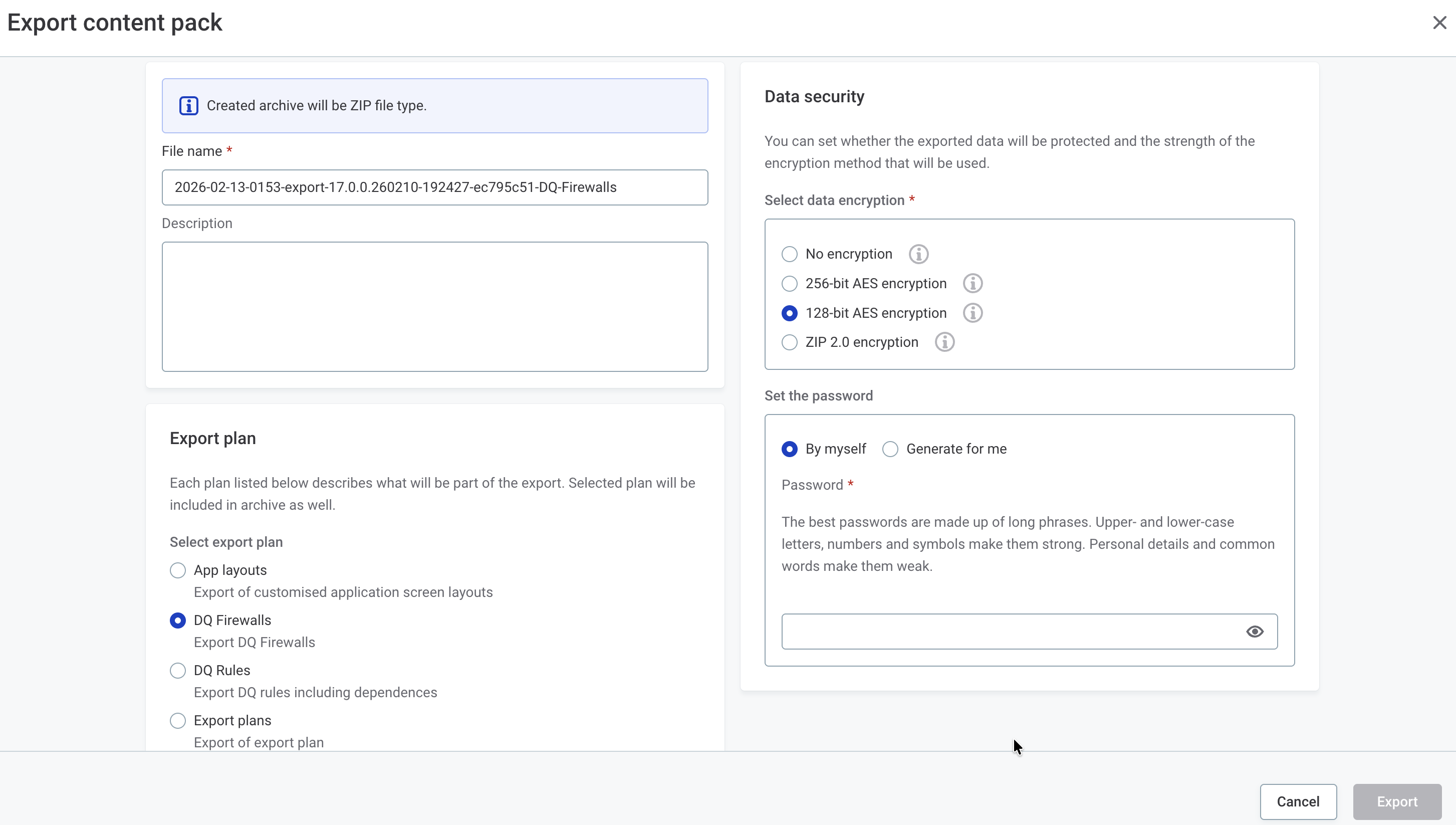
Asset promotion allows automated migration of data quality assets across environments (for example, DEV → TEST → PROD) with minimal manual intervention. Export monitoring projects, DQ rules, transformation plans, and other assets with complete dependency resolution and automatic environment remapping.
Key capabilities include:
-
Export and import of monitoring projects, DQ rules, transformation plans, DQ firewalls, terms, and lookup items.
-
Automatic environment remapping for connections, schemas, and database names.
-
Comprehensive audit trails for compliance and traceability.
-
Incremental updates — promote individual assets without re-exporting entire projects.
-
Encrypted, password-protected archives for secure transfer between environments.
-
Validation-only mode to preview import results before applying changes.
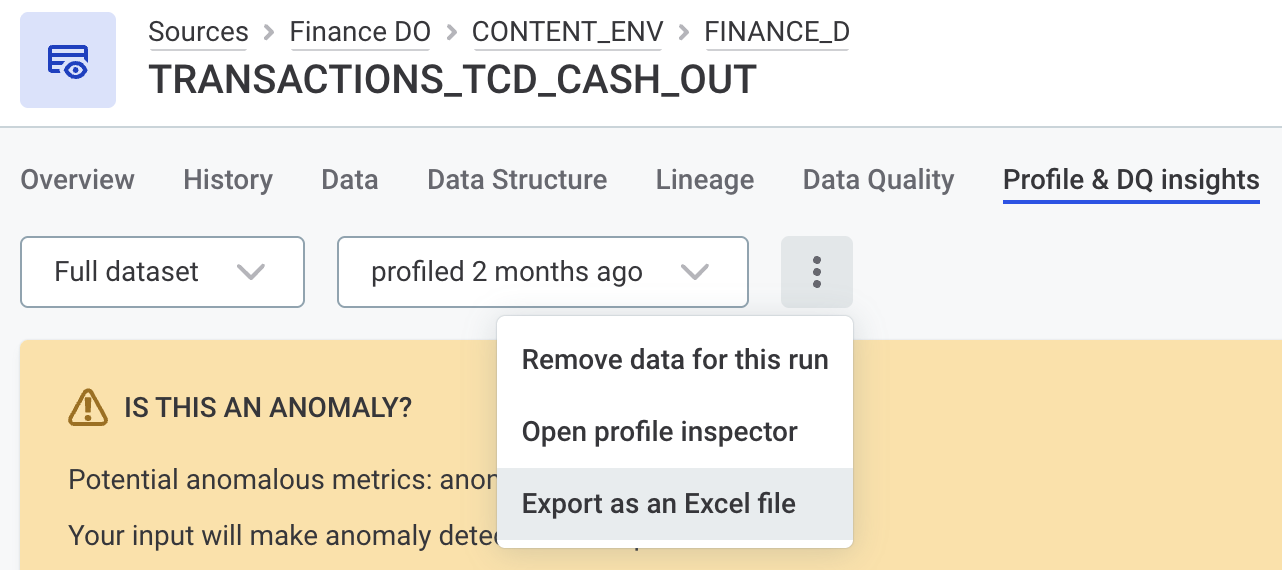
Export Profiling Results to a Microsoft Excel File
Export profiling results for a catalog item as an Excel file.
Use this to share profiling statistics for company audits or to demonstrate data quality insights to teams evaluating the platform. The export includes links to detailed attribute-level profiles for ease of access.
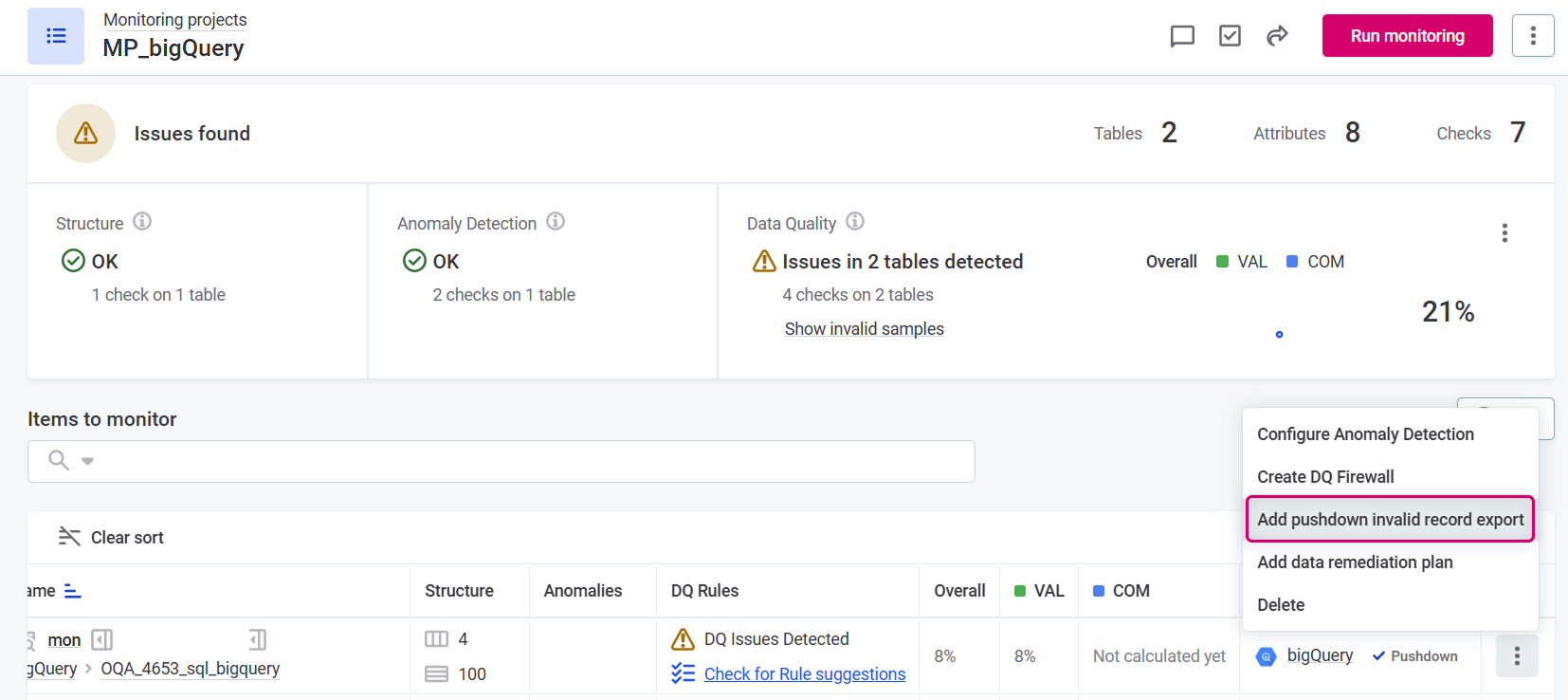
Export Invalid Records from Monitoring Projects
| Available for BigQuery and Databricks used in pushdown mode. |
Export records that fail DQ evaluation rules to an external table directly from your monitoring projects. The export includes information about failing rules and selected attribute values, making it easier to share data quality issues with stakeholders who don’t have access to Ataccama ONE or to integrate with external remediation workflows.
Records are exported to a table in the same data source (write permissions required). This replaces post-processing plans, which are not compatible with SQL pushdown processing.
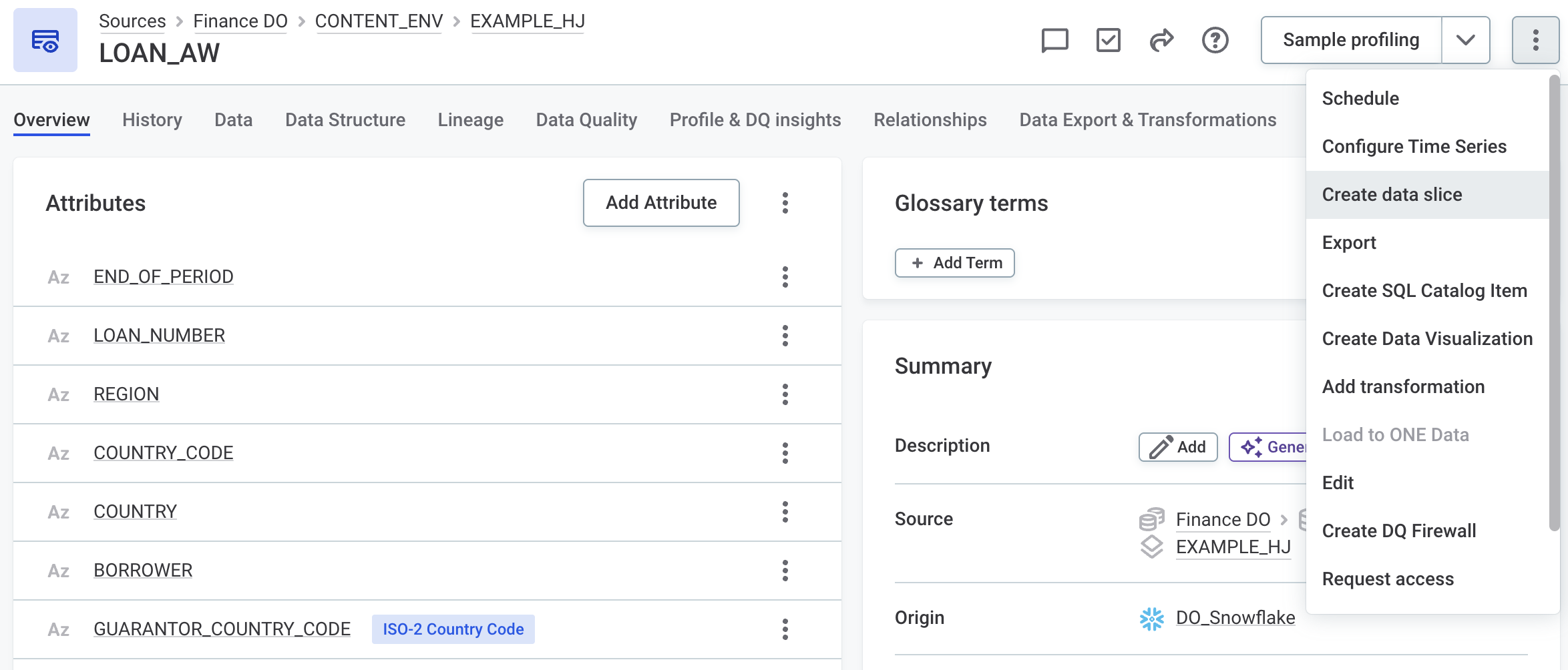
Apply Data Slices to Catalog Items
Apply data slices directly to catalog items, extending their use beyond monitoring projects.
When applied, a data slice filters the data used across all catalog item operations, including profiling, DQ evaluation, Data Observability checks, exports, and imports to ONE Data. The slice name is displayed next to the catalog item name, making it immediately visible that you are working with filtered data.
See Create a Data Slice.
Schedule Removal of Obsolete Catalog Items
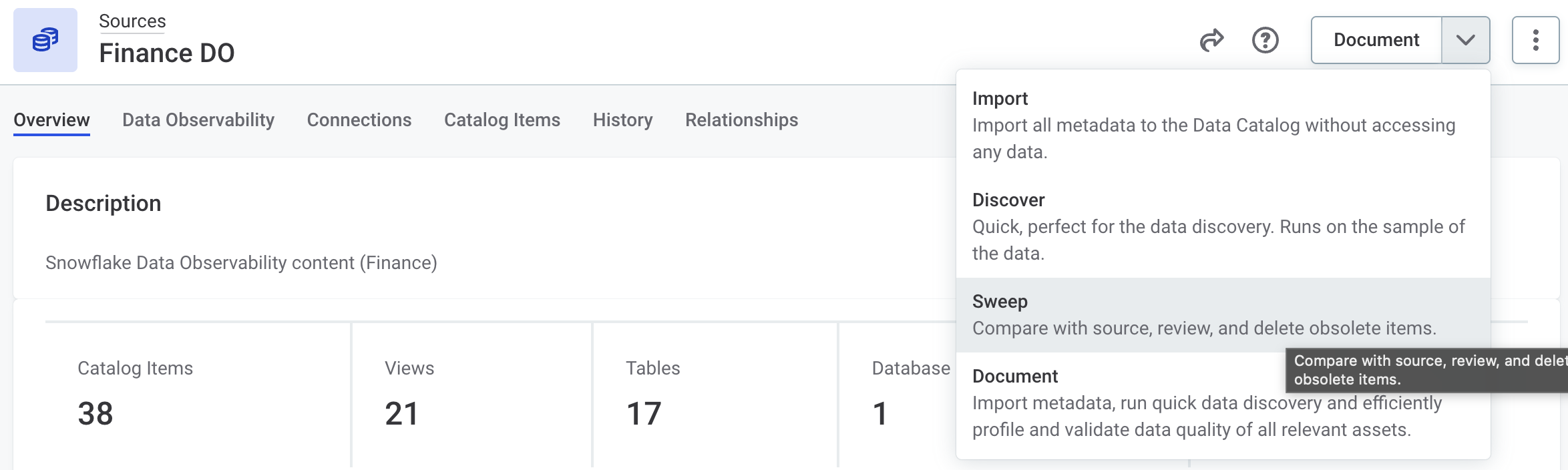
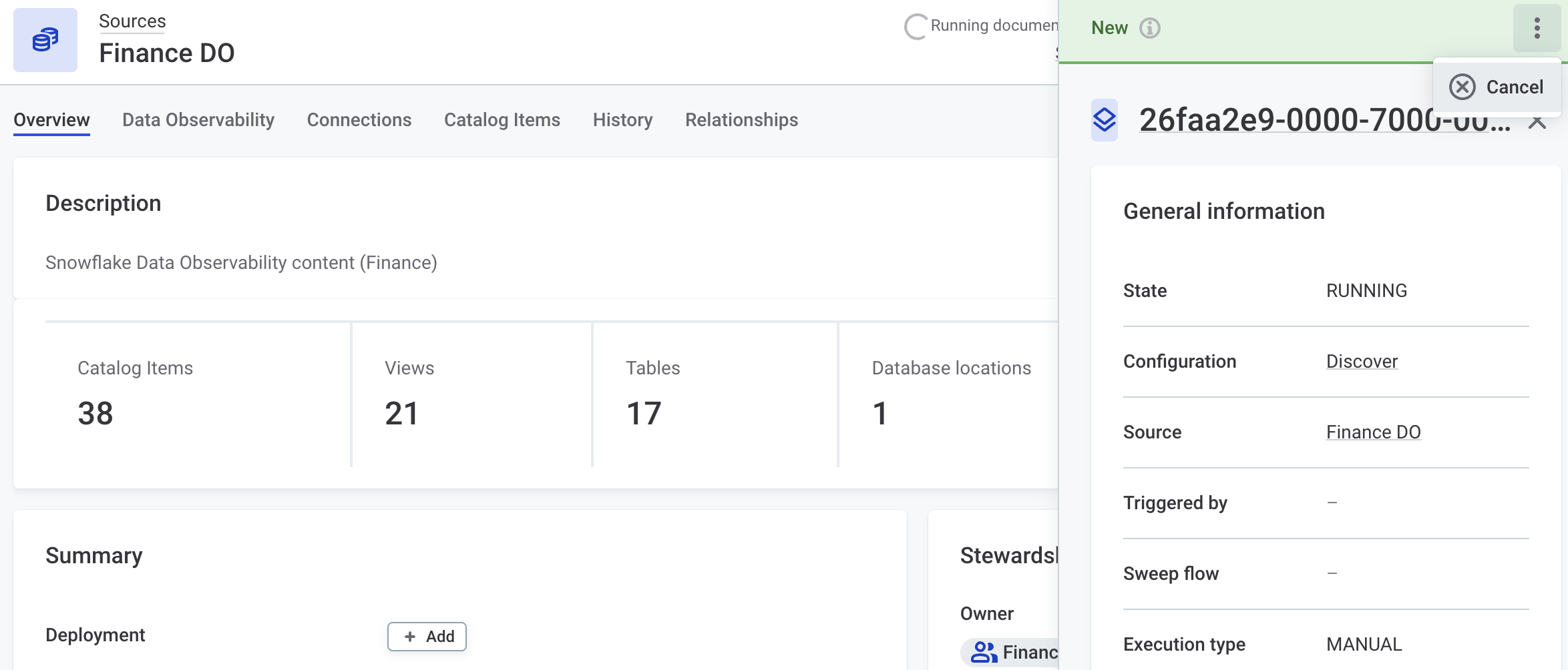
Schedule the Sweep documentation flow to automatically delete obsolete catalog items without manual review.
Keep your catalog up to date by removing items that are no longer relevant after being removed from the original data source: set the schedule once and let it run. For organizations that prefer more control, a manual workflow is also available: identify, review, and bulk delete obsolete catalog items on demand.
Preserve Customized Catalog Item Names on Reimport
Catalog item names you change in ONE are now preserved when metadata is reimported from the data source.
Previously, reimporting metadata overwrote any names you had edited. If you prefer imports to apply the latest names from the data source, select the new Override catalog item name option in the connection settings.
IOMETE Pushdown Processing
IOMETE pushdown processing is now available.
Profile and monitor data quality of large-scale tables directly in the IOMETE lakehouse using SQL pushdown. Apply DQ checks and profiling without moving data out of IOMETE.
Key capabilities include:
-
Simple configuration through a single JDBC connection.
-
Full DQ rule designer support — the advanced expression editor checks expression compatibility with pushdown.
-
Pushdown can be applied at the connection or monitoring project level.
Secret Management Services: CyberArk and AWS Secrets Manager Support
ONE now supports two additional secret management providers: CyberArk Secrets Manager and AWS Secrets Manager. These join the existing Azure Key Vault and HashiCorp Vault integrations, giving you more flexibility in how you retrieve credentials when connecting to data sources.
Reuse a shared secret management service across many connections, governed by the existing user access management model.
-
AWS Secrets Manager: Retrieve secrets stored as key/value pairs using AWS access key credentials, with optional IAM assume role support for cross-account setups.
-
CyberArk Secrets Manager: Retrieve secrets from CyberArk Central Credential Provider (CCP). Authenticate the CCP connection with a client certificate: either a PFX file (certificate and private key bundled) or a separate Cert/Key file pair.
Configure integrations in Global Settings > Application Settings > Secret Management, then use them when adding credentials to your data source connections.
New Geospatial ONE Expressions
Use new geospatial functions to work with geographic data in ONE expressions. The functions accept geometries in common formats (GeoJSON, WKT, WKB, EWKT, EWKB) and assume the WGS84 model.
Use these expressions to build spatial data quality rules, for example:
-
Verifying that insured properties fall within policy coverage zones.
-
Detecting overlapping territories that should be mutually exclusive.
-
Ensuring clinical trial sites are within approved geographic regions.
-
Checking that branch locations are within regulatory jurisdictions.
For the full list of functions, see ONE Expressions Reference > Geospatial operations.
MDM
Streaming Event Handler Improvements
Batching and Performance
The Streaming Event Handler now supports collecting smaller transactions into a single publishing batch, controlled by a volume (Streaming Size) threshold and a time threshold (Streaming Seconds), whichever is reached first. This increases throughput for high-volume scenarios where many small changes occur in quick succession.
All transactions collected in the same batch are assigned a common streaming ID and published together. The handler also applies deduplication: if multiple changes affect the same root entity within the streaming window, the downstream system receives a single consolidated message with the final state.
For configuration and tuning guidance, see Streaming Event Handler > Best practices and Add a Streaming Event Handler.
Monitoring
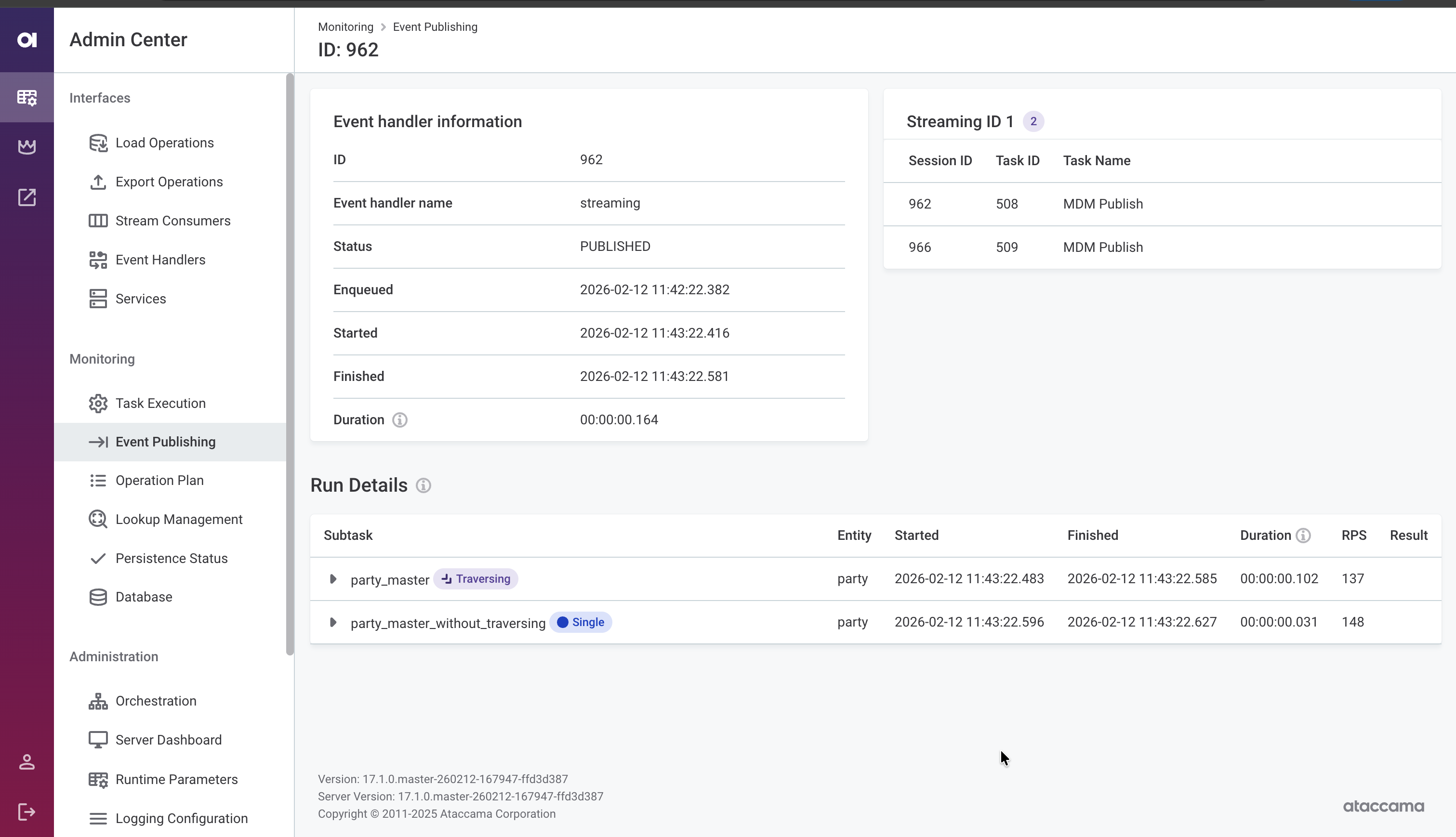
Monitor event handler activity directly in the MDM Web App Admin Center. The event publishing detail view now shows:
-
Streaming ID — Trace which transactions were published together in the same batch.
-
Enqueued, Started, and Finished timestamps — Assess streaming latency from when a change occurred to when it was delivered.
-
Per-publisher breakdown — View processing status for publishers with traversing (labeled Traversing) and without traversing (labeled Single) independently.
For details, see MDM Web App Admin Center > Monitoring > Event publishing.
State Change Notifications
Configure event handler listeners that trigger actions when an event handler changes state (activated, inactivated, or disabled). Use these to execute shell commands, run SQL statements, invoke workflows, or call external HTTP/SOAP services, enabling automated responses to publishing pipeline issues.
For configuration details, see Executor.
PostgreSQL as Sole Supported MDM Storage
As announced in 15.4.0 and reiterated in 16.3.0, MS SQL and Oracle are no longer supported for MDM storage. PostgreSQL is now the only supported database engine for MDM.
If you have not yet migrated, see MDM 17.0.0 Upgrade Notes for guidance.
Improvements to Admin Center
The MDM Web App Admin Center includes several usability improvements:
-
Environment banner: Display a colored banner with the environment name (for example, DEV, TEST, PROD) to help distinguish between environments at a glance. See Environment banner.
-
Lookup management screen: View the list of file system locations configured within the Versioned File System Component. See Lookup management.
-
Runtime parameter export: Download the current runtime parameters as a
runtime.parametersfile, making it easier to migrate configuration between environments or keep it under version control. See Runtime parameters. -
License information: View license details in the Orchestration section. See Licenses.
Example Project Available on macOS
You can now set up and run the MDM example project on macOS using Docker containers. For instructions, see MDM Example Project on macOS.
Fixes
For fixes delivered in patch releases, see 17.0.0 Patch Releases.
ONE
- Monitoring projects
-
-
Anomaly detection on the Profile & Insights tab displays the
expectedvalues correctly. -
Anomaly detection pop-up notifications now display correctly.
-
Profile inspector no longer shows mixed results when monitoring projects target the same catalog item with and without data slices. Results now correctly reflect whether the project uses the full dataset or a specific data slice.
-
Monitoring projects with post-processing plans deactivated no longer remain in the post-processing status indefinitely due to duplicate filters. A validation error now prevents publishing duplicate filters on the same attribute.
-
Manual runs of monitoring projects no longer fail after rule modifications.
-
Monitoring projects no longer fail after DQ dimension rename.
-
When importing monitoring project configuration containing filters, filter references to catalog items and attributes are correctly updated after remapping. Previously, filters would appear invisible after remapping but were still submitted to DQ evaluation as duplicates, causing exponential growth in filter combinations and processing failures.
-
When reimporting the same monitoring project configuration but with a post-processing plan attached, related catalog items are no longer duplicated and the project runs as expected.
-
Long path names on the monitoring project Notifications tab do not overflow.
-
DQ filters in monitoring projects now work correctly with pushdown enabled.
-
Long rule explanations on the monitoring project Report tab do not overflow.
-
Monitoring project results in email notifications are now rounded to two decimal places.
-
Updating individual data quality checks using the Update rule option in the DQ check modal works as expected. Previously, the update would fail to be propagated.
-
Scheduled monitoring projects do not fail even if the Data Processing Engine (DPE) is temporarily disconnected when the run starts.
-
When using transformation plans to export monitoring project results to a database or a CSV file, invalid and valid columns are correctly populated for failing rules instead of containing only null values.
-
- Rules
-
-
Rule suggestions now correctly respect your access permissions when using the Check for rule suggestions option. You’ll see suggestions for catalog items you have access to (even without term access), while rules requiring higher permissions are excluded.
-
Rule suggestions load correctly in monitoring projects for catalog items with assigned rules or terms you don’t have access to.
-
Removed the non-functional Apply the following rules automatically on all attributes with this term option from the term Settings tab. Rules are always applied when a term is assigned to an attribute.
-
A rule detail page loads correctly when opened from the Rule suggestions screen.
-
Rule suggestions on the attribute Profile & DQ insights tab do not overflow.
-
Data quality rules containing regular expressions now produce consistent results between rule debugging and DQ evaluation.
-
Context help consistently shows for functions in the Rule Builder.
-
Pushdown profiling now shows which rule and lookup caused the failure when a referenced lookup hasn’t been built.
-
- Transformation plans
-
-
Transformation plan previews are generated for all plans with at least one valid step, even if they contain invalid steps.
-
In transformation plans, Stewardship can now be edited for governance roles with the Full access level.
-
- Data slices
-
-
Data slices in monitoring projects now include null values.
-
Data slices are supported for Databricks catalog items.
-
The Create data slice option is correctly hidden for users with view-only access to the catalog item.
-
- Catalog & data processing
-
-
Power BI report previews load reliably without intermittent errors.
-
Setting a custom preview for a Power BI report no longer deactivates the Open in reporting tool option.
-
The Schemas screen reflects term updates more quickly after modifications.
-
Attribute IDs on SQL catalog items imported from content packs are now preserved when editing the query.
-
A warning is displayed when attempting to delete a catalog item that is referenced by a monitoring project.
-
Fixed an issue where DQ evaluation failed with
DataSourceClientConfig not founderror even after profiling completed successfully. -
DPM no longer crashes when post-processing very large profiling results, such as tables containing huge JSON values.
-
- Documentation flows
-
-
After upgrading, Sweep documentation flow now appears in the documentation flow menu.
-
When a documentation flow is discarded, the corresponding jobs are now canceled.
-
The Delete all option in the Sweep documentation flow deletes all obsolete catalog items, not just those on the current page.
-
Users with full access level to a source can run the Sweep documentation flow.
-
- Business glossary
-
-
Long term names do not overflow the Relationships widget.
-
The term Occurrence tab displays correctly regardless of metadata model property configurations.
-
Term Suggestions services no longer overload application logs with zero-confidence term suggestions.
-
Term Suggestions metrics are no longer collected when the services are not configured.
-
- Workflows & tasks
-
-
Fixed an issue where an error was shown instead of creating a Review task when non-admin users requested reviewing and publishing of changes.
-
- ONE Data
-
Loading to ONE Data works correctly for data with null or empty values of DateTime data type.
- Data source connections
-
-
Deleting interactive credentials from a source connection no longer prevents the connection from publishing.
-
File import settings no longer appear on database connections.
-
Snowflake JDBC connections now time out properly when the target host is unreachable, instead of leaving DPE threads stuck indefinitely.
-
When using Snowflake OAuth credentials, the token validity is derived from the OAuth response.
-
Databricks JDBC connections using integrated credentials work correctly after upgrading.
-
Databricks pushdown processing works as expected when operational credentials are used.
-
Databricks jobs execute successfully when the ADLS path contains spaces in folder names.
-
Fixed an issue where profiling failed on Databricks JDBC connections after upgrading to 16.3.0-patch3, caused by internal properties being incorrectly passed to the Databricks driver.
-
Workflows no longer fail when runtime configuration contains empty passwords or other secrets.
-
Fixed an issue where importing folders from ADLS failed to browse nested path levels correctly and created catalog items at the folder level instead of for individual files.
-
BigQuery pushdown processing now displays the correct source name in error messages.
-
Canceling pushdown data quality jobs now immediately stops running database queries.
-
- Upgradability
-
-
Azure Key Vault authentication settings are no longer lost when upgrading from 15.4.1, which previously caused connections using secret management to fail.
-
Export to database no longer fails after upgrading to v17.
-
- Performance and stability
-
-
Keycloak now starts successfully when using a custom monitoring port.
-
Set the default logging level for hybrid DPEs to
DEBUG. -
Improved hybrid DPE stability during high memory usage.
-
Fixed 'user is null' messages flooding logs on some environments.
-
Self-managed deployments now support IAM authentication for the ONE database connection, with automatic token refresh.
-
MDM
-
Transition Name in custom workflow configuration must now be unique.
-
MDM server no longer fails on startup with
WorkflowServerComponent not founderror whenWorkflowTaskListeneris configured innme-executor.xml. -
The default workflow and scheduler ID in MDM Server components is set to
MDM. -
When configuring workflows, you can now use
meta.usernamecolumn in Steps and Statements conditions. -
Improvements to loading runtime parameters and fetching parallelism settings for MDM matching. Relative paths to files are correctly resolved, and matching parallelism settings are more clearly tracked both in the application and audit logs.
-
Virtual file system is used as expected in MDM cleansing plans. Previously, lookup files in these plans were incorrectly loaded from a temporary local folder instead and the VFS was ignored, leading to recent unsafe memory access operation error messages.
-
Filtering works as expected on fields using
WINDOWlookup type. -
During publishing, the streaming event handler now correctly populates the
meta_origincolumn as a string instead of incorrectly treating it as a number. -
Batch load and workflow operations no longer fail when the parallel write strategy is enabled and matching is added to an entity after initial data load.
-
IgnoredComparisonColumnsignores columns only on the selected entities. -
When rejecting a matching proposal with the Exclude this decision from AI matching learning option selected, the web application now clearly reports an error if there are no records related to the proposal. If the linked entity exists, the proposal is rejected without issues.
-
MDM Web App now displays more informative errors when Keycloak token refresh fails.
-
Fixed duplicate
eng_last_update_tidcolumn in History Export when Export eng__tid columns is selected. -
Fixed database connection leaks in event handlers.
-
In HA setups, scheduled tasks use a dedicated thread pool, allowing the second processing node to remain stable.
-
Updated Kafka client library in Kafka Provider Component to prevent compatibility errors.
-
MDM server logs events related to the setup of PostgreSQL database.
-
MDM server logs events related to Lookup items and VFS configuration.
-
MDM count metrics now gracefully handle rollbacks or failures; such records are no longer counted.
-
Improved error messages for missing autocorrect configuration when using enrichments.
-
Selecting Details in the Orchestration section of MDM Admin Center expands rows correctly.
-
Usernames are correctly displayed in MDM Web App Admin Center instead of appearing hashed.
-
MDM Web App Admin Center correctly reports on the event handler execution times (started and finished), allowing you to more accurately assess the handler status.
-
MDM Web App Admin Center no longer shows incorrect duration and number of records for failed jobs.
-
Users with
MDM_Viewerrole correctly see only attributes ofcmo_typewhen querying the MDM REST API.
RDM
-
Save option now appears alongside Publish and Discard when creating or updating records with direct publishing configured.
-
Email notification links now work correctly in Ataccama Cloud environments. Previously, the
$detail_href$variable was incorrectly resolved, causingHTTP 401 Unauthorizederrors when opening links, and in some cases, the link wasn’t rendered as a hyperlink. -
In summary emails, the
$environment$variable resolves as expected. -
Deleting an active configuration in RDM Web App now requires typing 'delete' to confirm, preventing accidental deletions that could cause model and database inconsistencies.
-
Improved support for long-running requests in Ataccama Cloud, preventing large data imports from timing out.
-
Fixed connection leaks in RDM that were causing sessions to remain idle, potentially leading to lock or wait issues.
-
In RDM Server runtime configuration (
server.runtimeConfig), predefined connections now use OpenID authentication instead of Basic authentication to enforce 2FA-only access to the application. Predefined connections can be overridden by custom connections of the same name if needed. -
Improved table loading performance for non-admin users in environments with extensive role configurations.
ONE Runtime Server
-
Run DQC Process task is no longer supported in Ataccama Cloud environments. Use Run DQC instead.
-
Arguments in Run DPM Job task have been renamed to Parameters. See ONE Runtime Server 17.0.0 Upgrade Notes.
-
Run DPM Job tasks no longer fail with "no compatible/available engine" error when database connections are correctly configured.
-
Increased the default
client_max_body_sizein Ataccama Cloud environments, enabling larger bulk record imports in RDM without application timeouts. -
Workflow files (
.ewf) no longer fail with "Invalid link definition at index" errors when task IDs contain trailing spaces. -
ONE Runtime Server no longer logs repeated
keycloak-downerrors during startup while waiting for Keycloak to become available. -
Removed an incorrect
ssh://prefix from theGIT_CLIENT_URLfield, which was preventing SSH connections to repositories in Ataccama Cloud environments.
ONE Desktop
-
Time zones are synchronized between ONE Desktop and the processing node for DQ operations.
-
Data quality processing steps now correctly preserve time zones from input timestamps. The steps respect the time zone specified in input data or use the local time zone setting of the execution environment.
-
ONE Metadata Reader step correctly reads properties of Referenced Object Array type.
-
Collibra Writer step now properly groups relations to prevent overwrites in REPLACE mode and allows specifying Source or Target asset as the relationship identifier.
-
Notification handler now resubscribes automatically after five minutes of inactivity, preventing high-traffic environments from getting stuck.
-
Improvements to SAP RFC connections:
-
Added support for UTCLONG data type.
-
Added support for gateway host parameter in the connection configuration, resolving connectivity issues when connecting over SAP JCo.
-
SAP client no longer skips importing columns where metadata hasn’t been updated in a while.
-
SAP metadata discovery now uses business types instead of storage types, so columns display their correct data type (for example, integer instead of binary).
-
SAP RFC Execute step now supports transaction commit, generic parameters, result format selection, and browsing all RFC functions including custom ones.
-
Fixed SAP table display and step dialog selection issues.
-
Was this page useful?