
SQL Pushdown for DQ Evaluation
SQL pushdown for data quality (DQ) evaluation runs your DQ rules directly in the data source instead of on Ataccama ONE Data Processing Engines (DPEs). Once enabled on a connection, all supported rules applied to catalog items under that connection, including in monitoring projects, are evaluated in pushdown.
This page covers what is specific to DQ evaluation: which rules, functions, and operators can run in pushdown, how to check whether a rule is supported, and how to turn pushdown off for individual catalog items and monitoring projects when it isn’t. For the benefits of pushdown processing, how the SQL translation works, and setup instructions for your data source, start with SQL Pushdown Processing.
| Pushdown for DQ evaluation builds on pushdown profiling: you can’t enable it on a connection without enabling pushdown profiling first. On Snowflake, a single setting enables pushdown for both profiling and DQ evaluation. |
Supported rules
The following rules are supported in pushdown:
-
Rules created using Condition Builder, including aggregation rules, as all functions available in the condition builder are supported in pushdown.
In Snowflake, aggregation rules are not supported with Legacy pushdown. -
Parametric rules.
-
Advanced Expression rules, rules generated using the Ask AI feature, and rules using variables, provided they use only supported functions and operators.
Component rules are not supported.
Verify rule support
Rule support in pushdown is shown in two places, with different scopes:
In the rule library (Data Quality > Rules), an icon next to each rule name shows whether the rule is supported across pushdown engines, independent of any specific connection:
-
No icon: The rule is supported in all pushdown engines.
-
Half-filled circle: The rule is supported in at least one pushdown engine. Hover over the icon for details.
-
No-entry sign: The rule is not supported in any pushdown engine.
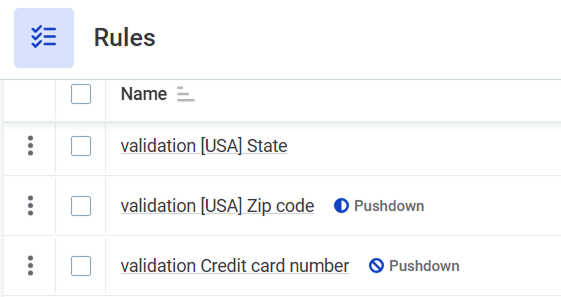
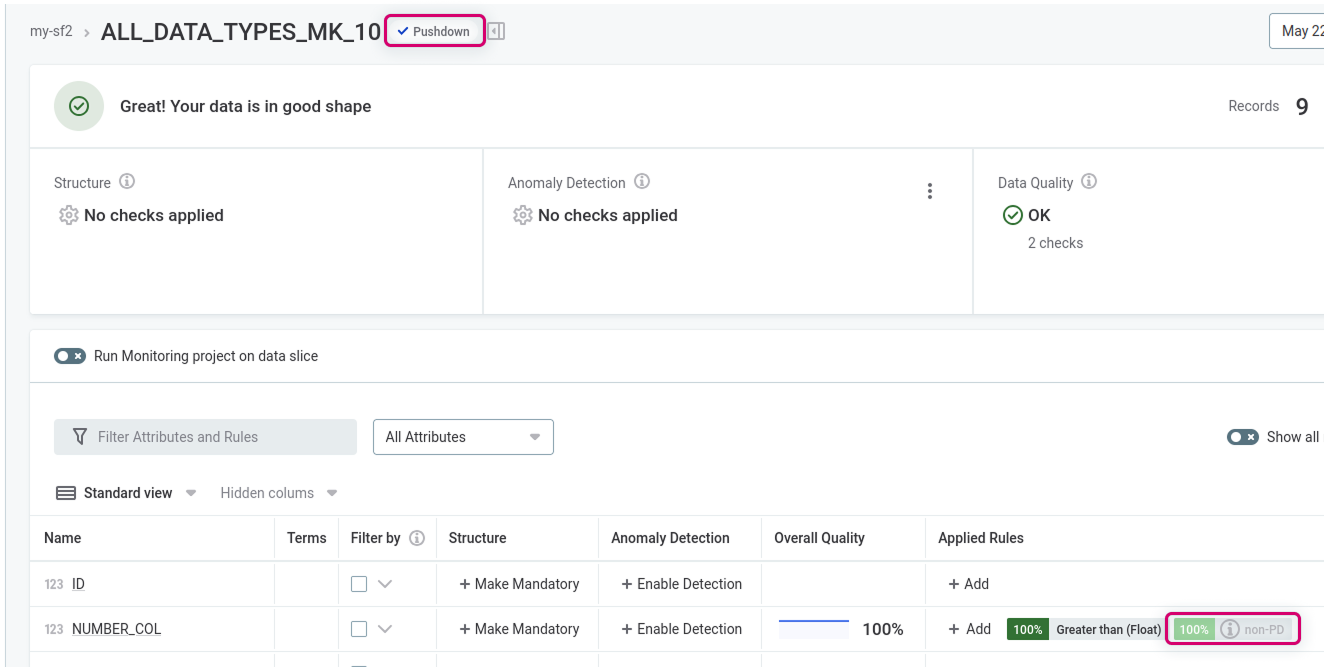
On catalog items and in monitoring projects, rules not supported for the specific connection are grayed out and marked with an info icon:
-
On the catalog item Data Quality tab.
-
On the monitoring project Configuration & Results tab.
Hover over the info icon for details.
Supported functions and operators
Rule expressions are translated to the native SQL functions of your data source, so only ONE expression functions with an SQL equivalent are supported in pushdown. Whether a rule can run in pushdown is checked when you apply it: rules that can’t be translated get a pushdown compatibility warning and are skipped during evaluation (see How unsupported rules are handled in pushdown). Use the following lists to avoid unsupported functions when you write rules.
Supported operators
Operators are supported the same way on all data sources.
Supported operators
-
+(concatenate for string, addition for numeric values) -
-(subtraction) -
*(multiplication) -
/(division) -
%(modulo) -
div(division of integer values without a remainder) -
< -
⇐ -
<>,!= -
=,== -
> -
>= -
AND -
NOT -
OR -
XOR -
in -
is -
is in -
is not -
is not in -
is not null -
is null -
not in
Supported functions by data source
-
Snowflake
-
Databricks and IOMETE
-
BigQuery
-
Azure Synapse
| Category | Functions |
|---|---|
Date |
|
Aggregation |
|
Conditional |
|
Conversion |
|
Math |
|
Min and max |
|
Other |
|
String |
|
| Category | Functions |
|---|---|
Date |
|
Aggregation |
|
Conditional |
|
Conversion |
|
Math |
|
Min and max |
|
Other |
|
String |
|
| Category | Functions |
|---|---|
Date |
|
Aggregation |
|
Conditional |
|
Conversion |
|
Math |
|
Min and max |
|
Other |
|
String |
|
Structured |
|
| Category | Functions |
|---|---|
Date |
|
Aggregation |
|
Conditional |
|
Conversion |
|
Math |
|
Min and max |
|
Other |
|
String |
|
Source-specific notes
-
BigQuery: JSON attributes are supported, with limitations on some
json.andarr.functions. See Limitations of BigQuery pushdown. -
Snowflake: For performance reasons,
eraseSpacesInNamesis supported only with theminLengthparameter set to3or lower. Rules that use a higher value are treated as not supported in pushdown (see How unsupported rules are handled in pushdown). With Legacy pushdown enabled on the connection, function support differs: see Supported functions in Legacy pushdown.
Enable and disable pushdown on the catalog item level
This applies to DQ evaluation run directly on catalog items, outside of monitoring projects.
Once pushdown for DQ evaluation is enabled on the connection level, you can turn it off for individual catalog items. This is useful if the catalog item has rules applied that are not supported in pushdown.
To turn off pushdown processing for DQ evaluation:
-
In Knowledge Catalog > Catalog Items, select your catalog item.
-
Select the three-dot menu and then select Edit.
-
Clear Enable Data Quality evaluation using pushdown.
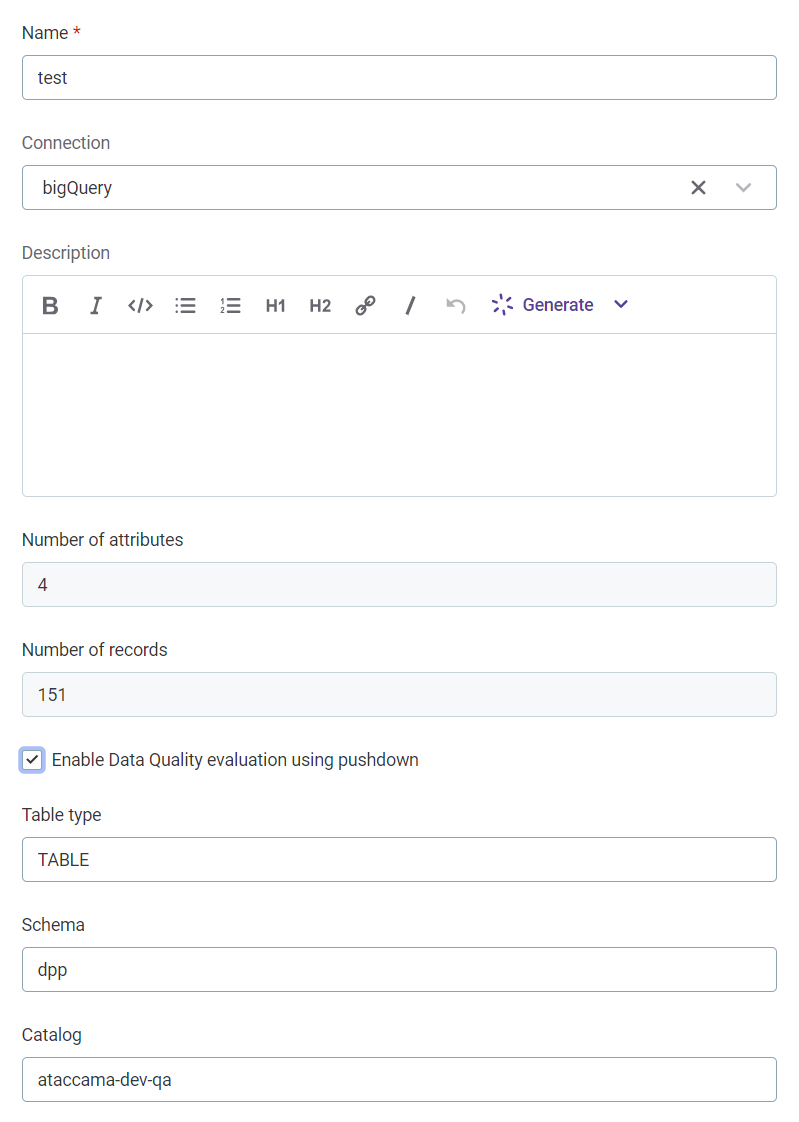
If you leave pushdown enabled and unsupported rules are applied to the catalog item, those rules are skipped during DQ evaluation.

Enable and disable pushdown on the monitoring project level
This applies to DQ evaluation in monitoring projects.
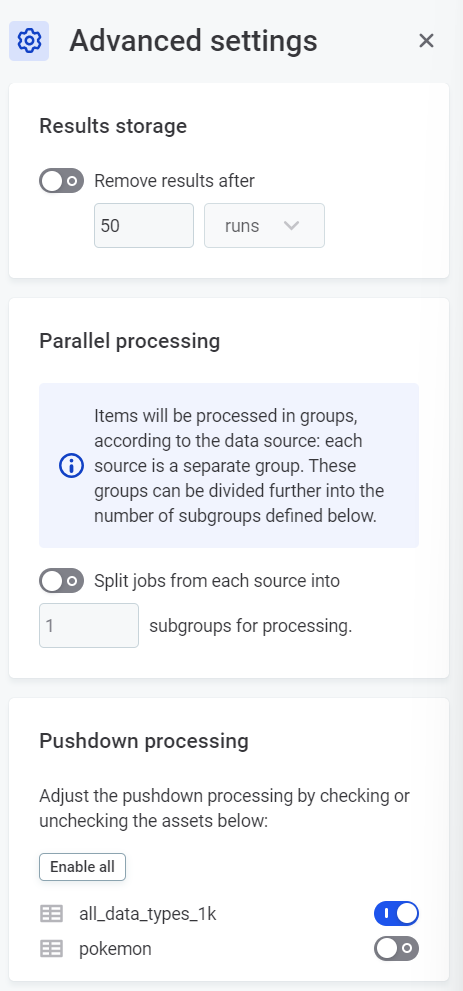
Once pushdown for DQ evaluation is enabled on the connection level, you can turn it off for catalog items in a monitoring project. This is useful if rules applied to items in the monitoring project are not supported in pushdown. See How unsupported rules are handled in pushdown.
To turn off pushdown processing for monitoring projects:
-
In Data Quality > Monitoring Projects, select your monitoring project.
-
Select the three-dot menu and then Advanced settings.
-
In Pushdown processing, turn off pushdown for the catalog items that contain unsupported rules.
Next steps
-
To enable pushdown for DQ evaluation, follow the setup instructions for your data source: Supported data sources.
-
When exporting invalid records from monitoring projects running in pushdown, additional permissions are required in your data source. See Export Invalid Records.
Was this page useful?