
Use Snowflake DMFs with Data Quality Gates
Use this page to generate Snowflake Data Metric Function (DMF) SQL from published Ataccama ONE DQ rules.
The generated SQL can be run directly in Snowflake to create DMFs. Each DMF returns the number of records that fail a specific rule.
DMFs vs. UDFs
The DQ Gates DMF flow translates published DQ rules into CREATE DATA METRIC FUNCTION statements instead of deploying DQ firewalls.
For row-level validation results, use Snowflake UDFs instead.
How rules are translated
DQ Gates translates each eligible rule condition from ONE expressions to Snowflake SQL. Here is an example of a simple DQ rule that validates continent values and the resulting DMF statement:
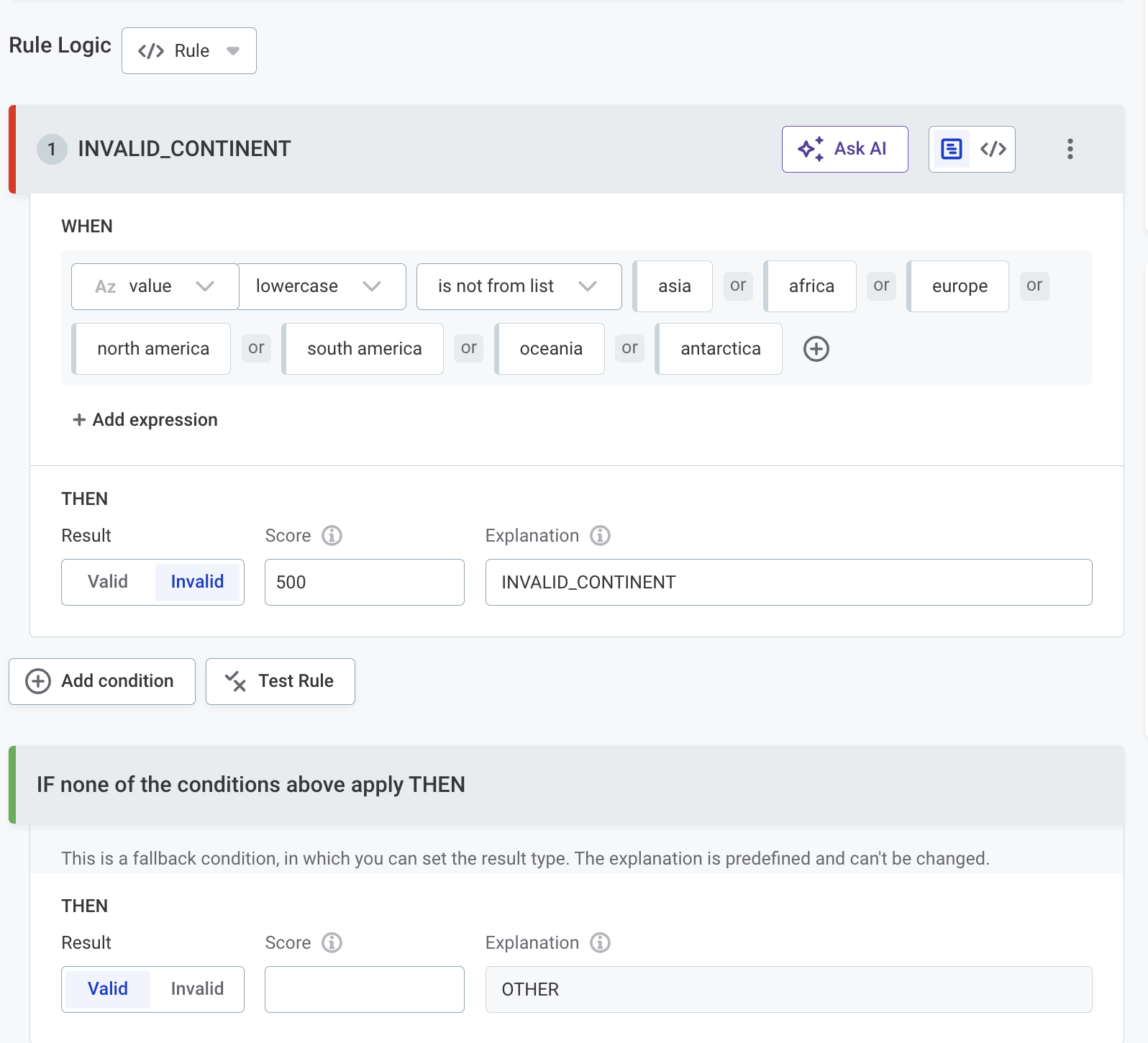
This translates to a Snowflake DMF statement:
CREATE OR REPLACE DATA METRIC FUNCTION validation_continent_failed_records(
  arg_t TABLE(col_1 VARCHAR)
)
RETURNS NUMBER
AS $$
  SELECT COUNT_IF(CASE
    WHEN not (lower(col_1) in ('asia', 'africa', 'europe', 'north america', 'south america', 'oceania', 'antarctica')) THEN TRUE
    ELSE FALSE
  END)
  FROM arg_t
$$;
Limitations
The current DMF implementation supports the same rules, functions, and operators as Snowflake pushdown processing.
The following are currently not supported:
-
Aggregation rules.
-
Parameterized rules (DMFs cannot accept external parameter values).
-
Rules with lookups.
-
Rules without fully translated conditions.
-
DMFs with nondeterministic functions (not supported by Snowflake, for example
CURRENT_TIME).
Was this page useful?