
Ataccama 17.1.0 Release Notes
Connect AI assistants to your catalog, data quality, and master data through new MCP servers; sharpen DQ scoring with Not Applicable results; and extend reach with a new Snowflake pushdown implementation and SAP connectivity.
Release date |
June 26, 2026 |
Upgrade notes |
|
Latest patch |
Patch 14 (October 2, 2026) |
Products |
ONE Data Quality & Catalog, ONE MDM, ONE RDM, ONE Runtime Server, ONE Desktop |
Downloads |
|
Security updates |
Release Highlights
Model Context Protocol (MCP) Servers ONE DQ&C ONE MDM
Connect AI assistants to Ataccama through the Model Context Protocol, giving them governed, permission-aware access to your catalog, business terms, and data quality results, or master data and tasks in MDM.
DQ&C ↓ · MDM ↓
New Snowflake Pushdown Processing ONE DQ&C
Export invalid records from monitoring projects, run aggregation rules, and use lookups in DQ rules processed in pushdown on Snowflake connections.
Read more ↓
Not Applicable Results for Out-of-Scope Records ONE DQ&C
Exclude records a rule can’t meaningfully assess from your data quality scores, so results reflect only the data the rule actually applies to.
Read more ↓
SAP BW/4HANA and S/4HANA Connector via OData ONE DQ&C
Connect to SAP BW/4HANA and S/4HANA through OData to catalog, profile, and run data quality on SAP data.
Read more ↓
ONE
Data Quality & Catalog MCP Server
Connect AI assistants such as Claude, Gemini CLI, and Codex to Ataccama ONE through the new Data Quality & Catalog (DQ&C) MCP server. From your AI client, you can search the catalog, inspect data quality results, look up business terms, and work with monitoring projects using natural language.
Instead of switching to the web application, you can combine several steps — such as finding low-scoring tables, investigating the cause, and summarizing the result — in a single request. Each request runs with your own credentials, so the assistant only sees and does what your permissions allow.
The server is available in Ataccama Cloud environments.
For details, see Data Quality & Catalog MCP Server.
New Snowflake Pushdown Processing
A new Snowflake pushdown implementation adds new data quality capabilities to Snowflake pushdown.
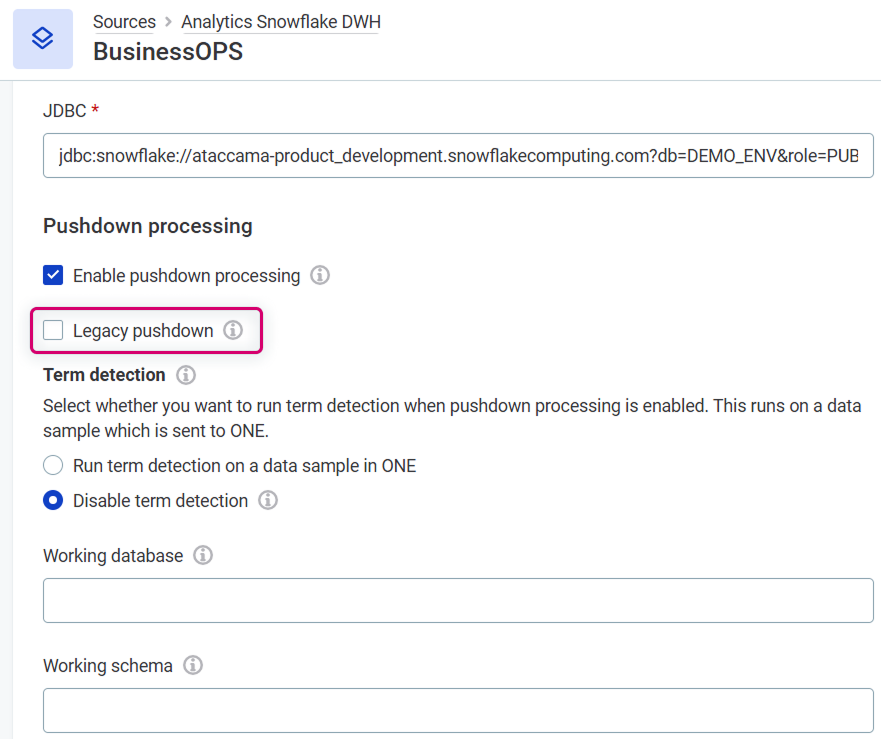
When you turn off Legacy pushdown on a connection, the new implementation adds support for:
-
Invalid records export from monitoring projects: Send records that fail DQ evaluation to a table in Snowflake. See Export Invalid Records.
-
Aggregation rules: Run them on Snowflake catalog items and monitoring projects.
-
Lookups in DQ rules: Use lookup data in rules processed in pushdown.
Data quality jobs that use lookups also benefit from improved performance.
Function support differs between the two implementations, and some additional limitations apply when Legacy pushdown is turned off. Before switching, check that the rules on your connection are still supported. See Which pushdown processing to choose.
Existing connections keep Legacy pushdown turned on after upgrade, so nothing changes until you opt in.
Not Applicable Results for Out-of-Scope Records
Keep your data quality results accurate by excluding records that fall outside a rule’s scope.
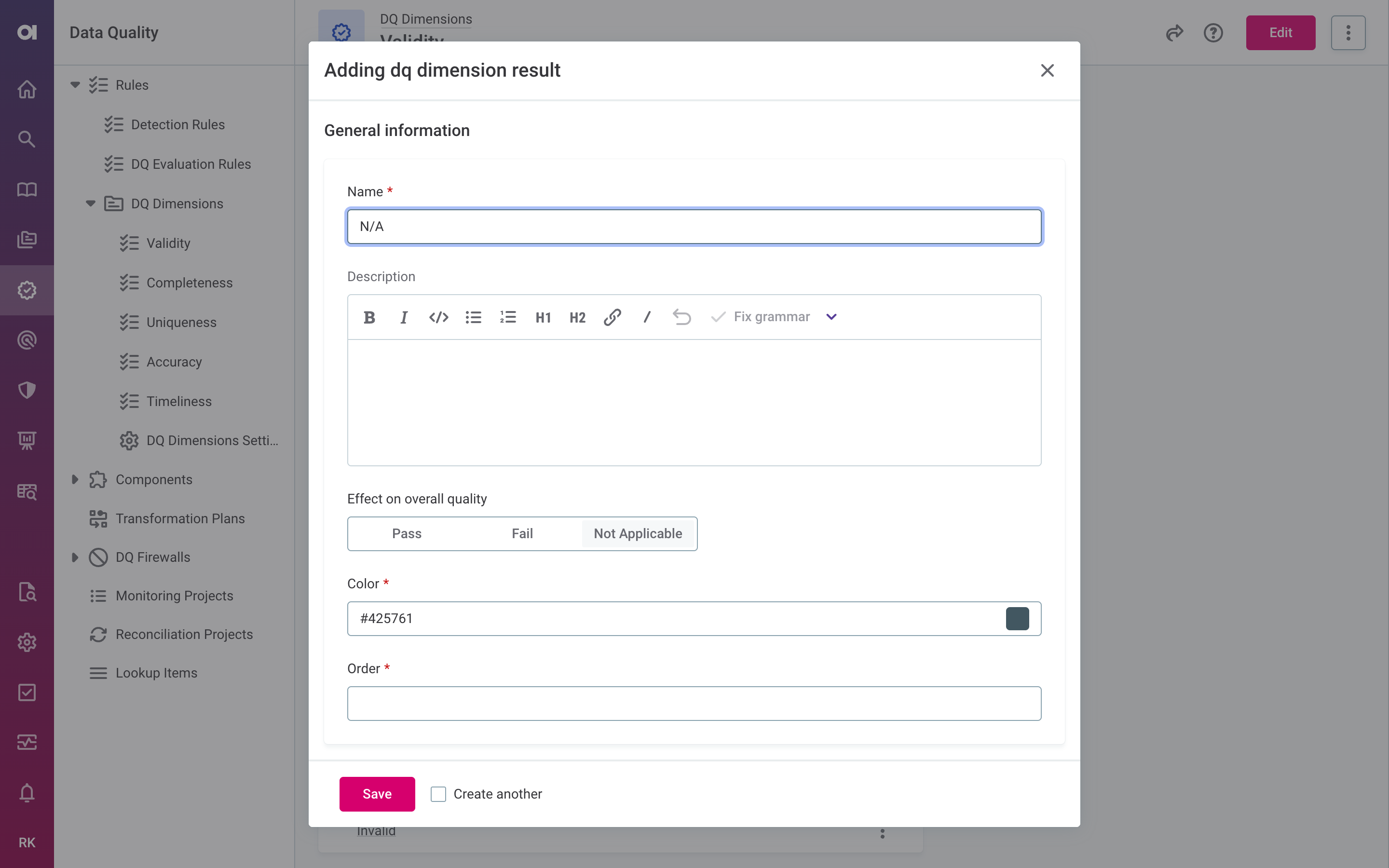
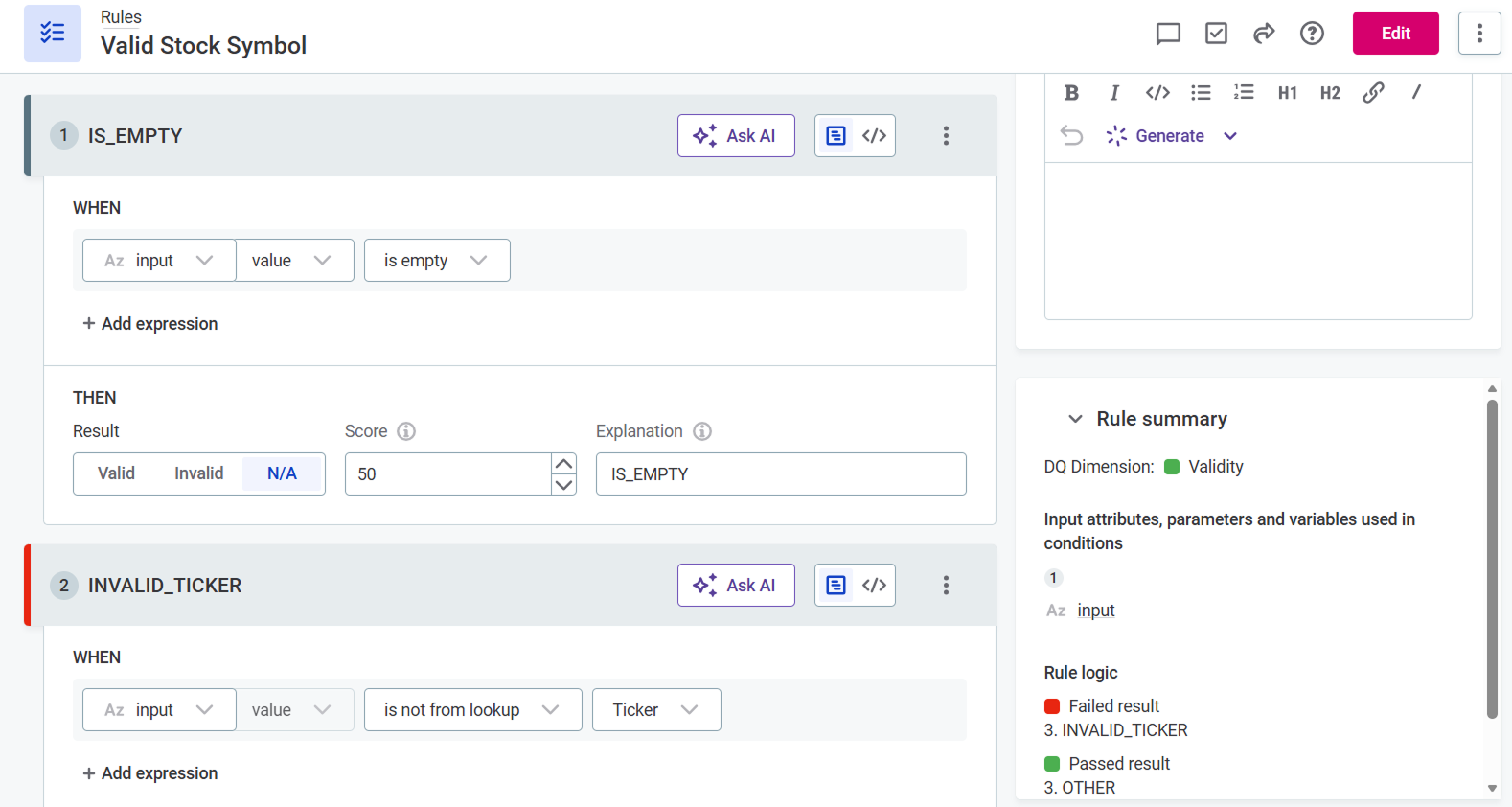
DQ evaluation rules can now return a Not applicable result for records a rule can’t meaningfully assess, for example a format check on an empty field. Previously, records a rule couldn’t evaluate still had to pass or fail, which could skew your results, especially when many such records were present. Now these records are reported as a separate count and excluded from the overall quality calculation.
Not applicable is opt-in: if you don’t configure it, nothing changes in how your data quality is calculated. To use it, configure a Not applicable result on a DQ dimension and select it in a rule condition.
Not applicable results are supported across ONE, including monitoring projects, DQ firewalls, DQ Gates, post-processing plans, ONE Data, and in the Atlan integration.
If you adopt Not applicable results and process DQ output programmatically (for example, DQ firewall API responses or post-processing plan exports), see the upgrade notes for the specific changes to review.
Reconcile Source Column Changes in Monitoring Projects
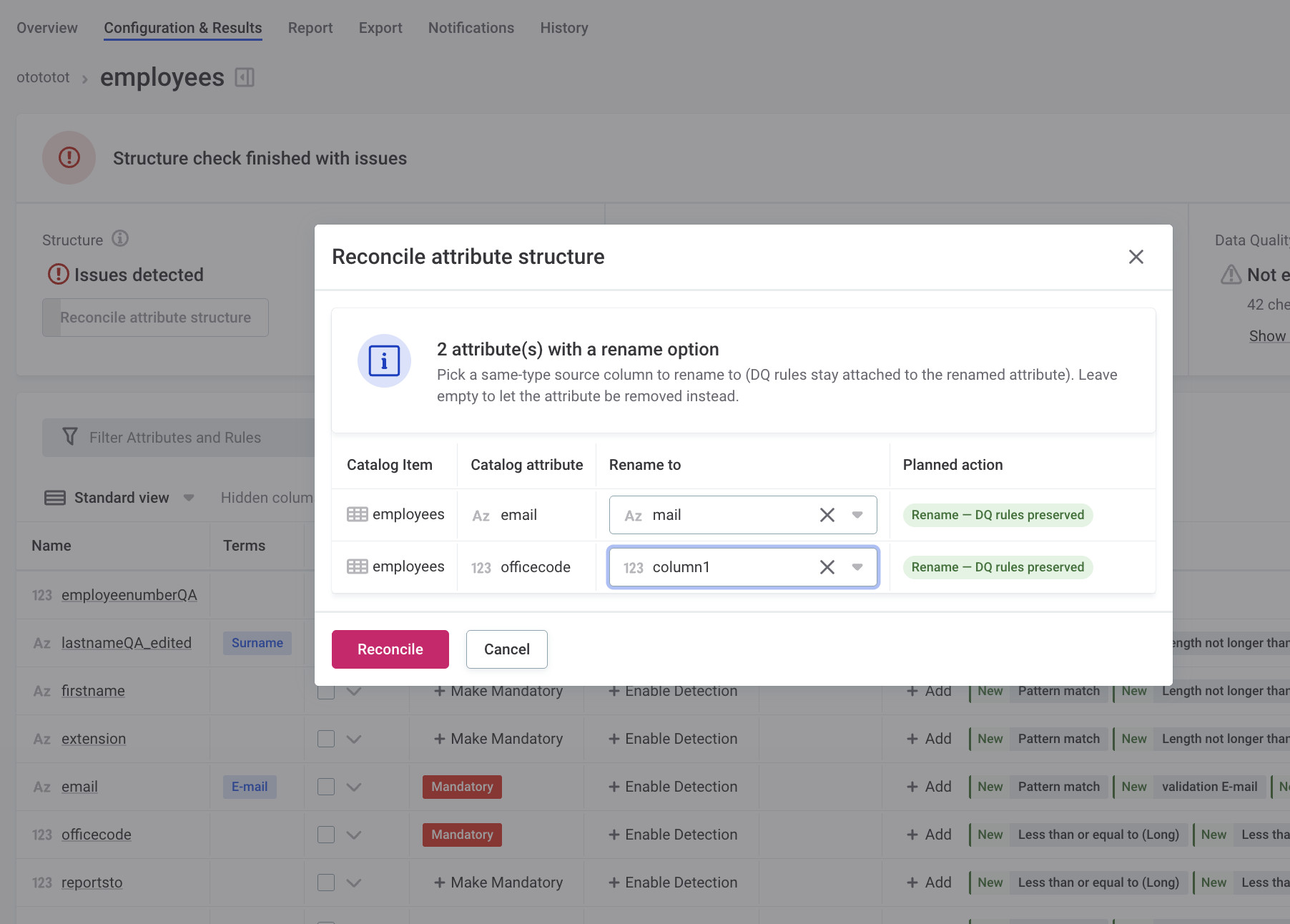
When a source column is renamed or has its data type changed, you can reconcile the change to keep the DQ rules and results of the affected attributes. Previously, a renamed column was treated as removed, so its rules and results were lost.
When a structure check detects these changes, reconcile to align the monitoring project with the source:
-
Renamed columns: Map the renamed column to its existing catalog attribute to keep its rules and results.
-
Columns with a changed data type: When a column keeps its name but its data type changes, the new data type is applied to the attribute, and its rules and results stay attached.
-
Removed columns: As before, attributes whose source column no longer exists are removed, along with their rules.
A column that is both renamed and has its data type changed in the same run is treated as removed, and its rules are lost.
For details, see Reconcile attribute structure changes.
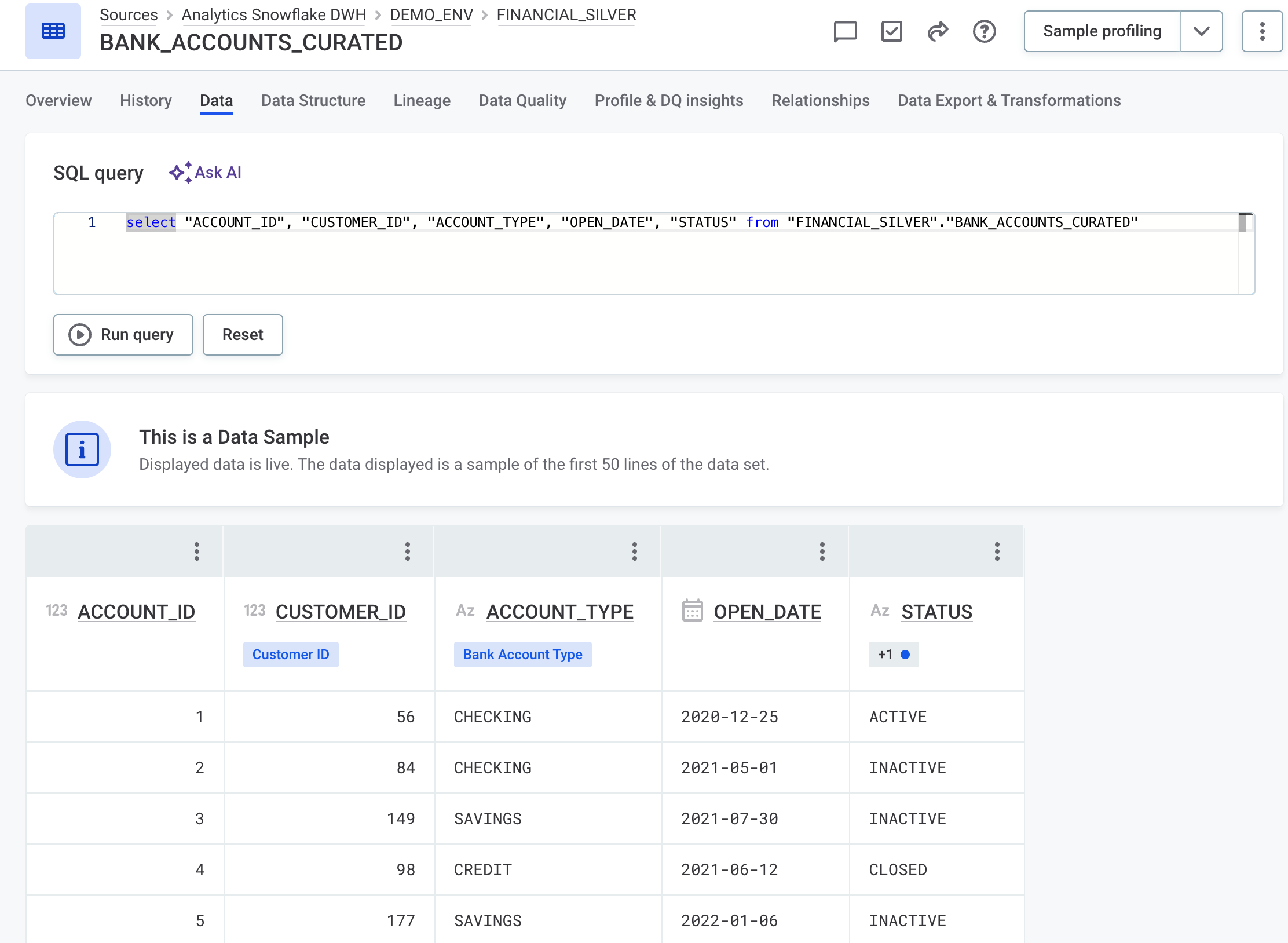
Query Live Data with SQL
Live data preview now supports SQL. Filter, sort, and paginate results with standard SQL clauses to inspect specific rows, without exporting the table. Available for catalog items from JDBC sources.
For more information, see View live data.
Improved Bulk Catalog Import
Importing catalog items from large data sources is faster and more resilient, with filtered selection and graceful handling of missing required fields.
-
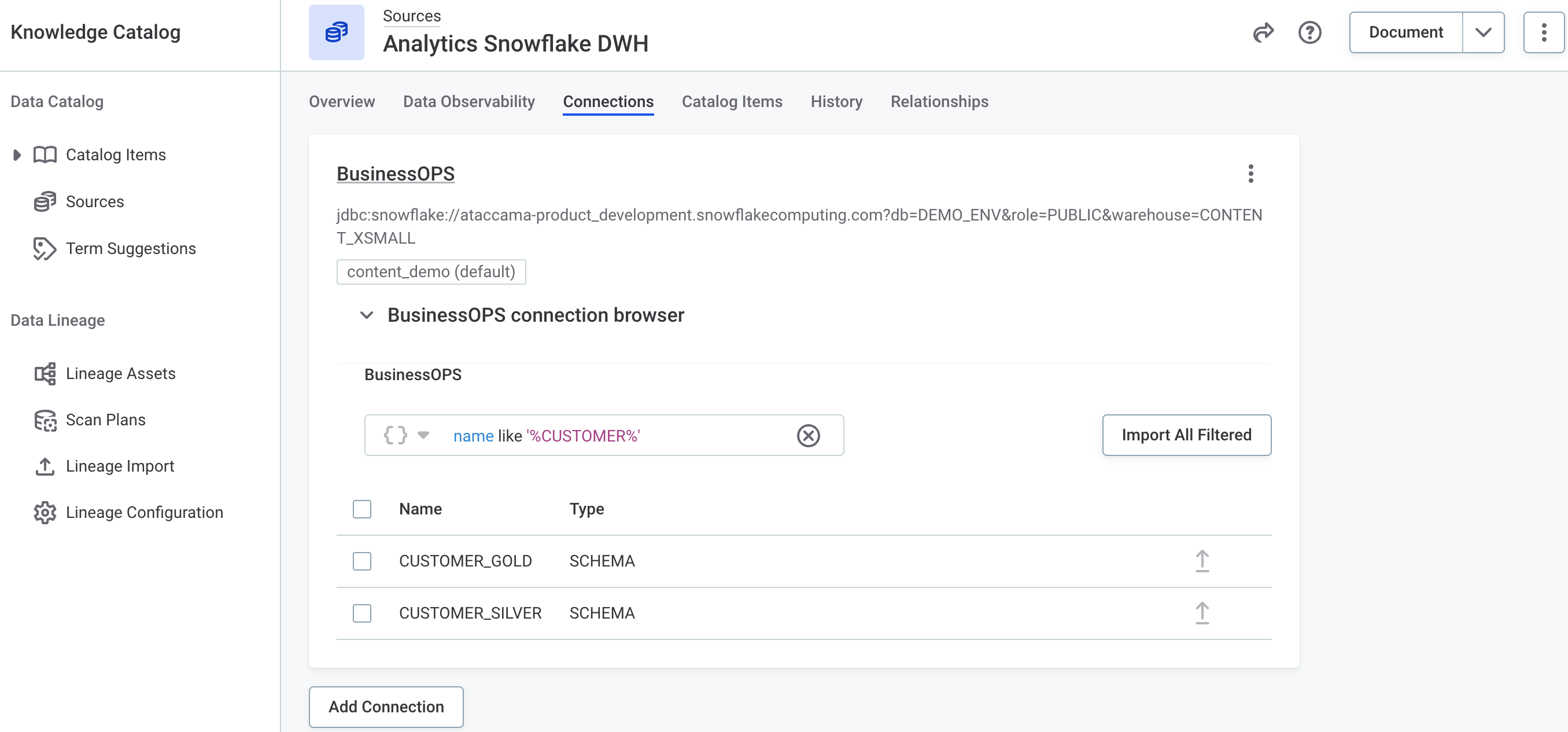
Bulk import of filtered catalog items: Use AQL filters to select what to import, instead of picking items one by one. This makes it much faster to import metadata from large sources and avoids cleanup work afterward. See Filter catalog items and Bulk-import catalog items.
-
Import into a draft state when required metadata fields are missing: Metadata imports no longer fail when your metadata model defines required properties for catalog items and the imported metadata doesn’t provide values for them. Instead, those catalog items are imported in the draft state, so you can fill in the missing fields directly in ONE and publish them when ready.
If a metadata import can’t provide values for required fields, all of its newly imported catalog items are created as drafts. Catalog items that are already published stay published and keep their previously filled-in values. See Required metadata fields and draft imports.
Automatic Cleanup of Internal Metadata
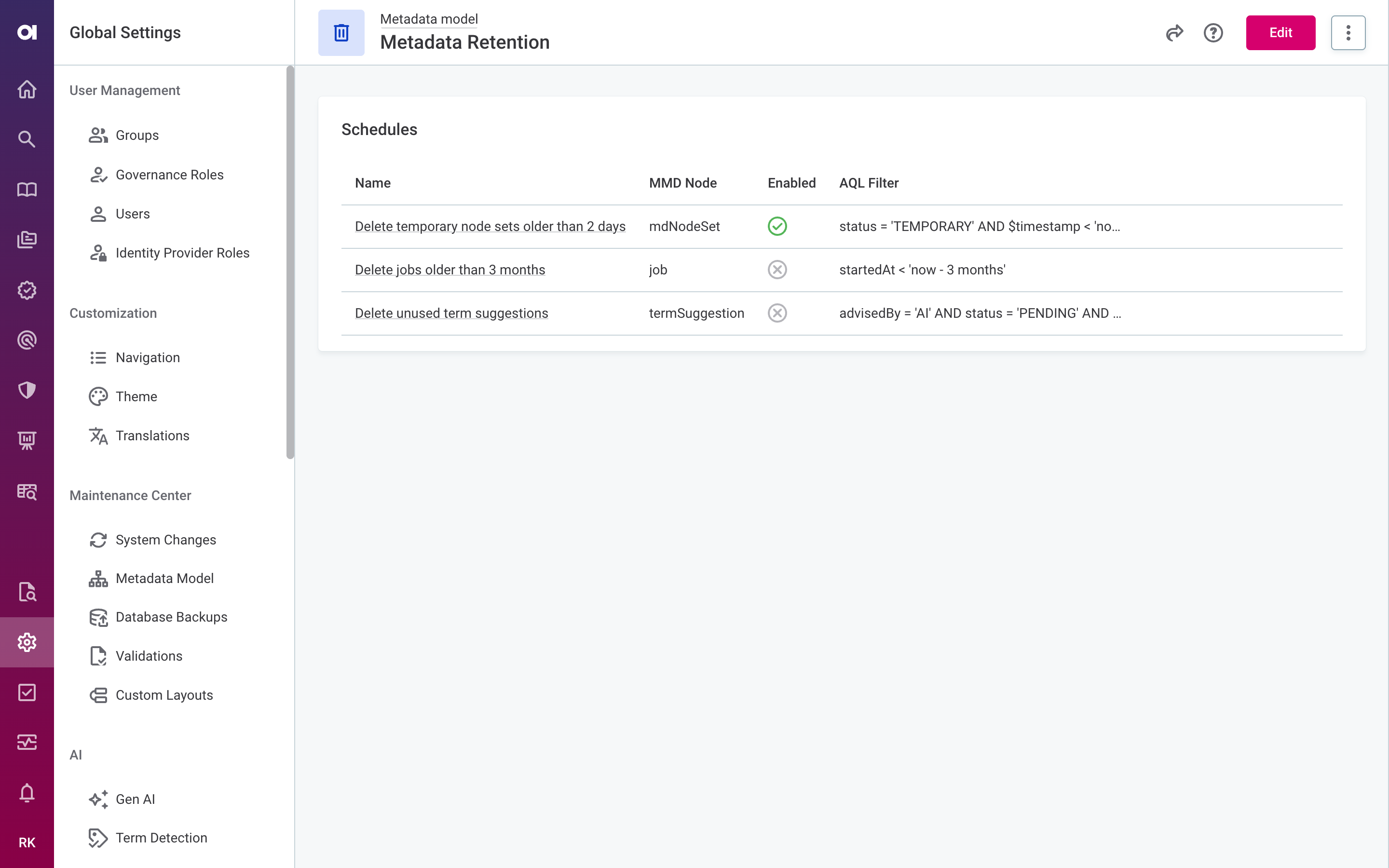
Configure retention policies to automatically and permanently remove old internal metadata, such as completed jobs, temporary node sets, and unused term suggestions, on a recurring schedule. This helps keep the database lean and prevents performance from degrading as metadata accumulates over time.
To view or change retention schedules, go to Global settings > Retention settings > Metadata retention.
For details, see Metadata Retention.
Property Descriptions in Metadata Edit Forms
You can now add descriptions to custom simple (scalar) properties in the metadata model. When a user creates or edits an instance of the entity, the description is shown as a tooltip on the information icon next to the field label, helping them understand what to enter.
Descriptions are plain text and can be translated like other customized sections of ONE.
For details, see Property descriptions.
SAP BW/4HANA and S/4HANA Connector via OData
Connect to SAP BW/4HANA and S/4HANA through OData to catalog, profile, and run data quality on SAP data.
Once the SAP OData service is activated in your SAP system, add a SAP OData connection in ONE and start governing and documenting your SAP entity sets. The connector supports username/password and OAuth authentication, as well as configurable paging and parallelism that you can tune per entity set for large or selective imports.
For details, see SAP OData Connection.
SAP Catalog Import via Silwood Safyr
Bring SAP metadata into ONE as lineage, and optionally as catalog items, using Silwood Safyr.
Safyr extracts metadata from enterprise applications such as SAP and exports it as JSON to an Amazon S3 bucket. ONE reads those exports on a schedule and converts them into lineage; the integration is read-only and never writes to your bucket. Each import processes the full snapshot and replaces the lineage from the previous run.
By default the import produces lineage only. To also govern, document, and run DQ evaluation on your SAP BW/4HANA and S/4HANA assets, map your source to a SAP Safyr connection during import. This way, catalog items are created from the same export, with no manual creation and no direct access to the SAP system required.
For details, see Safyr Lineage Scanner and SAP Safyr.
Rocket Software Lineage Integration
Extend lineage coverage to mainframe and legacy sources by scanning them through Rocket Software.
Rocket specializes in metadata and lineage for environments many tools can’t reach. Through this integration, Ataccama standalone lineage scanners pull that lineage into ONE, broadening end-to-end visibility into sources beyond those ONE scans natively.
Because Rocket Software runs on Windows and the Ataccama scanners run on Linux, an Ataccama Rocket gateway bridges the two, and the integration requires Windows with WSL and a Linux container manager.
For details, see Rocket Software Integration.
Cross-Account IAM Role Authentication for Amazon Athena
Amazon Athena connections now support IAM role authentication, allowing the Data Processing Engine (DPE) to assume a role in the target AWS account. This makes cross-account access to Athena straightforward, without the need for long-lived IAM access keys.
For configuration details, see Amazon Athena Connection.
MDM
MDM MCP Server
Connect AI agents such as Claude Code, Cursor, and OpenCode to MDM through the Model Context Protocol, so they can work with your master data using natural language.
In this iteration, agents can read metadata, records, and tasks: search for data across the instance and master layers, inspect entity structure, and analyze workflow tasks. The MCP operates in read-only mode, so agents currently can’t modify entities or create tasks and drafts.
Each agent operates as the authenticated user, with the same roles and permissions it has in the MDM web application, including column and row restrictions.
The server is embedded in the MDM Server and available across all deployment types (Ataccama Cloud, Custom Ataccama Cloud, and self-managed).
| The MDM MCP Server is an experimental feature. We recommend using it for research, development, and proof-of-concept workflows rather than production. |
For details, see MCP Server in MDM.
Instance and Master Reprocessing from a Selected Layer
Start a reprocessing job from a specific layer instead of always running from the beginning, which can significantly shorten job duration. Instance reprocess operations can now start from the CLEANSE, MATCH, AGGREGATE, or MERGE layer.
A new master reprocess operation is also available, defined per master layer (identified by master_id), supporting full and partial reprocessing from the MERGE or VALIDATE layer.
For configuration, see:
You can override the reprocess operation setting from the Admin Center, see Override reprocess settings on launch.
Preserve Manual Matches During Rematch
Choose what happens to manually created matches when you rematch data, so deliberate steward decisions aren’t lost on reprocessing.
When launching a full or partial instance reprocess, from the MDM Web Application or as a reprocess operation, you can pick one of three rematch strategies: no rematch, preserve manual matches, or remove manual matches. See Rematch operation.
For instance records, you can also override the rematch settings from the Admin Center, see Override reprocess settings on launch.
Create Matching Proposals on Record Change
Route potential match changes through steward review instead of applying them automatically when a record changes.
When an attribute change causes matching to detect a possible change in how a record should be grouped, MDM now creates a proposal for a steward to review, rather than rematching at the record level. The proposal is a MERGE type, capturing possible moves between groups.
To learn more whether the configuration works for your use case, see Create Proposal If Changed configuration.
For configuration details, see Configure proposal conditions.
Example Project Available on macOS
You can now set up and run the MDM example project on macOS using Docker containers. For instructions, see MDM Example Project on macOS.
Platform Changes
Java 25 Upgrade
ONE components are now shipped with and support Java 25 where applicable.
All servers running ONE components need to be upgraded to Java 25 when upgrading self-managed, on-premise deployments to version 17.1.0.
For the list of supported versions, see Supported Third-Party Components.
Salesforce CData JDBC Driver Upgrade
The Salesforce CData JDBC driver is now using v25.0.9434.0. From this version, Basic Authentication is obsolete and we recommend upgrading to a supported authentication scheme.
If you want to continue using username and password to connect, a configuration update is required.
For details, see Salesforce CData JDBC.
Fixes
For fixes delivered in patch releases, see 17.1.0 Patch Releases.
ONE
Click here to expand
- Rules
-
-
Reverting a rule to a previous version correctly restores its expressions.
-
Test Rule returns correct results for rules with multiple input attributes. Previously, input values could be mapped to the wrong attributes after adding, removing, or renaming the attribute.
-
Date parameters in parameterized rules display the value you entered when testing or applying the rule, instead of a date one day earlier.
-
Rule suggestions list only single-input rules, preventing the monitoring project errors that occurred when multi-attribute suggestions were accepted.
-
Rules with missing mappings between rule inputs and catalog item attributes can no longer be published, preventing
Missing input attributes forvalidation errors that were difficult to resolve in monitoring projects. -
Filtering by attributes and applied rules on the catalog item Data Quality tab returns all matching results.
-
Rule Debug displays generated inputs for
DateTimeattributes. -
When defining a rule condition, you can enter a value as an input.
-
Users with View metadata access level can use Test Rule on DQ rules again, without requiring Editing access level.
-
- Monitoring projects
-
-
When you update a single rule and republish its catalog item in a monitoring project, the View changes screen now lists only that rule, instead of showing all rules of the catalog item as changed.
-
On the monitoring project Report tab, switching from a processing that uses attribute filters to one that doesn’t clears any applied filters, so the report and charts display correctly.
-
All results are displayed in the monitoring project report for every filter combination, including projects with a very large number of filter combinations.
-
Specific notifications in monitoring projects are no longer sent when data quality evaluation does not complete. Previously, a "Project run failed" email was incorrectly sent to recipients.
-
The Filter Attributes and Rules search bar on the monitoring project Configuration & Results tab accepts special characters.
-
Selecting an unsupported component type in an Embedded component step produces a non-blocking validation warning instead of failing the plan. Previously, selecting a component that contained a format-changing step, such as a Group aggregator, could fail the transformation or remediation plan, an issue that surfaced after upgrading to version 17.0.0 due to stricter validation. Removing a column that is not present in the input is now ignored rather than failing the plan.
-
Data quality rules implemented as components now produce correct results in monitoring projects when the component plan in ONE Desktop includes a record-reordering step such as Sort, Unique, or an aggregation. Previously, such a rule could corrupt the results of the rules evaluated after it.
-
When a rule implementation changes after it has been published, the monitoring project Configuration tab flags the affected DQ check as outdated.
-
The monitoring project Export tab displays correctly for projects that use post-processing on a virtual catalog item, instead of the tab layout breaking.
-
On the monitoring project Report tab, the overall data quality of a custom report section counts only the dimensions that contribute to overall quality.
-
When importing monitoring project configuration with an applied data slice to another monitoring project, the data slice reference is no longer carried over if a different catalog item is selected. This prevents monitoring project run failures with the "Data slice was not found" reason.
-
Monitoring project notifications no longer display an incorrect dash before DQ result percentages.
-
Monitoring projects whose catalog item is based on a local file no longer fail validation when their post-processing plan uses Spark processing (for example, a
SparkWriterstep). Validation still correctly fails when the plan references a data source that does not exist, while other validation issues are reported in the logs without stopping the run.
-
- Transformation plans
-
-
Validating a transformation plan shows all error messages for invalid ONE expressions, instead of only the first one.
-
Transformation plan validation and DQ rule input mapping now accept implicit type widening (INTEGER→LONG, INTEGER→FLOAT, LONG→FLOAT, DATE→DATETIME), so valid widening assignments no longer fail with errors like
The type of the attribute 'X' must be LONG but is INTEGERafter upgrading. -
Transformation plans with a Database writer step let you select both the catalog and the schema when creating catalog items on Unity Catalog-enabled Databricks sources.
-
- DQ firewalls
-
-
DQ firewall configuration no longer displays names of rules that the current user does not have access to. Previously, rule names were visible and the configuration banner misleadingly reported them as outdated or damaged.
-
The Create DQ Firewall option is not available for monitoring projects that have never been published.
-
Users with View metadata access level can debug rules in a DQ firewall and view the DQ firewall Documentation tab.
-
Restoring a previous version of a DQ firewall from the History tab works as expected.
-
Calling a DQ firewall no longer fails with a SQL error when one of its rules has no parameter values.
-
The DQ firewall Documentation tab displays correctly even when attribute names, rule names, or parameter values contain special characters.
-
- Reconciliation projects
-
-
Reconciliation projects no longer fail to publish with a validation error after a referenced catalog item is re-profiled or its structure changes.
-
Catalog items that have been selected appear at the top of the catalog item list on the Select sources screen, making them easier to find in large sources.
-
Tabs for filtering catalog items on the Mapping screen are clearly indicated as clickable.
-
Long attribute names no longer cause layout issues on the reconciliation project Results tab.
-
- Anomaly detection
-
-
The anomaly detection state can no longer be edited from the detail page of a specific profiling run.
-
Anomalies filter on the Catalog Items screen returns correct results.
-
In Profile Inspector, the Display only anomalous items option now correctly filters the list to show only anomalous attributes.
-
- ONE Data
-
-
ONE Data tables open correctly without
TypeErrorerror notifications. -
When importing data to a ONE Data table from a catalog item, the selected stewardship is applied to the new table and permissions are no longer duplicated.
-
Cancelling an overwrite or upsert import to a ONE Data table no longer deletes the existing table. The cancelled import also preserves attribute definitions, the original column and row order, and the state of DQ checks (enabled or not).
-
- Lookups
-
-
Lookup-based detection rules are applied correctly during profiling, even when the rule expression uses a variable with the same name as a column in the profiled data.
-
Lookup item files are visible immediately after a review is approved, without requiring a page reload.
-
- Business glossary
-
-
Mandatory term properties of type
referenced object arrayandreferenced objectwith thevalueList:propertytrait now show the required field indicator (red asterisk) on term editing forms. Previously, the indicator was missing and the requirement was only surfaced as a validation error on publish. -
When you select Add Term in the attribute detail sidebar, the dropdown with terms no longer incorrectly shows suggested terms as already applied; selecting a suggested term adds it to the attribute.
-
Redrawing the relationship graph for a term no longer creates duplicate relationship type entries in Global Settings > Graph Visualization.
-
Deleting a catalog item or attribute no longer removes valid term suggestions on similar attributes by incorrectly treating the deletion as negative feedback for the AI model.
-
The Stewardship widget on glossary term pages now reliably loads all governance roles on first page load. Previously, the widget would show only basic stewardship information in certain cases until the page was refreshed.
-
Rich text values written to business terms via the ONE Metadata Writer step in ONE Desktop display correctly in the ONE web application.
-
You can find and mention terms in comments.
-
- Search & filtering
-
-
Filtering by keyword values works correctly when the search query contains uppercase words such as AND, OR, or NOT.
-
Catalog search ranks catalog items whose names contain underscores correctly even when the search query omits them (for example, searching
HR dept listmatchesHR_DEPT_LIST). -
Searching by an indexed property that was inherited from a parent entity returns results, and the matching value is highlighted. For example, after marking the abbreviation property as searchable, you can find terms by their abbreviation and see the match highlighted in the results.
-
Search index event processing no longer accumulates partly failed events, which could lead to stale or incomplete search results.
-
Reindexing no longer leaves some catalog items missing from search results.
-
When you set numeric range filters on the Catalog items screen to a range that returns no results, you can now clear that individual filter, instead of having to reset all filters at once.
-
When expanding nested search results (such as attributes under catalog items), only the newly loaded items show a loading spinner, instead of all listed items briefly flashing spinners.
-
Long term names no longer overflow in the global search left sidebar.
-
- Workflows & tasks
-
-
Moving tasks on the Tasks Overview screen works as expected without freezing or requiring a page refresh.
-
Individual review tasks are automatically cleared once their changes are resolved through a combined review request, instead of lingering as pending tasks with no changes to review.
-
The Tasks Overview and home pages load correctly for users who have both the admin role and a custom governance role assigned. Previously, the page failed to load with an error for these users.
-
- Sweep documentation flow
-
-
Sweep documentation flow no longer fails on Databricks data sources.
-
The Sweep documentation flow screen in Notification Center correctly states that items have been automatically deleted for scheduled runs, instead of manually deleted.
-
On the Sweep documentation flow Delete obsolete catalog objects screen, the Delete Selected option is inactive after a deletion, and it does not overlap the search bar when search returns no results.
-
When a scheduled sweep flow is started with missing or invalid configuration, an error notification with the specific reason is displayed, instead of failing silently.
-
Fixed an issue where scheduled Sweep documentation flow deleted obsolete catalog items only when an item had not been modified and had not been profiled within the threshold period. An item is now deleted when it has not been modified or has not been profiled within the threshold period.
-
- Data source connections
-
-
OneLake data source connections now support Azure AD Workload Identity authentication. See OneLake.
-
Amazon Redshift connections support using AWS assumed-role (IAM) authentication. See Amazon Redshift Connection.
-
Local filesystems now support mounting Parquet files.
-
To improve the protection of stored credentials, connection and secret management service addresses can no longer be changed after creation, and stored credentials can no longer be reused across connections. To point a connection to a different server, create a new connection instead. See Connection addresses can no longer be edited.
-
Adding credentials to a connection shows a clear error message instead of a blank page when the DPE is disconnected or the connection type is not enabled in the DPE.
-
Editing credentials from the connection screen shows all fields, such as username and password, on first open.
-
Username and password credentials migrated from 15.4.x can be edited in the web application.
-
Databricks Spark pushdown jobs now work correctly when ADLS credentials are stored in Azure Key Vault.
-
Metadata import from ADLS Gen2 connections no longer fails when the connection uses path conditions and ACL settings.
-
Testing a Secret Management Service connection correctly reports failure for invalid credentials.
-
- Catalog & data processing
-
-
Advanced encryption is now available for secrets passed from Data Processing Module to hybrid Data Processing Engine; standard encryption is considered obsolete. We recommend upgrading at your earliest convenience, see Advanced encryption between DPM and DPE.
-
Fixed an issue where jobs could intermittently get stuck in the DPM queue and never be submitted to DPE, with the
Detected old submitting jobmessage appearing in the DPM Admin Console. -
Job submission no longer fails with an "Engine not available" error when DPE is temporarily reconnecting.
-
Job submission no longer fails with
JobInvalidArgumentExceptionwhen a job with the same ID already exists on DPE. -
DPM no longer throws a
NullPointerExceptionwhile handling a job that could not be submitted, for example when a hybrid DPE disconnects. -
Improved hybrid DPE stability during high memory usage.
-
Fixed an issue where DPE could run out of memory and become unavailable with a
There is no available data processing engineerror after browsing several different sources. -
In Data Observability, DQ evaluation no longer fails with
DataSourceClientConfig not founderror when the source connection is correctly configured. -
DPE correctly creates the job folder when a custom
TEMP_ROOTis specified in the configuration, preventing temporary file errors during profiling. -
Profiling jobs with regex-based detection rules no longer get stuck on columns containing large text values. The maximum input length for regex evaluation can be limited using the
MAX_REGEX_INPUT_LENGTHDPE property. -
SAP metadata imports no longer fail with
Columns must have unique orderswhen source tables have attributes with duplicate order values. -
Snowflake
DECFLOATcolumns are now imported as a floating-point type instead ofLONG, so profiling works correctly. -
Profiling no longer fails on Trino columns of type
TIMESTAMP(6) WITH TIME ZONE. -
S3 sweep and profiling jobs no longer fail entirely when a password-protected file is encountered; such files are skipped and the rest of the job completes.
-
MMM jobs that never receive events from their DPM jobs fail with a clear timeout instead of remaining stuck in
RUNNINGindefinitely. -
DPE now creates temporary directories on Hadoop worker nodes with more restrictive permissions.
-
Large profiling plans are stored via object storage instead of the database, and job data is cleaned up after completion, reducing database load and storage usage.
-
Faster DPM resource allocation queries, reducing database load in high-throughput environments.
-
Monitoring projects on catalog items from a local file system with Spark post-processing plans no longer incorrectly fail model validation.
-
Fixed an issue where long-running JDBC operations could intermittently fail with a
NoClassDefFoundError, typically on Azure MS SQL connections using service principal authentication. -
DPM now removes long-disconnected engines and their job records from the database, preventing the DPM console from slowing down as the engine table grows.
-
Databricks jobs on shared clusters no longer fail with "Plan file not found" errors caused by concurrent sessions sharing the same workspace path.
-
Fixed an issue where DPE slots were incorrectly reported as fully utilized, causing queued jobs to stall indefinitely.
-
Set the default logging level for hybrid DPEs to
DEBUG. -
Fixed a memory leak during profiling jobs that could lead to
OutOfMemoryerrors on large environments.
-
- Pushdown processing
-
-
IOMETE pushdown processing now uses the ArrowFlight JDBC driver instead of the deprecated Hive JDBC driver.
-
IOMETE pushdown processing supports exporting invalid records, however, the Export tab in monitoring projects doesn’t link directly to the export table. Instead, it shows the table identifier. See View exported records.
-
Attributes no longer show unrelated DQ dimensions after pushdown DQ evaluation.
-
When editing rule configuration, conditions with functions or expressions not supported by Snowflake pushdown are correctly marked. Rules with such conditions are excluded from evaluation in Snowflake pushdown.
-
Parameterized rules using float comparisons can be applied to data sources with pushdown enabled.
-
Data quality results for catalog items evaluated with pushdown correctly include all result data: data slices, partitions, term aggregations, post-processing results, and export results.
-
When export from a pushdown data source is not supported, the warning message is displayed in a tooltip on the monitoring project Export tab. The Snowflake-specific message for BigQuery sources has been removed.
-
Pushdown invalid record export includes additional columns and record identifiers even when invalid samples are turned off.
-
When exporting invalid records using Databricks pushdown, the
RECORD_IDcolumn is now populated correctly regardless of how the primary key is named or structured. For Databricks, Snowflake, and BigQuery pushdown, a single-column primary key now populates theRECORD_IDcolumn with the value directly instead of a JSON object. -
Snowflake pushdown profiling no longer fails with a SQL compilation error when frequency analysis is turned off.
-
- Usability & display
-
-
On the Invalid Samples page, the catalog item name aligns correctly with the icon, even for catalog items with long names.
-
Source detail screen loads correctly when reopening a previously viewed source.
-
Job duration is displayed correctly in the web application, even for jobs running longer than 24 hours.
-
The source and location Overview tabs no longer display the Term occurrences section that showed internal IDs and produced an error when opened.
-
Editing a term or changing its stewardship no longer occasionally shows a
TypeErrorinstead of the expected notification. -
The web application no longer displays irrelevant errors as recurring popups (such as those from the analytics library).
-
Catalog item attribute Profile & DQ insights tab opens the first time, instead of showing a render error until you open the attribute in a new tab.
-
In the thumbnail view of report catalog items, items marked for deletion show a For delete label on the tile, instead of only after opening the item in the sidebar.
-
Date filter inputs no longer change the entered date to an incorrect value in the Ataccama Cloud Portal.
-
- Performance & stability
-
-
Faster loading of user and role selection dropdowns in project notifications, observability settings, and DQ firewall configuration, especially in environments with many users.
-
Catalog item Data Quality tab loads significantly faster, especially on catalog items with a large number of attributes.
-
DQ evaluation on Spark no longer fails while generating the invalid record samples for DQ results.
-
Fixed long-running database transactions caused by slow OpenSearch responses, which could block other operations.
-
Turned off resource-intensive PostgreSQL custom metrics that could significantly slow down database performance.
-
In Ataccama Cloud environments, the PostgreSQL monitoring exporter correctly loads custom metric queries from the configuration, ensuring all configured database metrics are collected as expected.
-
After a database cluster failover, new and updated term suggestions continue to appear in the application automatically. Previously, term suggestions would stop updating until the service was manually restarted.
-
Recent changes to catalog items, terms, and other assets are reliably reflected in search, instead of search results going stale when the indexing service stalled on startup in large environments.
-
The application no longer becomes intermittently unavailable when catalog search indexing puts the search engine under heavy write load. Calls to the search engine now time out and recover instead of blocking indefinitely.
-
AI Term Suggestions use database space more efficiently, preventing database CPU overload in large environments.
-
Fixed long-running database transactions during data observability runs that could slow down other operations.
-
Search index event processing no longer accumulates partly failed events, which could lead to stale or incomplete search results.
-
A change event that cannot be processed no longer blocks metadata updates across the platform. The affected event is skipped and logged so that subsequent changes continue to propagate.
-
Fixed 'user is null' messages flooding logs on some environments.
-
- Other fixes
-
-
The Add to Slack option shows a clear error when Slack is not configured at the server level, instead of incorrectly indicating success.
-
The Data slices dialog no longer appears during SQL catalog item creation, where it served no purpose and could prevent the catalog item from being created.
-
Validation component templates include
DQD_REC_IDon integration inputs, enabling DQ evaluation with complex component rule plans. -
Data quality results exported to Atlan are rounded correctly, matching the values shown in ONE.
-
Fixed an upgrade issue where certain roles could end up with duplicate access levels, preventing modifications.
-
In Ataccama Cloud environments, JAVA_OPTS are correctly configured for DPE when custom trust certificates are enabled.
-
In Ataccama Cloud environments, new users are correctly prompted to set a password on first access instead of being redirected to the standard login page.
-
Keycloak no longer fails to start after upgrading from version 25 to 26 in self-managed deployments. This was caused by a missing client scope during realm re-initialization.
-
The last system validation run is no longer part of the
/actuator/healthhealth check for Metadata Management Module. Previously, a canceled or failed validation run caused the whole health check status to be marked asDOWN.
-
- Security
-
-
Upgraded third-party dependencies across multiple services (including Task Service, Workflow Service, PostgreSQL exporter, term suggestions, AI matching, and anomaly detection) for enhanced security and stability.
-
MDM
Click here to expand
- Matching
-
-
The Identify MDM API now evaluates key rules across all relationship nodes in the request, instead of stopping at the first node and missing matches on subsequent ones.
-
Fixed incorrect matching results when using multiple matching rules with filters in a key rule.
-
Fixed incorrect merge proposal creation when Rematch If Changed is enabled and a previously merged master is re-evaluated.
-
Merge proposal resolution no longer fails with a "Draft doesn’t exist" error when previous drafts in the same task were discarded.
-
Data load no longer fails with
IllegalStateException: Queue fullduring party matching when a large number of matched pairs are produced.
-
- MDM Web App Admin Center
-
-
Usernames are correctly displayed instead of appearing hashed.
-
The task properties section is again visible on the task details screen.
-
The Last run column on the Load Operations tab correctly updates when load operations are executed via the Run MDM Multi Load workflow task. Average duration is skipped as load durations within a multi-load are not directly comparable.
-
Selecting Clone config repository after a failed configuration apply correctly resets the configuration status to Idle.
-
The "MDM not responding" error is cleared once API calls succeed again, instead of remaining visible while the server is running.
-
The legacy Admin Center now reflects the latest server startup time after a stop/start performed in the new Admin Center.
-
Fixed database connection leaks that could occur after cancelling tasks repeatedly.
-
Restored the Remove option for crashed streaming event handlers in the Event Publishing view, where it was previously missing.
-
Crashed streaming event handler publishing shows the publishing error in the publishers list, instead of failing with no visible message.
-
- Streaming event handler
-
-
MDM streaming event handler now publishes updates for every record change. Previously, only the first version of a record was written to the streaming output.
-
The streaming event handler correctly captures events only from configured entities, preventing out-of-memory (OOM) crash loops.
-
The MDM Server no longer runs out of memory when the streaming event handler encounters parallel write conflicts during large batch operations.
-
- Usability & display
-
-
Action buttons in the MDM Web Application column properties dialog are no longer partially cut off when scrolling on some browsers.
-
Added confirmation popups after Delete task and Reassign task operations, and improved the notification messages shown after Resolve and discard and Resolve and publish actions.
-
When using the COMBO lookup type, it is now easier to distinguish between active and inactive lookup values in the MDM Web Application
-
Faster loading of large entity details in the MDM Web Application, reducing the likelihood of gateway timeouts when opening records with very large numbers of related rows.
-
When searching for records with empty values via the REST API, the filter is no longer ignored.
-
- Performance & stability
-
-
Snowflake JDBC connections in MDM Server no longer fail with a driver initialization error.
-
Kafka stream consumers no longer fail with
Kafka stream source is not producing values of type stringwhen receiving null (tombstone) messages. -
MDM stream consumers no longer occasionally fail on startup with an "Authorizator is null" error due to a security initialization race condition.
-
Fixed intermittent
Duplicate ID encounteredfailures during parallel batch processing when two transactions write to the same instance record and one of them also inserts a child record linked to the parent viaCopyColumns. This is more likely with multiple parent-child relationships referencing the same entity. -
MDM Server correctly logs online (SOAP/HTTP) service calls through the
service-loglogger when HTTP logging is enabled. -
MDM Server stops during startup when the license check fails, instead of continuing initialization.
-
MDM
runtime.propertiesfiles are loaded correctly on the first MDM Server startup in Ataccama Cloud environments. -
MDM health checks now reflect Keycloak availability in the readiness probe, making authentication-provider issues easier to detect.
-
- Other fixes
-
-
Added Google Cloud Storage (GCS) as a supported data source for MDM Server, enabled through additional drivers.
-
Added MDM persistence and NME configuration parameters as Prometheus metrics for monitoring.
-
Master records are no longer incorrectly marked as inactive after running a migration load.
-
MDM cleansing tasks no longer hang indefinitely under rare race conditions during plan reloads, which previously left tasks stuck and required a restart to recover.
-
The MDM REST API now returns preloaded related entities consistently across both instance endpoint styles (
/instance/party/{id}and/instance/party?id=). -
Restored the default value of
nme.vldb.commitSizeto10000, re-enabling intermediate commits during the MDM committing phase. Previously, the default of-1ran the entire phase as a single transaction.
-
RDM
Click here to expand
-
Publishing changes from the web application now correctly generates
MODIFY_TABLES_CONFIRM_ROWSaudit events. Previously, the confirm/publish step was missing from audit logs, creating a gap in the data modification audit trail. -
Editing rows in Views with Edit Rows Filters configured no longer fails for users without full permissions.
-
The REST API now formats float values of 0 as
0.0000000000, instead of returning them as0E-10. -
In Ataccama Cloud environments, RDM Server connects to the database as expected when using shared or dedicated Aurora databases.
ONE Runtime Server
Click here to expand
-
You can now configure the server to use uppercase driver names instead of lowercase in Ataccama Cloud environments. See JDBC driver name casing.
-
Removed an incorrect
ssh://prefix from theGIT_CLIENT_URLfield, which was preventing SSH connections to repositories in Ataccama Cloud environments. -
In Ataccama Cloud environments, the Sendmail step in workflows works correctly after upgrading to v17.
-
Kafka online services no longer fail with
ByteArrayDeserializer is not an instance of Deserializererror caused by duplicate Kafka JARs on the classpath. -
Added a configurable data source availability check interval so metered or serverless sources are not kept alive when idle.
ONE Desktop
Click here to expand
-
ONE Metadata Writer step now supports longer SQL queries.
-
ONE Metadata Writer step works as expected for term groups.
-
SAP RFC connections now support UTCLONG data type.
-
Fixed intermittent
ConcurrentModificationExceptionfailures in JDBC Reader and SQL Execute steps, sometimes surfacing as "Cannot connect to the database" errors despite the database being healthy. The issue was caused by a race condition when multiple jobs ran concurrently. -
On Windows, the step help documentation opened directly from the step can be used while viewing the step details at the same time.
-
HTTP calls using the Json Call step no longer fail intermittently with
Auth scheme may not be nullwhen the target server returns a temporary 401 response. -
Connections using Service Principal in Key Vault credentials (such as Snowflake and Azure MSSQL) no longer fail after testing a SAP RFC connection in the same session.
-
Snowflake JDBC connections using OAuth no longer fail intermittently with
Missing user namewhen a plan contains many parallel readers or writers. OAuth access tokens are now cached globally to avoid excessive token requests. -
A
NullPointerExceptionno longer appears when right-clicking a database connection while it is still connecting. -
Copying a DQ project between two ONE Desktop instances on Windows no longer incorrectly triggers a name conflict prompt.
-
ONE Desktop can again connect to and browse Amazon Redshift sources.
-
Faster project saves in ONE Desktop when the Git Staging view is open, especially for large Git-connected projects.
Was this page useful?