
May 2026
This release brings pushdown processing, AI-assisted alert assessment, and streamlined connection management — more capability with less setup.
It also introduces a new self-managed deployment option for edge processing, along with support for customer-managed encryption keys — giving you more control over where your sensitive data lives and how it’s processed.
Self-managed edge deployment
Run edge processing entirely on infrastructure you own and operate. You manage the deployment lifecycle end-to-end; Ataccama provides the software, Terraform artifacts, and upgrade packages.
Self-managed deployment is the right fit when you need:
-
Full operational control over every component touching your data.
-
Stricter compliance with internal policies for cloud infrastructure provisioning and change management.
-
Custom integration with your existing IaC, secrets management, or observability stack.
The Ataccama-managed AWS deployment remains available for teams who prefer Ataccama to provision and operate the edge compute for them.
For deployment instructions, see Deploy a Self-Managed Edge. For an overview of both options, see Edge Processing.
What stays the same
Regardless of deployment option, edge architecture keeps your data in your environment:
-
Sensitive data and processing results stay in storage you own.
-
All cross-account traffic is outbound from your AWS account.
-
Ataccama staff have no direct access to your edge environment.
What you’ll own with self-managed
Compared to the managed option, self-managed deployments add a few responsibilities on your side:
-
Running Terraform to provision edge AWS resources.
-
Configuring a Terraform backend and managing IAM permissions for the deployment principal.
-
Downloading and applying upgrade packages within the 90-day support window.
For the full breakdown, see Shared Responsibility Model.
AWS Secrets Manager integration for edge
Pull database passwords, API keys, and other credentials directly from AWS Secrets Manager when configuring edge data sources, keeping credential management in your existing AWS infrastructure. Supports both same-account and cross-account setups.
Set up an IAM role that grants the edge read access to your secrets, then add a key vault connection in ONE pointing at that role. From there, reference secrets by name when configuring source credentials.
For details, see Set Up AWS Secrets Manager Access for Edge Processing.
Encrypt your data with your own KMS keys
Bring Your Own Key (BYOK) lets you encrypt your Ataccama ONE environment’s data at rest using AWS KMS keys you create and control in your own AWS account. Key material never leaves your account, and every KMS operation is logged in your own CloudTrail for full auditability.
BYOK protects both data stores that hold your environment data:
-
Amazon S3 buckets, using SSE-KMS with your S3 key.
-
Amazon Aurora database storage, including all automated snapshots.
Each environment gets its own dedicated pair of keys, providing cryptographic isolation between environments.
Configure BYOK in the Create SaaS environment wizard in Ataccama Cloud Portal — a CloudFormation template sets up both keys for you.
For details, see Bring Your Own Key (BYOK).
AI assessment for alerts
You can now generate an AI assessment directly on any alert to quickly understand what happened, what’s affected, and what it means for your data.
For details, see Investigate Alerts.
Run profiling and DQ evaluation natively on Databricks
Profile data and evaluate DQ rules directly on your Databricks cluster — your data never leaves the source.
Instead of moving data into Ataccama ONE, the platform generates SQL that runs inside Databricks using its compute. Only results (and invalid samples, if configured) come back.
What you get:
-
Speed: Evaluate millions of records in seconds using your existing cluster.
-
Security: Data stays in your governed environment, no external transfer.
-
Simpler infrastructure: No separate processing servers to provision or maintain.
What to know before you turn it on:
-
Profiling runs in pushdown by default. No setup required.
-
DQ evaluation is opt-in and needs an operational database: a schema in Databricks where ONE stores data your rules need to reference. Cleaned up automatically after 30 days of inactivity.
-
Private Databricks? Route through Edge. If your instance isn’t reachable from the Ataccama cloud, which is common in regulated environments, execution can go through the Ataccama-managed AWS Edge.
-
Not every rule expression is supported. Most Condition Builder, parametric, and Advanced Expression rules work in pushdown, but some functions don’t translate to Databricks SQL. See When to Use Pushdown for DQ Evaluation.
For setup details, see Databricks Connection.
One connection for data processing and lineage scanning
Configure each data source once and reuse it everywhere. Scan plans now inherit connection details from the same connection you set up for data processing, instead of requiring connection parameters declared separately in the scan plan.
The result:
-
Simplified scan plan configuration.
-
Single location for providing and editing connection details across the platform.
-
Centralized credentials management.
For details, see Built-In Lineage Scanner.
Assign reference data table roles to groups
You can now grant reference data table roles to user groups, not just individual users. When a group holds a role, every current and future member inherits the role’s permissions — useful for teams that need the same level of access on a table.
The Request review form now also includes a Reviewer field that lists users and groups with the Approver or Owner role on the table. The first eligible candidate is preselected — change it to route the review to a specific person or team.
For details, see Assign roles to groups and Publish changes.
Data quality for published and in-review reference data
You can now view data quality results and run evaluations on Published and In review reference data datasets, not just Draft.
For In review datasets, the results reflect the future state of the published dataset — the data quality it will have once the in-review changes are applied.
For details, see Monitor Data Quality of Reference Data.
Pick values from the source reference data table
Pick values directly from the full source table when editing connected attributes, with filtering to navigate large datasets. Now available in the record detail and bulk edit dialogs, in addition to the data grid.
For details, see Select from the source table.
Filter reference data records by data quality
Filter the records in a reference data table by their data quality validation status to focus on the records that need attention.
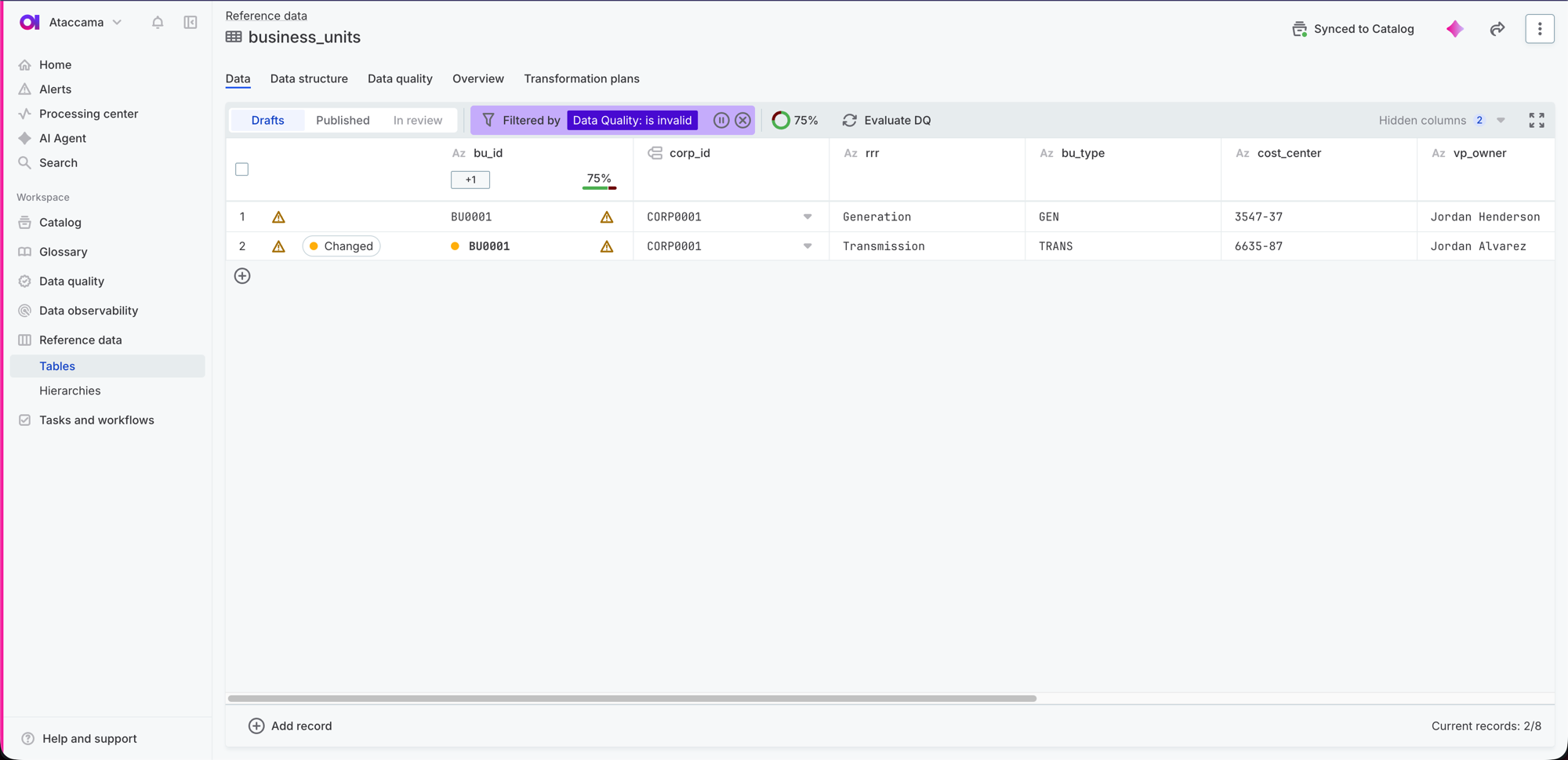
When you filter a table, you can now show only:
-
Valid records that passed all data quality rules.
-
Invalid records where one or more rules failed.
The filter uses the results of the most recent data quality evaluation.
For details, see Filter records.
Was this page useful?