
June 2026
This release introduces data products — a new way to package data and its context into trusted, reusable assets — along with criticality, so you can focus governance where it matters most.
Govern data as products
Define what your data means, the standards it should meet, and who owns it once — then apply that definition across catalog items that implement your data product.
Governance lives on the data product, so it covers every connected catalog item, allowing you to govern the whole picture, not asset by asset.
Data products work together with domains, business processes, and data elements:
-
Data products — Bundle data with its standards, ownership, and context into a trusted, ready-to-use asset. You can choose a recommended catalog item to point consumers to the canonical source.
-
Domains — Group related data products into data areas like Customer or Risk, nested to mirror your business.
-
Business processes — Capture the activities that produce or consume data; can be nested like domains.
-
Data elements — Act as the data product’s contract, declaring what should be there independent of the physical table.
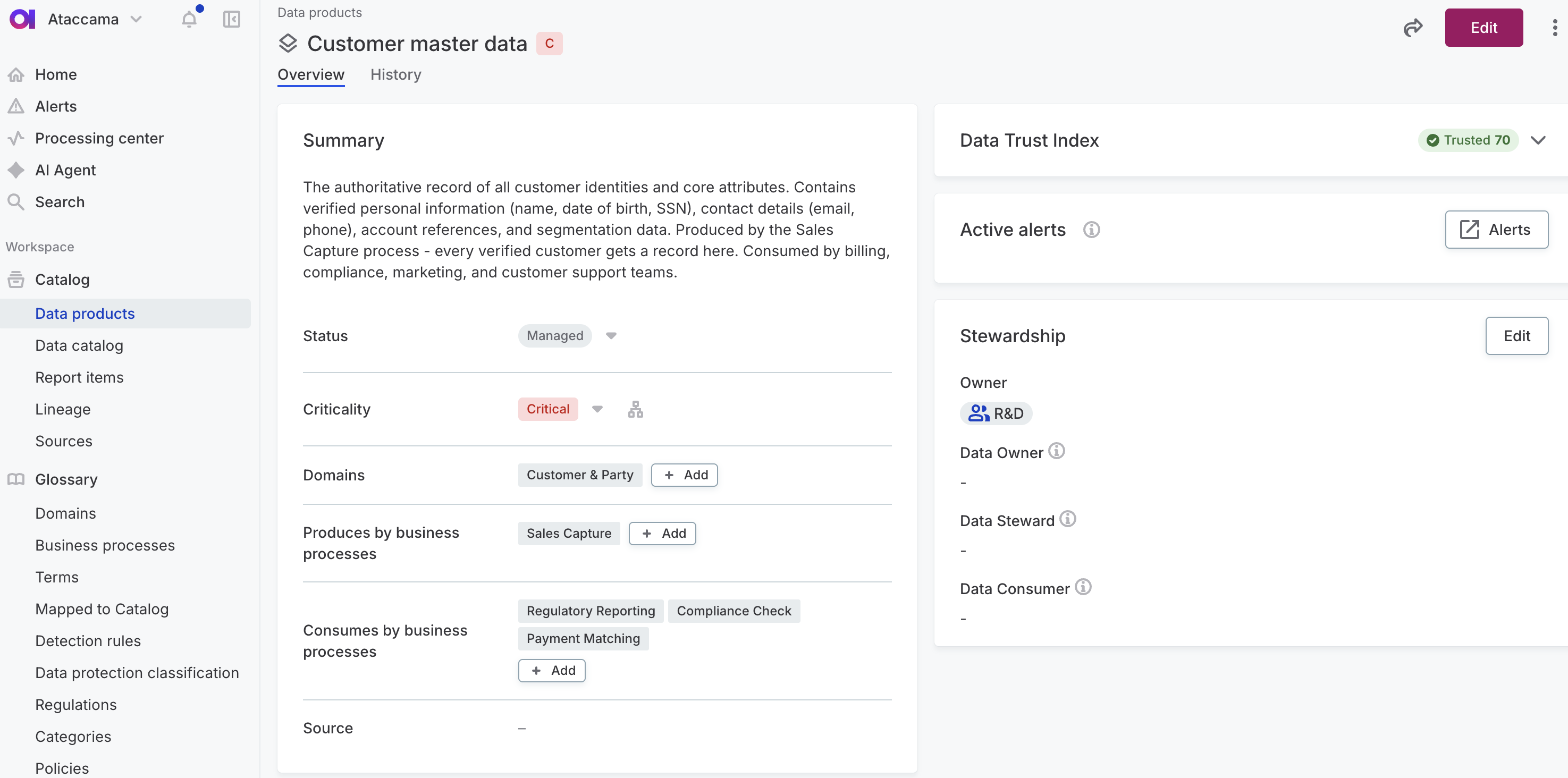
For details, see Data Products and Create Data Products, Domains, and Business Processes.
Prioritize governance with criticality
Not all data deserves equal attention. Flag your critical data elements (CDEs) so the data that drives revenue, compliance, or safety gets governed first.
Mark one asset at the top of the tree and criticality flows down:
-
From a critical business process to its data elements and the terms behind them.
-
From each term to every attribute, catalog item, and data product that uses it.
A single decision covers a term, its attributes, the catalog items that hold them, and the data product that declares them — without flagging each asset by hand.
Criticality gives you:
-
Focused governance: Apply stewardship, DQ monitoring, and lineage validation to what matters first.
-
Coverage reporting: Filter by criticality to find critical assets missing a data steward or DQ check.
-
Faster compliance response: Surface every critical asset tied to a process, term, or domain as a query, not a project.
For details, see Define Critical Data Elements.
Prepare data with transformation rules
Use a preparation set to apply transformation rules to a catalog item, preview the result, and publish a standardized output — without writing a transformation plan.
A preparation set is a named, reusable configuration of rules applied directly to a source catalog item. You can:
-
Add rules from the rule library and reorder them to control the transformation sequence.
-
Preview the combined output of all rules, or step through each rule individually to see exactly what it contributes.
-
Select which columns to include before publishing — the platform creates a new transformation catalog item from the result.
You can create multiple preparation sets on a single catalog item to produce different standardized outputs for different consumers.
For details, see Prepare Data with Transformation Rules.
Score only the attributes a rule targets
When a DQ rule uses multiple attributes, you can now control which of them the result is reported on. Set an attribute to Hidden and it’s still used in the rule logic, but the result is reported on Scored attributes only.
You can set this on the rule itself, or later on the rule instance when applying the rule — so the same rule can be scored differently depending on context.
| Hidden attributes still participate in rule evaluation and can affect the result. They just aren’t the ones the result is reported on. |
For details, see Scored and hidden attributes.
Escalate alerts to ServiceNow
Connect Ataccama ONE to ServiceNow to turn data quality and observability alerts into tickets in the workflows your teams already use.
Escalate an alert manually to create a single ticket, or set up escalation policies to create tickets automatically whenever alerts match your criteria, such as by severity, finding type, or affected assets.
For details, see Connect to ServiceNow and Escalate Alerts.
Was this page useful?