
Data Transformations
Data transformations let you clean, combine, and reshape your data using a visual, low-code interface.
Ataccama ONE provides several types of transformation plans to fit different use cases—from scheduled batch processing to always-current data views, all built using the same drag-and-drop visual canvas.
Why transforming your data matters
Raw data rarely arrives in the format you need. Data transformations help you bridge the gap between what you have and what your business processes require—whether that’s feeding analytics, syncing systems, or enforcing data standards.
Common transformation scenarios include:
- Data preparation
-
Modify and combine source datasets, parse selected attributes, and apply filters before using them in ONE or downstream systems.
- Data standardization
-
Unify structure, format, and terminology across datasets to ensure consistency in reporting and cross-system integrations.
- Data enrichment
-
Add value by combining data with external sources or reference data lookups.
How transformations work
You build transformations on a visual canvas by connecting steps into a data pipeline.
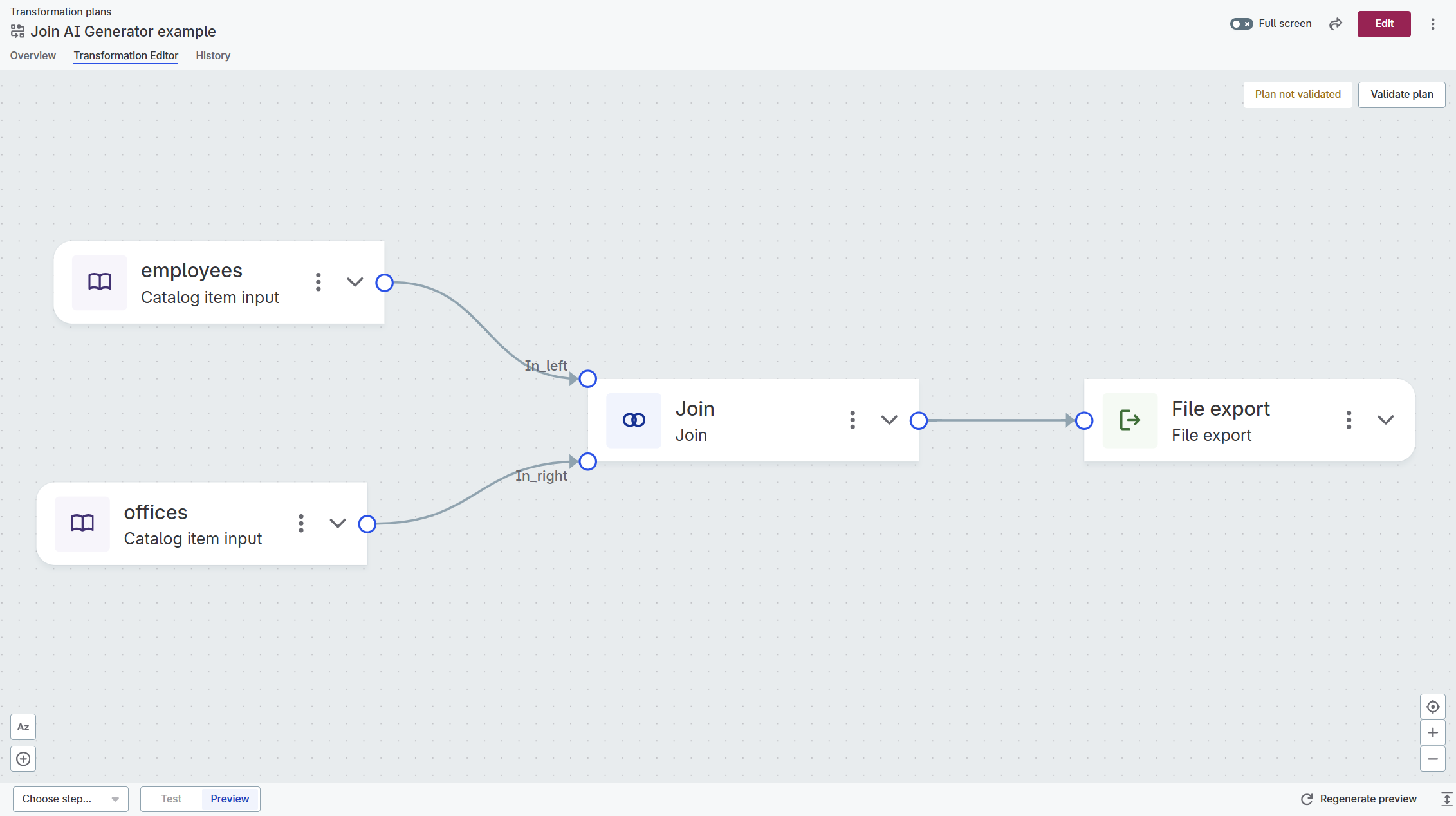
Every transformation follows the same pattern:
-
Input: Bring data in from catalog items or define inputs for embedded logic.
-
Transform: Apply steps like filter, join, add attributes, or embed reusable plans.
-
Output: Write results to a database, file storage, reference data table, or pass them to a parent plan.
For a full list of available steps, see Data Transformation Steps Reference.
Transformation plan types
ONE offers four plan types, each serving a different purpose:
| Type | Use when |
|---|---|
Standalone plan |
You need to run or schedule batch processing—migrations, nightly aggregations, exports. |
Embedded plan |
You want reusable logic (like address formatting) shared across multiple plans. |
Transformation catalog item |
You need an always-current view that computes results on access, not on a schedule. |
Transformation rule |
You want to enforce organization-wide standards (like email formatting) on catalog items. |
For detailed comparison and examples, see Transformation Plan Types.
Get started
Where you start depends on what you’re trying to achieve:
| I need to | Start here |
|---|---|
Process data on a recurring schedule (nightly loads, weekly exports) |
Create a standalone plan and set up a schedule. |
Combine or filter data for analysis without storing copies |
Create a transformation catalog item from your source catalog item. |
Apply the same formatting or cleansing logic across multiple datasets |
Build an embedded plan or transformation rule once, reuse everywhere. |
Explore what’s possible |
Follow Create Your First Data Transformation to build a simple standalone plan and see the canvas in action. |
Once you’re on the canvas, the workflow is the same: add an input, connect transformation steps, define your output, preview, validate, and publish.
AI-powered capabilities
If Gen AI features are enabled, you can use AI assistance throughout the transformation workflow:
-
Plan summary: Generate a readable summary of what a transformation plan does from the plan Overview tab.
-
Test data generation: Automatically generate sample input data when testing transformation steps or expressions.
-
Rule generation: Create transformation rules from natural language descriptions using AI-assisted creation.
-
Pattern parsing: Let AI analyze your example values and automatically identify segments and suggest parsing patterns in the Pattern Parser Step.
Learn more
-
All available steps—inputs, outputs, joins, filters, aggregations, and more: Data Transformation Steps Reference
-
Detailed comparison of standalone plans, embedded plans, TCIs, and transformation rules: Transformation Plan Types
-
Set up recurring execution with simple schedules or cron expressions: Schedule Transformation Plans
-
Enforce organization-wide standards by creating reusable rules for transformation catalog items: Transformation Rules
-
Test expressions used in transformation steps: Test Expressions
-
Test transformation steps with sample input data: Test Transformation Steps
Was this page useful?