
AI Agent
The Ataccama ONE AI Agent is a general-purpose tool for automating the most repetitive parts of data management.
For detailed use case walkthroughs and example prompts organized by workflow, see AI Agent Handbook.
Before you start
Take a moment to get familiar with the recommended practices for using Generative AI capabilities of ONE, described in Gen AI Best Practices. This will help you use Generative AI more effectively.
Using the AI Agent requires specific identity provider roles. See Reserved identity provider roles.
How the AI Agent works
| The AI model is not trained using your data or metadata. |
When you give the AI Agent a goal, it builds a plan and works through it step by step, calling the tools it needs and re-evaluating as it goes. If a step doesn’t produce what it expected, it adjusts the plan rather than failing outright. Replanning is what lets the AI Agent handle tasks that span several areas of the platform, such as investigating a data quality issue, or creating rules and assigning them across a table.
The AI Agent works from skills: focused packages of instructions for a specific kind of task, such as creating data quality rules, each carrying the tools that task needs. While planning, the AI Agent sees only the name and description of each available skill. It loads a skill’s full instructions and tools only after selecting it for the job. Loading only what it needs keeps the AI Agent focused on the task at hand, which improves the accuracy of the plans it builds and the tools it chooses.
Underneath, the AI Agent is built on a graph-based agentic framework designed for long-running, auditable work in enterprise environments. In practice, this means you can follow every decision it made and every action it took, and you keep the final say over what it changes. See Review and approve changes.
The AI Agent handles both quick questions, like a typical AI assistant, and complex multi-step work across Ataccama ONE. It can plan and carry out tasks, search and read metadata, modify content, explore and analyze your data, and answer questions about the platform from the documentation.
AI Agent capabilities
The AI Agent uses the following tools to form plans that can execute complex work:
|
Complex requests can take longer than simple queries. For example, bulk creation of data quality rules could take three minutes and more to fully run. Be clear about your question and expectations. |
Search and discovery
-
Catalog search: Searches catalog items by keywords. Returns references, attribute or row counts, and match reasons with pagination.
-
Business terms search: Searches the business glossary by keywords. Returns term references with pagination.
-
Rule search: Finds data quality (DQ) rules using combined keyword and semantic matching on name, description, and keywords.
-
Reference data table search: Finds reference data tables by name substring. Returns table references with a pagination cursor.
-
Search transformation plans: Finds transformation plans by name, type, or last run state. Returns references with pagination.
-
Search transformation rules: Finds transformation rules by name. Returns references with pagination.
-
Attribute search: Finds attributes across the catalog by keyword, without needing to know which catalog item they belong to.
-
Search by business term: Finds catalog items and attributes that have a given glossary term assigned.
-
Search by owner: Filters catalog items by the user group that owns them.
-
Fit-for-purpose search: Finds the highest-quality data available for a stated purpose, combining relevance with data quality scores.
-
User groups list: Lists user groups with optional name filter and pagination. Useful for finding candidate steward groups.
-
Documentation search: Answers natural-language questions against Ataccama ONE documentation. Returns a response and source references.
Catalog inspection
-
Catalog detail: Retrieves comprehensive catalog item details including terms, relationships, DQ monitors, assigned rules, and ancestor hierarchy.
-
Catalog item attributes: Lists a catalog item’s attributes (columns) along with any assigned terms and rules. Paginated.
-
Data Trust Index: Fetches the Data Trust Index score (0-100) for a catalog item with a brief summary.
-
DQ job results: Returns DQ job runs with pass or fail counts and overall score for a catalog item’s DQ monitor. Supports pagination.
-
Data protection classifications: Returns the data protection classifications applied to a catalog item and its attributes.
-
Upstream sources: Traces where the data in a catalog item comes from.
Glossary terms
-
Create term: Creates a new business term from a name and description.
-
Compare terms: Explains the difference between two glossary terms.
Reference data table management
-
Create table: Creates a new empty reference data table in draft.
-
Create attribute: Adds a new column to a reference data table in draft. Requires applying schema changes afterward.
-
Remove attribute: Deletes a column from a reference data table in draft (blocked if referenced). Requires applying changes afterward.
-
Rename table: Renames a reference data table.
-
Rename attribute: Renames a column in a reference data table draft. Requires applying changes afterward.
-
Set table description: Sets or updates the description of a reference data table.
-
Generate table description: Generates a description for a reference data table based on its schema and sample data.
-
Change attribute data type: Changes a column’s data type in draft. Requires applying changes afterward.
-
Suggest data types: Suggests attribute data types and detects format patterns for a reference data table.
-
Connect attribute: Creates a foreign-key reference from one reference data table attribute to another table’s attribute (types must match). Requires applying changes afterward.
-
Apply metadata changes: Publishes all pending draft schema changes for a reference data table.
-
Fetch table attributes: Returns the schema (attributes, types) for a reference data table, including any reference attributes.
Reference data records
-
Create or update records: Creates or updates records in a reference data table draft from provided objects. Supports record IDs for updates.
-
Edit records: Executes a single-column SQL UPDATE against a reference data table draft. Returns the number of affected rows.
-
Delete records: Deletes records from a reference data table draft using a detailed filter. Deletions can be undone by discarding the draft.
-
Discard record changes: Discards draft record changes and restores last-published values matching a filter.
-
Sample data: Returns up to 50 sample rows from a reference data table with optional filtering and sorting.
-
Auto-import: Imports reference data from a catalog item into a reference data table via an auto-plan. Runs asynchronously and requires approval.
Profiling and DQ evaluation
-
Create DQ rule: Creates a new DQ evaluation rule from a name, business description, inputs, and optional dimension. Aggregation and parameterized rules are not supported.
-
Delete DQ rule: Deletes a DQ rule that is no longer needed.
-
Assign rule to catalog item: Assigns a DQ rule to catalog item attributes, validating intent, input mapping, and data types.
-
Assign rule to reference data table: Assigns a DQ rule to one or more reference data table attributes. Supports multi-input and parameterized rules.
-
Run profiling: Starts a profiling job on a catalog item and reports the results when it finishes.
-
Run DQ evaluation: Starts a DQ evaluation job on a catalog item and reports the results when it finishes.
-
Profile anomalies: Retrieves profiling anomalies and basic profiling information for a catalog item or run.
-
Profile statistics: Fetches attribute-level profiling stats including distribution, masks, and patterns.
-
Rule coverage: Reports how many DQ rules exist, which quality dimensions they cover, and which catalog items have no rules assigned.
Governance and metadata enrichment
-
Assign stewardship: Assigns stewardship of a catalog item or rule to a user group.
-
Assign term to attribute: Links a glossary term to a catalog item attribute. Creates a draft term-attribute link.
-
Assign term to catalog item: Links a glossary term to a catalog item. Creates a draft term-catalog item link.
-
Suggest critical data elements: Proposes which attributes of a catalog item should be flagged as critical data elements, each with a category and rationale.
-
Edit description: Edits the description of a catalog item, term, or rule.
-
Generate description: Generates or improves a description for catalog items, attributes, rules, or terms.
-
Rename entity: Renames a catalog item, term, or rule.
Transformation plans and rules
-
Manage plan or rule lifecycle: Publishes, discards, deletes, or confirms deletion for transformation plans and rules (not DQ rules).
-
Run transformation plan: Starts an immediate one-time run of a published standalone transformation plan.
-
Configure plan schedule: Creates or modifies a recurring cron schedule for a standalone transformation plan.
-
Control plan schedule: Deletes, pauses, or resumes a plan’s existing schedule.
-
Generate transformation rule: Generates a new transformation rule from a natural-language prompt using AI. Returns a draft.
-
Create transformation catalog item: Applies a transformation rule to a catalog item to produce a transformation catalog item.
-
Describe plan or rule: Generates an AI summary of a transformation plan or rule.
SQL queries and catalog items
-
Create SQL catalog item: Creates a new SQL catalog item from a base catalog item and an SQL query, with name and description.
-
SQL query: Executes an SQL query on a catalog item to retrieve data (SQL-compatible items only).
-
Data sample: Retrieves a small random data sample for each attribute to understand structure.
Limitations of the AI Agent
The AI Agent chains together the tools listed in AI Agent capabilities, so the range of tasks it can take on is wide. While we can’t list every possible use case, we actively test and support the ones in the AI Agent Handbook. Results for use cases outside that set can’t be guaranteed.
The AI Agent currently cannot:
-
Generate complete transformation plans end-to-end.
-
Read all metadata from catalog items.
-
Edit all fields within catalog items.
How to use the AI Agent
Open the AI Agent chat window at any time from the left navigation menu.
Additionally, the AI Agent is available throughout the platform, for example in the Catalog or Glossary. When accessed from these locations, the AI Agent can provide context-aware assistance relevant to the assets.
| To open the AI Agent from these locations, select the diamond icon in the upper-right corner. |

AI Agent interface
When you open the AI Agent, a chat window appears with a field where you describe your task.
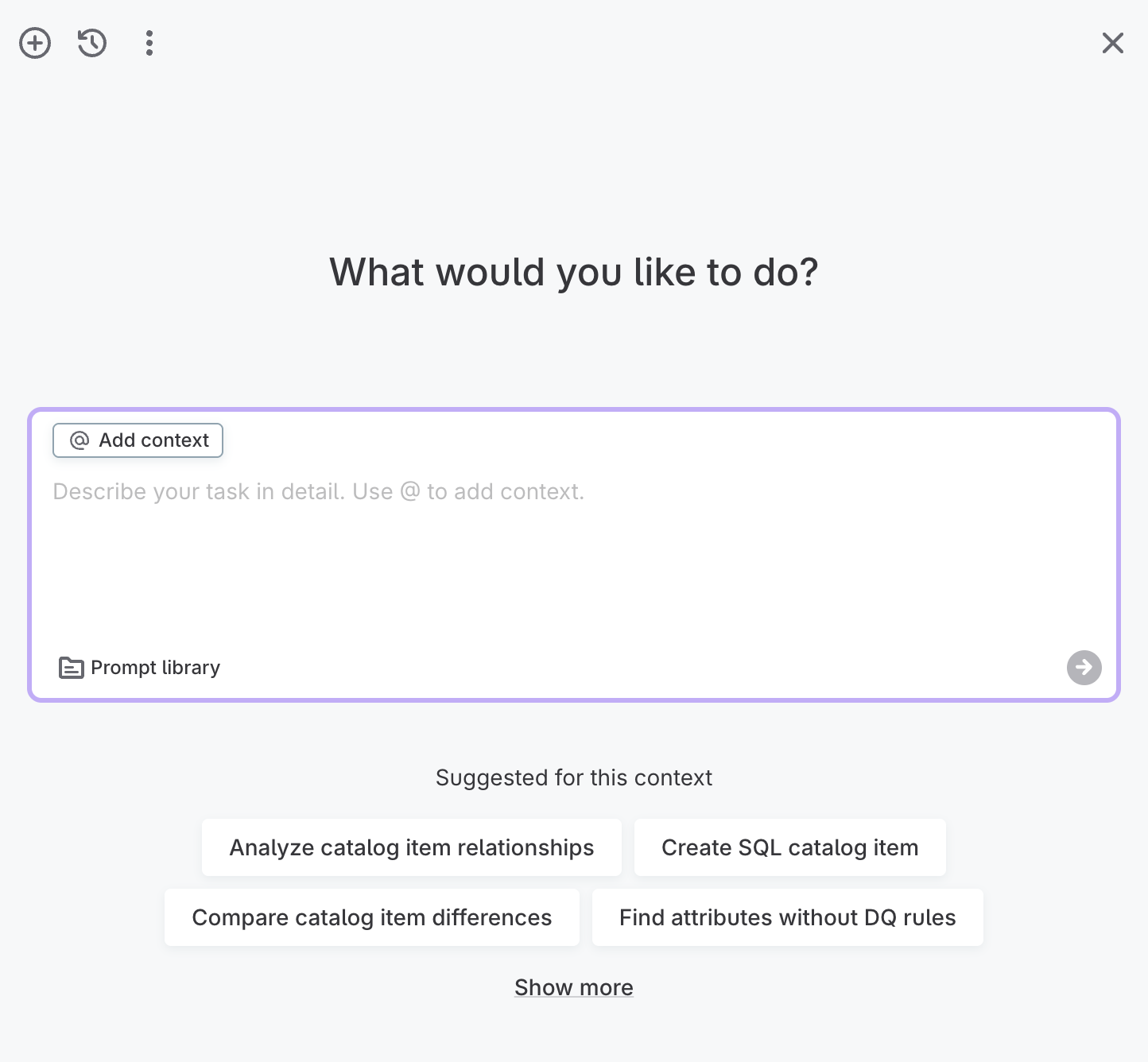
The interface includes the following elements.
Toolbar
-
New chat (plus icon): Open a new chat.
-
Chat history (clock icon): Access previous chats.
-
More options (three dots): Access Prompt library or Settings.
-
Close (X icon): Close the AI Agent window.
Query field
-
Add context: Select to add context using the
@symbol to reference specific entities and data assets. -
Prompt library: Access a library of pre-built prompts to help you get started, as well as your own saved prompts.
-
Send (arrow icon): Submit your query.
Suggested prompts
Under the query field, the AI Agent suggests prompts you can select instead of typing your own. What it suggests depends on where you opened it from.
Opened from an asset such as a catalog item, the suggestions apply to that asset and the heading names it. You might be offered prompts such as applying a DQ rule, or finding attributes with no rules assigned.
Opened from the home screen, the heading reads Suggested prompts and the suggestions are general, such as searching for terms or importing reference data.
If there are more suggestions than fit, select Show more.
Start a new chat
To start a new chat, select the new chat icon. Write a query in natural language and press Enter or select the arrow.
You can also choose from the prompt library or select one of the suggested prompts.
In the following example, we ask the AI Agent to find attributes of a specific catalog item, and let it suggest rules for it.
Find attributes of @DQ_CI_DIMENSIONS_FACTS with no rules applied, and suggest appropriate rules for them.
| Use @ to select entities and data assets when writing queries. |
I have identified that all attributes of the catalog item
DQ_CI_DIMENSIONS_FACTS do not have any rules assigned to them. Based on their data types, I have suggested appropriate rules for each attribute:
STRING Attributes: For attributes like REPORT_ID, PROCESSING_ID, CONFIGURATION_ID, CONFIGURATION_NAME, CATALOG_ITEM_ID, CATALOG_ITEM_NAME, DIMENSION_ID, and DIMENSION_NAME, I suggest a rule to check that the value is not empty.
DATETIME Attributes: For attributes like PROCESSING_STARTED_AT and PROCESSING_FINISHED_AT, I suggest a rule to check that the value is a valid date format.
LONG Attributes: For attributes like FAILED_COUNT, PASSED_COUNT, and TOTAL_COUNT, I suggest a rule to check that the value is non-negative.
Add context to a query
Context tells the AI Agent exactly which assets you mean, instead of leaving it to guess from a name.
Type @ in the query field, or select Add context, then choose the entity or data asset you want.
The asset appears as a chip in the query field and stays available for your follow-up questions, so you don’t have to name it again each time.
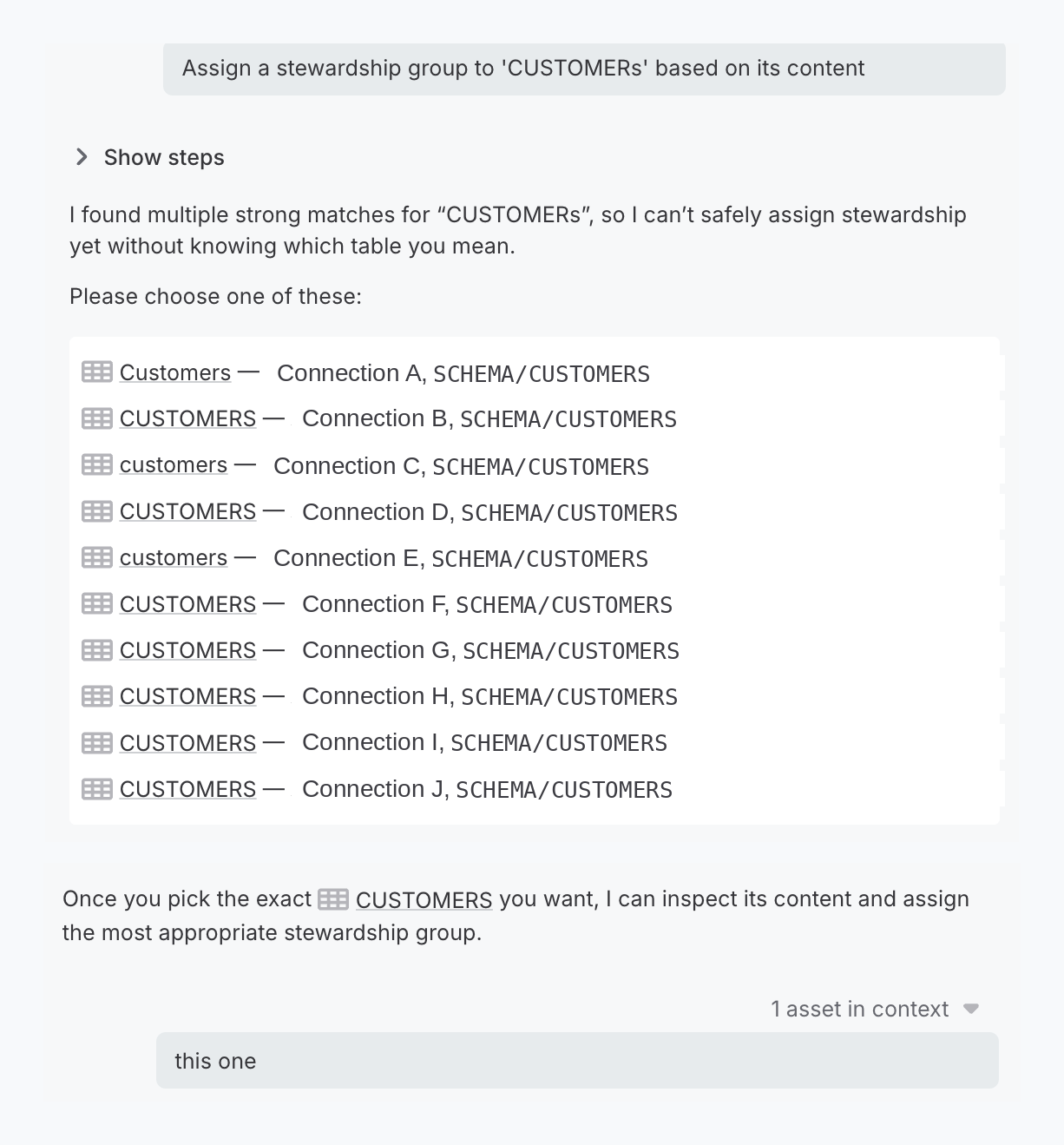
Choose between assets with the same name
If the name you use matches several catalog items, the AI Agent stops rather than guessing. It lists the matching items with the connection and schema each one belongs to, so you can tell them apart, and asks you to pick the one you meant.
Selecting an item from the list adds it to context.
You still need to send a message to continue, because the AI Agent can’t accept an empty one, so a short reply such as this one is enough.
Review and approve changes
The AI Agent shows you its reasoning as it works, asks before it applies changes, and lets you undo anything you’re not happy with. You always have the final say over what reaches your data and metadata.
Follow what the AI Agent is doing
Select Show steps to expand the AI Agent’s decision and action tree.
The tree isn’t a static log. You can open any step to see what the AI Agent decided at that point and which tool it called, and you can work through the steps independently of each other, in any order. Working through the tree is how you check the AI Agent’s reasoning on a long task without waiting for it to finish.
Select Hide steps to collapse the tree again.
Approve changes before they run
Some actions pause and ask for your approval before they run. Nothing that modifies your data or metadata is applied until you approve it.
When the AI Agent needs your approval, a Confirmation required panel appears describing what it is about to do. Select Confirm to let it go ahead, or Reject to stop it. To see exactly what the action involves before you decide, select Show details.
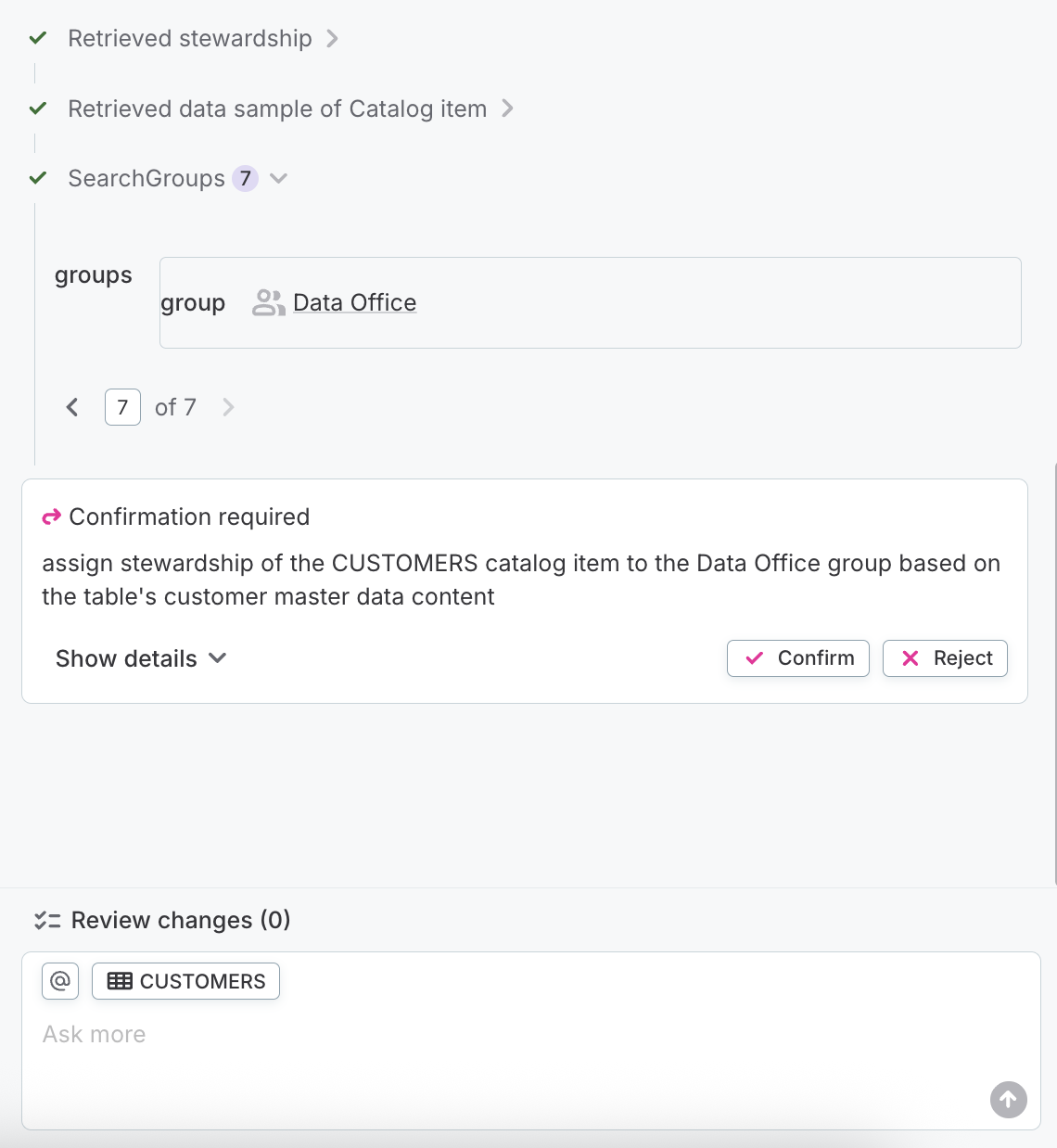
For a task that spans several steps, the AI Agent works through the sequence and stops at each action that needs approval, so you can let the safe steps run and take a closer look at the ones that change something.
Undo changes
When the AI Agent has made changes during a conversation, Review changes lists everything it did.
Use Review changes to check the AI Agent’s work after the fact, and to revert individual changes you don’t want to keep.
Rate a response
Hover over a response to show the rating icons, then select thumbs up or thumbs down to tell us whether it was useful. You can add a comment along with your rating.
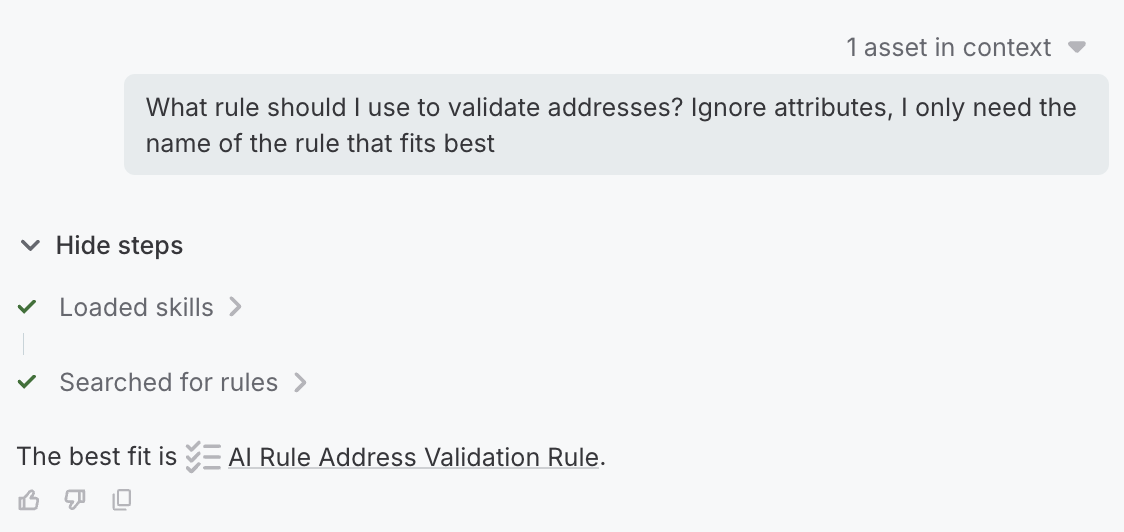
Ratings go to our product development team and help us decide what to improve. Only your rating and any comment you add are sent: the conversation itself is not included.
Was this page useful?