
Evaluate Data Against Catalog Items
Use catalog items as reference data during DQ evaluation. This allows you to identify invalid values by comparing your data against trusted values in the catalog item you selected as reference.
A common use case is validating that codes and identifiers match those in your reference tables, such as country codes, product SKUs, or department IDs.
Choose the catalog item
You can use two types of catalog items as reference data:
-
Any catalog item from your data catalog.
-
Catalog items managed through Reference Data.
| We recommend managing your reference data in Reference Data, which provides specialized tools for maintaining and synchronizing it with upstream systems. |
Use catalog item in a rule
To use the catalog item in a rule:
-
Go to the rule Implementation tab.
-
In the rule logic, select the appropriate condition based on your catalog item type:
-
is (not) from Catalog item- to use any catalog item -
is (not) from Reference Data Catalog item- to use a catalog item from Reference Data.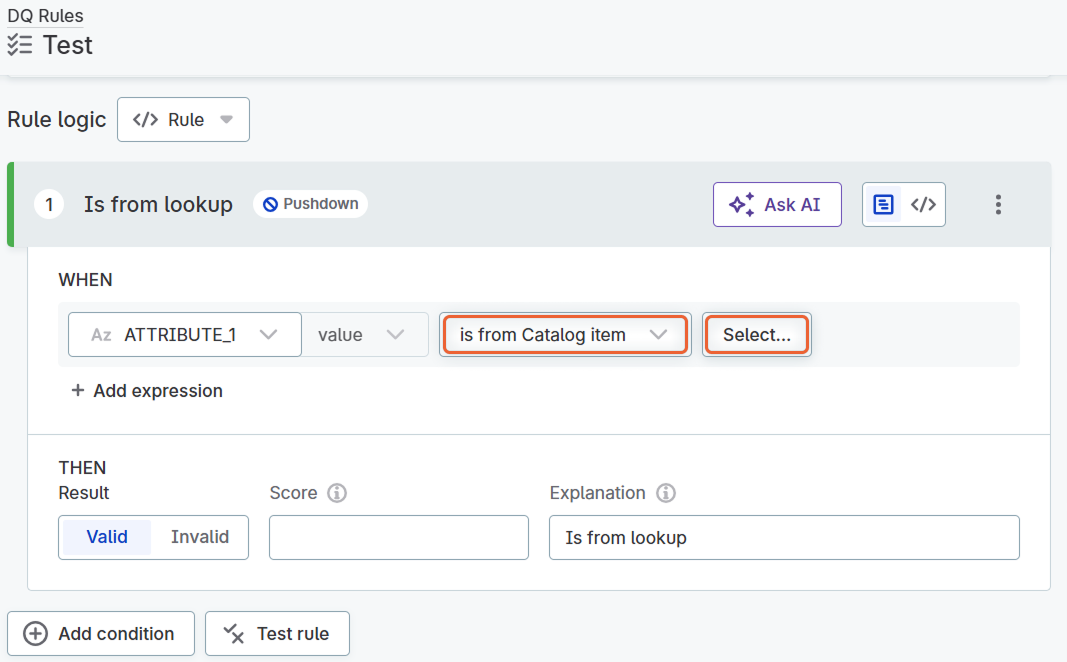
-
-
Click Select and choose the catalog item and attribute that contains the reference values.
-
Select Settings and configure the reference data:
-
Data updates: Choose how often the reference data is updated:
-
SCHEDULED: Schedule regular updates for the data. Select Add scheduled event and fill in the scheduler.
-
NEVER: Data is not updated.
-
-
(Optional) Configure the Advanced settings:
-
Duplicates handling: Select one of the following options:
-
First: Allows only the first copy of a duplicated record.
-
Omit: Deletes all duplicates.
-
Accept: All duplicates are accepted and there is no limit to the number of repeated values.
-
-
Matching values: Select options as needed.
-
Do remove accents: Remove all diacritic marks (accents).
-
Do remove repeated characters: Remove repeated characters.
-
Do squeeze whitespaces: Replace repeated white space characters with a single space character.
-
Do upper case: Convert all words to upper case.
-
-
Supported characters: Define the supported characters using the regular expression syntax, for example,
[:letter:] [:number:].If defined, characters not contained in this set are removed or substituted. By default, all characters are supported (
[:all:]). -
Substitute with: Define a string to substitute any unsupported characters, if you have defined specific supported characters in Supported Characters.
-
-
-
Select Confirm.
-
Publish the changes.
Was this page useful?