
Reference Data Management
Turn reference data into a trusted, governed asset that drives business value immediately. Whether you’re evaluating reference data management solutions or ready to implement, this guide shows you how to establish a single source of truth for your organization’s reference data.
Understanding RDM
Reference data management (RDM) is the process of governing the standardized values — country codes, currency types, product categories — that your organization uses to classify information. Think of RDM as the dictionary for your data. It ensures that when one system says "USA" and another says "US," they both mean the same thing.
Why reference data management matters
Inconsistent reference data quietly erodes data quality. When codes and classifications are scattered, you get the following issues:
-
The same customer appearing differently across systems
-
Product codes that don’t match between departments
-
Regulatory reports that fail validation
-
Multiple versions across systems with unclear ownership
-
Manual processes that don’t scale
Centralizing these values in Ataccama ONE establishes a single source of truth, boosts data quality, and simplifies compliance.
How it works in Ataccama ONE
Reference data in ONE bridges technical governance and business usage through three principles:
-
Centralized governance: Data owners manage values with version history and approvals.
-
Platform integration: Published tables appear in the Catalog for data quality rules and transformations.
-
Flexible access: Role-based permissions let you control who can view, edit, approve, or manage reference data.
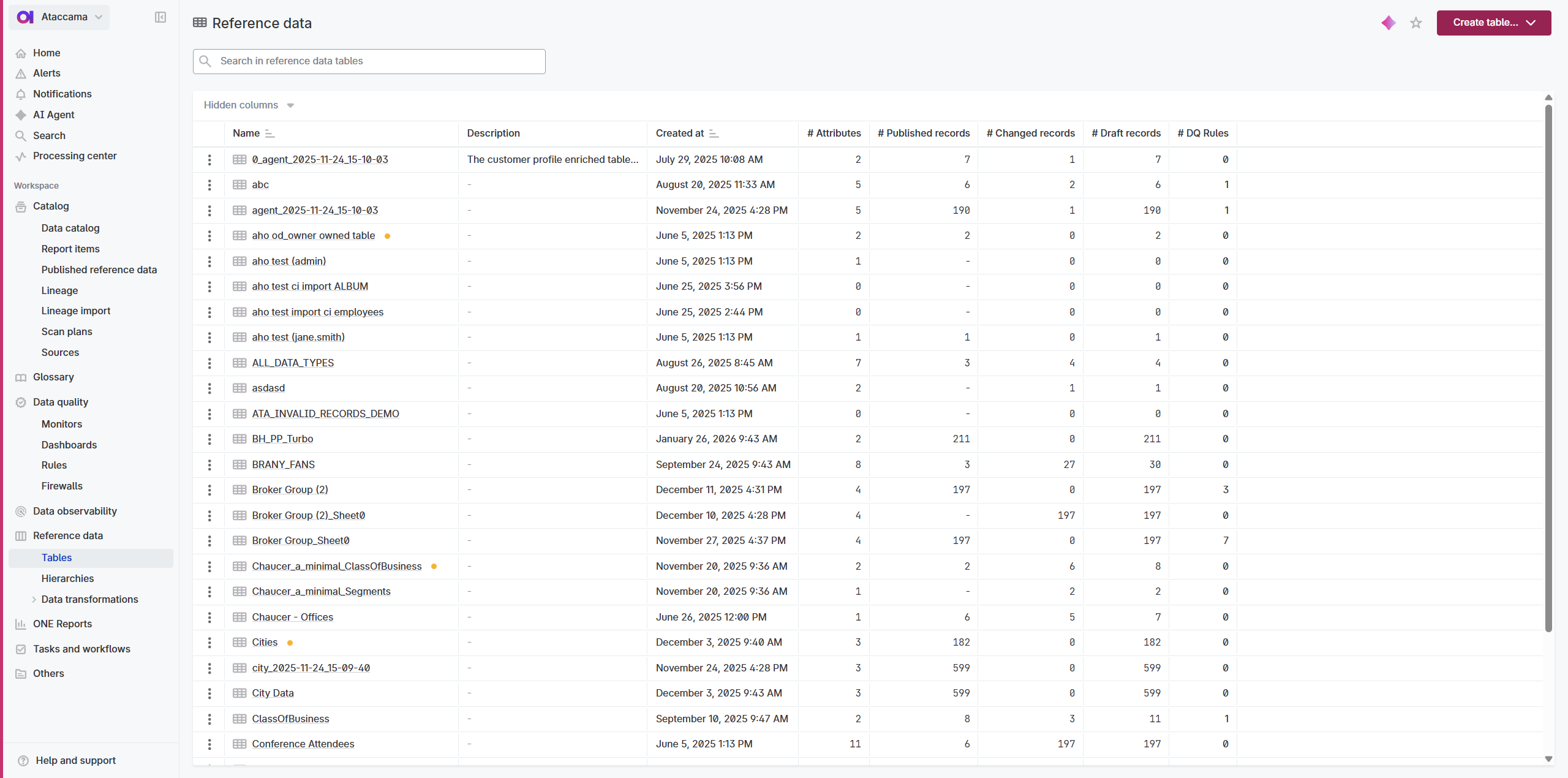
|
Access the module via Reference data > Tables. |
Get started
Follow these five quick steps to turn static lists into governed assets:
-
Onboard your data: Import CSV/Excel, load from Catalog, or use transformation plans to connect external sources.
-
Establish ownership: Assign Viewers, Editors, Approvers, and Owners so every change is intentional and every user gets the right level of access.
-
Work with records: Add, edit, and delete records as your data evolves.
-
Validate and publish: Run quality checks, then publish to the Catalog to make the data official.
-
Use and automate: Apply Data Quality rules, serve via Catalog, or export downstream.
Learn more
- Explore scenarios
-
Get inspired by real-world use cases and implementation patterns: Common Use Cases
- Advanced topics
-
-
Structure complex data: Create Hierarchies • Connect Tables
-
Monitor quality: Monitor Reference Data Quality
-
Handle advanced scenarios: Remove Duplicates • Export to Databases
-
Automate workflows: Use the API
-
- Best practices and troubleshooting
-
-
Patterns for scaling across your organization: Best Practices
-
Resolve common issues: Troubleshooting
-
Was this page useful?