
Bring Your Own Key (BYOK)
With Bring Your Own Key (BYOK), you encrypt your Ataccama ONE environment’s data at rest using AWS Key Management Service (KMS) keys in your own AWS account. Ataccama accesses those keys through cross-account permissions you explicitly grant — the key material itself never leaves your account.
This article covers what BYOK protects and how the cross-account access works. For details about how to set BYOK during environment creation, see Set Up Bring Your Own Key (BYOK).
What BYOK protects
BYOK encrypts the two data stores that hold your environment’s data at rest:
-
Amazon S3: Default bucket encryption is SSE-KMS using your S3 KMS key.
S3 uses envelope encryption where data keys are generated by KMS and protected by your key. The key must be symmetric and in the same Region as the bucket.
-
Amazon Aurora (PostgreSQL): Cluster storage encryption with
KmsKeyIdset to your Aurora KMS key ARN.On cluster creation, Aurora validates access to your key and creates a grant it uses for the lifetime of the cluster. All automated snapshots use the same key as the cluster.
Each environment gets its own pair of dedicated keys: one for S3, one for Aurora. Both must live in your AWS account and in the same Region as your Ataccama environment.
Keys are never shared across environments — this provides isolation between Ataccama-hosted environments at the cryptographic boundary.
Architecture
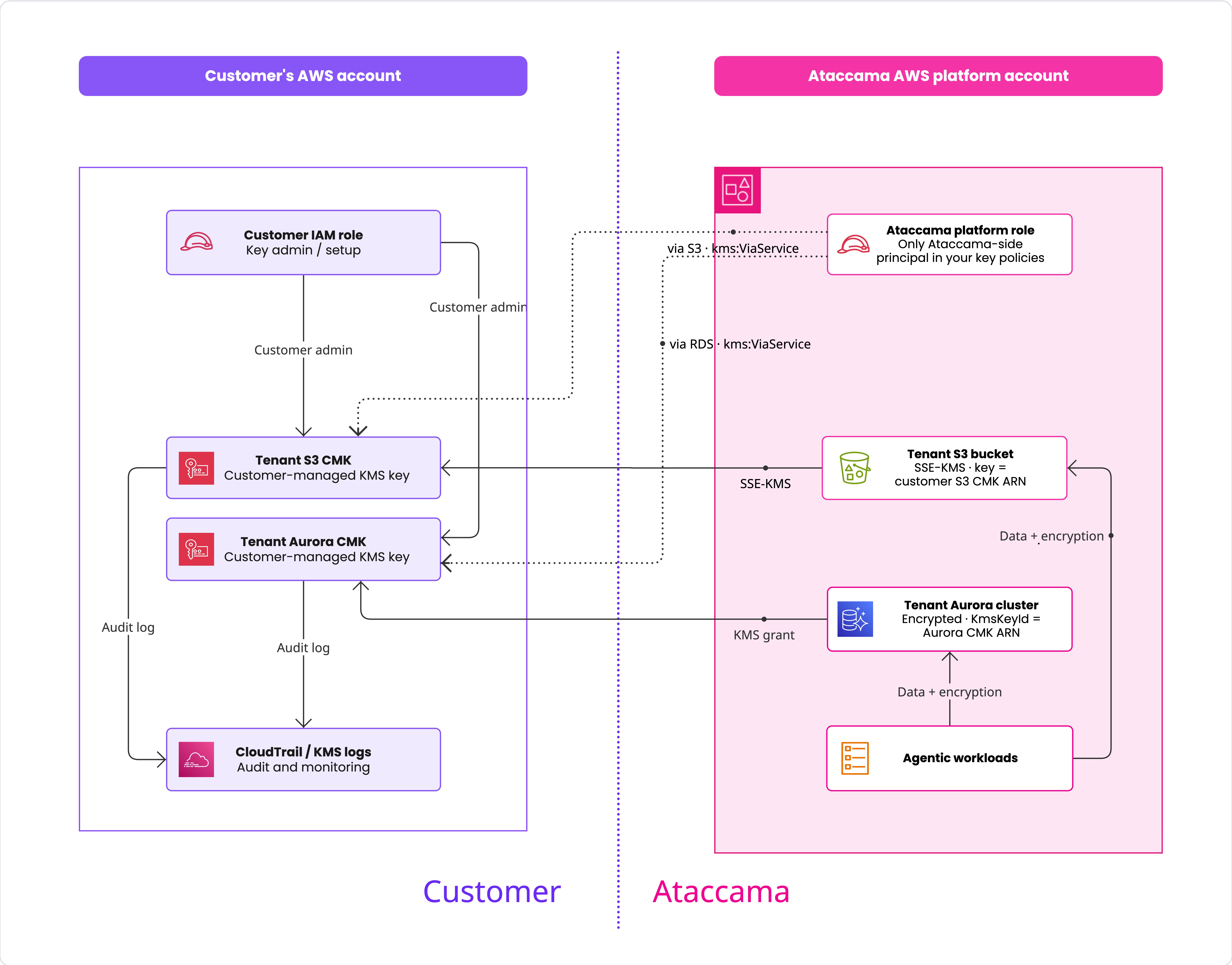
Ataccama operates the platform from a dedicated AWS account (the Ataccama platform account). The trust boundary sits at the key: you own and control it, and Ataccama holds the encrypted data. Cross-account access uses a single role in that account, scoped by KMS conditions.
BYOK is built on two core principles:
Customer key ownership: Your customer-managed key stays in your own AWS account. Ataccama never handles, stores, or copies the key material — all cryptographic operations are performed by AWS services.
Native AWS encryption at rest: Encryption uses standard AWS service integrations (S3 SSE-KMS and Aurora storage encryption) rather than proprietary key infrastructure. This keeps the trust boundary simple and auditable.
Access control model
Cross-account use of a KMS key requires two layers working together:
-
KMS key policy in your account (as the key owner): Explicitly allows the Ataccama platform role.
-
IAM identity policy in the Ataccama account: Grants Ataccama the permissions needed to call the KMS APIs.
Both are required for any cryptographic operation to succeed. The key policy statements provided when setting up BYOK implement the customer-side layer.
In addition to the key policy, the Ataccama platform role’s IAM policy requires your key to carry a byok = true tag (aws:ResourceTag/byok condition).
Access is granted only when the key policy and the tag both allow it, so a missing tag denies access even with a correct key policy.
Metadata that must match
Three pieces of metadata are enforced when the platform accesses your keys. If any of them doesn’t match, access is denied.
| Metadata | Must equal | Enforced by | Why |
|---|---|---|---|
|
|
IAM policy ( |
The platform role can use the key only when it is tagged |
Region ( |
The environment’s Region |
Key policy + IAM policy ( |
Access is allowed only via S3/RDS in that Region. If the Region is wrong, access is denied. |
Platform role ARN ( |
The role ARN for the selected environment |
Key policy |
The only Ataccama principal granted access; its account is also pinned. If the ARN is wrong, access is denied. |
S3 key access pattern
The S3 key policy grants the Ataccama platform role the permissions that S3 needs to encrypt and decrypt objects on your bucket, but only when both of the following conditions hold:
-
The KMS call is made through the S3 service (
kms:ViaService = s3.<region>.amazonaws.com). -
The calling principal belongs to the Ataccama platform AWS account (
aws:PrincipalAccount).
The combined effect:
-
The platform can use your S3 key only when S3 itself is performing encryption or decryption on its behalf.
-
Direct KMS API calls from any Ataccama principal are denied.
-
Even if the platform role’s identity is assumed from outside the Ataccama platform account, the policy still denies access.
Aurora key access pattern
The Aurora key policy grants the same Ataccama platform role two specific capabilities:
-
Describe the key to validate the key when creating the encrypted Aurora cluster.
-
Manage RDS grants (
CreateGrant,ListGrants,RevokeGrant) so RDS can use the key for ongoing encryption operations.
These permissions are restricted by:
-
kms:ViaService = rds.<region>.amazonaws.com: Calls must be made through the RDS service. -
aws:PrincipalAccount: Calls must originate from the Ataccama platform AWS account. -
kms:GrantIsForAWSResource = true(on grant-management actions only): Grants on your key can only be issued to AWS services, not to arbitrary principals.
Auditing key usage
All KMS API calls made against your keys are recorded in AWS CloudTrail in your own AWS account, since the keys live there. You can audit the operations the platform performs on your behalf directly from your own CloudTrail without any access from Ataccama.
The records include:
-
Bulk encrypt and decrypt operations tied to S3 object I/O.
-
Grant creation and grant usage tied to Aurora provisioning and operations.
-
Administrative changes to the key policy or key state.
Ataccama doesn’t provide access to its own platform-account CloudTrail — your CloudTrail captures every call against your keys regardless of which account initiated them.
Shared responsibilities for BYOK
BYOK operates on a shared responsibility model: you own and control the key, and Ataccama integrates the platform with that key through native AWS services.
Ataccama responsibilities
-
Publishing the onboarding values (Ataccama platform role ARN and AWS Region) required to construct your key policies.
-
Providing a CloudFormation template and ready-to-paste key policy statements in Cloud Portal.
-
Configuring all in-scope environment data stores (S3, Aurora, and their snapshots) to use the customer-provided KMS key ARNs.
-
Enforcing least privilege on the Ataccama side: the Ataccama platform role is the only Ataccama-side principal authorized in your key policies, and it can only invoke KMS through the S3 and RDS services as scoped by the
kms:ViaServiceandaws:PrincipalAccountconditions. -
Operating the platform in the Region you’ve been onboarded to. Ataccama doesn’t move encrypted data to a different Region without your consent.
| Ataccama staff have no access to your KMS keys or to the underlying key material. All KMS operations are performed by AWS services. |
Your responsibilities
-
Creating both KMS keys in your own AWS account, in the Region published by Ataccama, using either the CloudFormation template or the manual steps in Set Up Bring Your Own Key (BYOK).
-
Applying the key policies exactly as provided by Ataccama Cloud Portal. Removing or altering the statements can break provisioning or runtime operations.
-
Tagging both keys with
byok=truebefore provisioning. The CloudFormation template applies this tag automatically; when creating keys manually you must add it yourself. Without it, the platform role is denied access to your keys. -
Keeping the keys enabled and not scheduled for deletion for as long as the environment is in use (see Keep your keys active). Disabling or deleting the key can make the data and the cluster inaccessible and prevent uploads to S3 and automated snapshots of the Aurora cluster.
-
Managing key administrators on your side: deciding who is allowed to change the key policy, disable the key, or schedule it for deletion.
-
(Optional) Enabling automatic annual key rotation in KMS.
Joint responsibilities
-
Investigating and resolving KMS-related incidents. For example, if the platform reports
AccessDeniedExceptionorDisabledExceptionon a customer key, Ataccama provides the error context and you restore access. -
Maintaining a secure operating environment: Ataccama secures the platform side of the cross-account trust, and you secure the key policy and the accounts that can manage it.
Was this page useful?