
Configure Cloud Data Fusion with OpenLineage
This guide shows you how to set up the Cloud Data Fusion (CDF) OpenLineage integration to send pipeline execution events to your Ataccama ONE orchestrator connection.
No modifications to your existing CDF pipelines are required — the integration uses EventPublishConfig, an instance-level setting that automatically publishes events for all pipelines on the instance.
How the CDF integration works
The integration captures CDF pipeline activity by routing pipeline run events through Google Cloud Platform (GCP) infrastructure:
-
CDF publishes pipeline run status events to a Cloud Pub/Sub topic via
EventPublishConfig. -
A Cloud Function (2nd gen) processes each event in real time.
-
On completion, the function calls the Cask Data Application Platform (CDAP) REST API to retrieve the pipeline definition and extract source and sink dataset details.
Pipeline definitions are cached after the first call to minimize API requests.
-
The function transforms events to OpenLineage format and sends them to your ONE orchestrator connection endpoint.
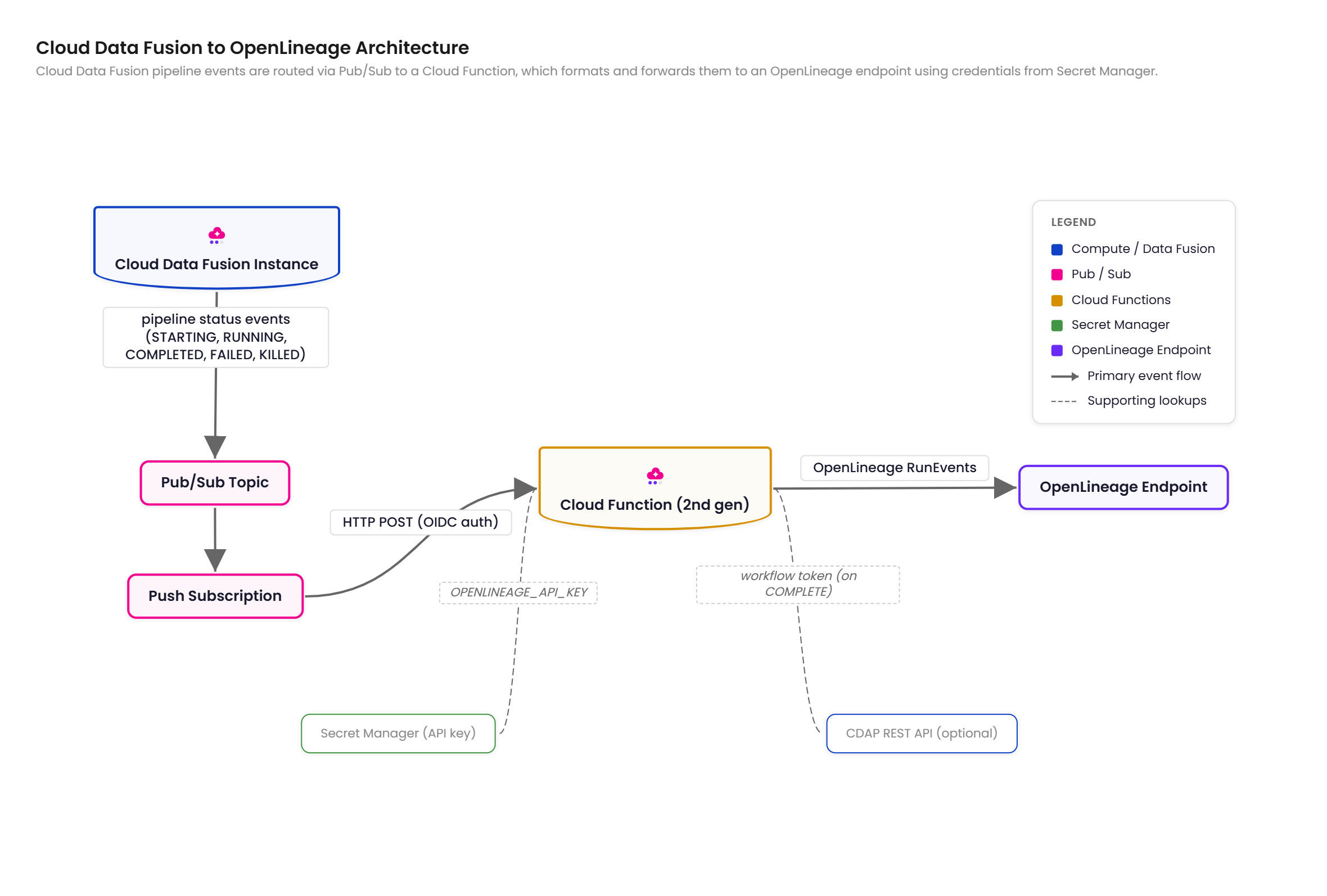
Per-stage row and byte counts are included directly in the Pub/Sub event payload and mapped to OpenLineage statistics facets — no additional API calls are needed for metrics.
CDF pipeline status values map to OpenLineage event types as follows:
| CDF status | OpenLineage event type |
|---|---|
|
|
|
No event emitted |
|
|
|
|
|
|
Supported plugin types
When CDF_API_ENDPOINT is set, the integration extracts dataset information via the workflow token on COMPLETE events.
Without it, the integration falls back to parsing the static pipeline JSON definition.
The following plugin types are supported in both cases:
| Plugin | Namespace | Name |
|---|---|---|
|
|
|
|
|
|
|
|
|
|
|
|
|
|
|
|
|
|
|
|
|
|
|
|
|
parsed from URL |
|
|
|
|
|
|
|
|
|
|
|
|
|
|
|
|
Plugins not in this list produce generic dataset references using cdf_plugin:<pluginName> as the namespace and the stage name as the dataset name.
CDF pipeline properties may use ${macro_name} placeholders.
The workflow token provides resolved values with macros already expanded by CDF at runtime, so no manual resolution is needed.
Prerequisites
Before you begin, make sure you have the following:
-
Ataccama CDF integration package, which includes the Cloud Function source and deployment templates.
This package is not publicly distributed and is available on request. Contact your Ataccama Customer Success Manager to obtain the integration package before proceeding.
-
Cloud Data Fusion instance version 6.7.0 or later.
-
GCP project with billing enabled and the following APIs enabled:
-
datafusion.googleapis.com -
pubsub.googleapis.com -
cloudfunctions.googleapis.com -
cloudbuild.googleapis.com -
run.googleapis.com -
secretmanager.googleapis.com -
artifactregistry.googleapis.com
-
-
OpenLineage endpoint URL and API key from your ONE orchestrator connection — see Gather connection credentials.
-
Node.js 18.0.0 or later and npm, required to build the function app.
-
Terraform 1.5.0 or later, required for Terraform deployment.
-
Google Cloud CLI (
gcloud), required for manual deployment.
Required IAM roles for the deployer
roles/owner covers all of the following — grant individual roles if you prefer least-privilege access:
| Role | Purpose |
|---|---|
|
Create and update Cloud Functions |
|
Set IAM policy on Cloud Run services |
|
Create topics, subscriptions, and set IAM policies |
|
Create secrets and manage access |
|
Create GCS bucket for function source |
|
Create service accounts |
|
Set IAM policy on service accounts |
Deploy the integration
Choose one of the following deployment options.
Option 1: Deploy with Terraform (recommended)
-
Build the function app:
cd function_app npm ci npm run build -
Configure Terraform variables:
cd deploy/terraform

cp terraform.tfvars.example terraform.tfvars
# Edit terraform.tfvars with your values
See Terraform variables for the full list of required and optional variables.
-
Apply:
terraform init terraform plan terraform apply -
Connect your CDF instance to the Pub/Sub topic created by Terraform:
gcloud beta data-fusion instances update <CDF_INSTANCE_NAME> \
  --location=<REGION> \
  --event-publish-topic=$(terraform output -raw pubsub_topic)
Terraform variables
Required variables:
| Variable | Description | Example |
|---|---|---|
|
GCP project ID |
|
|
Existing CDF instance name |
|
The openlineage_url and openlineage_api_key variables are also required — see Environment variables for values.
Optional variables:
| Variable | Default | Description |
|---|---|---|
|
|
GCP region |
|
|
Resource name prefix |
|
— |
Existing Pub/Sub topic ID.
If your CDF instance already publishes events to a topic, set this to reuse it.
When omitted, Terraform creates a new topic and grants the CDF service agent |
|
|
Cloud Function memory in MB |
|
|
Cloud Function timeout in seconds |
Additional optional variables (log_openlineage_events, cdf_api_endpoint) correspond to Cloud Function environment variables — see Environment variables.
Option 2: Manual deployment
A detailed manual deployment guide is included in the Ataccama CDF integration package. The following steps provide an overview of the process.
-
Enable the required GCP APIs:
gcloud services enable \ cloudfunctions.googleapis.com \ cloudbuild.googleapis.com \ run.googleapis.com \ pubsub.googleapis.com \ secretmanager.googleapis.com \ artifactregistry.googleapis.com \ --project=$PROJECT_ID -
Create a service account for the Cloud Function:
gcloud iam service-accounts create cdf-openlineage-fn \ --display-name="CDF OpenLineage Function" \ --project=$PROJECT_ID -
Store the OpenLineage API key in Secret Manager and grant the function service account access:
echo -n "$OPENLINEAGE_API_KEY" | gcloud secrets create cdf-ol-api-key \ --data-file=- \ --project=$PROJECT_ID gcloud secrets add-iam-policy-binding cdf-ol-api-key \ --member="serviceAccount:cdf-openlineage-fn@${PROJECT_ID}.iam.gserviceaccount.com" \ --role="roles/secretmanager.secretAccessor" \ --project=$PROJECT_ID -
Create the Pub/Sub topic and grant the CDF service agent publish access:
gcloud pubsub topics create $TOPIC_NAME --project=$PROJECT_ID

PROJECT_NUMBER=$(gcloud projects describe $PROJECT_ID --format="value(projectNumber)")

gcloud pubsub topics add-iam-policy-binding $TOPIC_NAME \
  --member="serviceAccount:service-${PROJECT_NUMBER}@gcp-sa-datafusion.iam.gserviceaccount.com" \
  --role="roles/pubsub.publisher" \
  --project=$PROJECT_ID
If your CDF instance already publishes to an existing Pub/Sub topic, skip topic creation and verify the CDF service agent already has
roles/pubsub.publisheron that topic. -
Build and upload the function source, then deploy the Cloud Function.
Refer to the manual deployment guide in the integration package for the full commands.
-
Configure IAM for Pub/Sub push authentication — two bindings are required:
# Allow Pub/Sub to invoke the function gcloud run services add-iam-policy-binding cdf-openlineage-fn \ --region=$REGION \ --member="serviceAccount:cdf-openlineage-fn@${PROJECT_ID}.iam.gserviceaccount.com" \ --role="roles/run.invoker" \ --project=$PROJECT_ID # Allow the Pub/Sub service account to mint OIDC tokens gcloud iam service-accounts add-iam-policy-binding \ cdf-openlineage-fn@${PROJECT_ID}.iam.gserviceaccount.com \ --member="serviceAccount:service-${PROJECT_NUMBER}@gcp-sa-pubsub.iam.gserviceaccount.com" \ --role="roles/iam.serviceAccountTokenCreator" \ --project=$PROJECT_ID -
Create the Pub/Sub push subscription:
gcloud pubsub subscriptions create cdf-ol-fn-push \ --topic=$TOPIC_NAME \ --push-endpoint=$FUNCTION_URL \ --push-auth-service-account="cdf-openlineage-fn@${PROJECT_ID}.iam.gserviceaccount.com" \ --ack-deadline=60 \ --project=$PROJECT_ID -
Connect your CDF instance to the Pub/Sub topic:
gcloud beta data-fusion instances update $CDF_INSTANCE_NAME \
  --location=$REGION \
  --event-publish-topic="projects/${PROJECT_ID}/topics/${TOPIC_NAME}" \
  --project=$PROJECT_ID
Configure the Cloud Function
Environment variables
| Variable | Required | Default | Description |
|---|---|---|---|
|
Yes |
— |
OpenLineage endpoint URL from your ONE orchestrator connection.
If the URL does not include |
|
Yes |
— |
API key for the OpenLineage endpoint |
|
No |
|
GCP region where the CDF instance is deployed, used in the job namespace. Set this to match your deployment region if it differs from the default. |
|
No |
|
Log full OpenLineage event JSON to Cloud Logging |
|
No |
— |
CDAP REST API base URL ending in
The function service account needs |
To retrieve the CDF_API_ENDPOINT value for your instance:
gcloud beta data-fusion instances describe <INSTANCE_NAME> \
  --location=<REGION> \
  --format="value(apiEndpoint)"
Required Cloud Function permissions
The following roles are assigned automatically by the Terraform template. For manual deployment, these are configured as part of the service account setup in Option 2.
| Role | Scope | Reason |
|---|---|---|
|
Project |
Call the CDAP REST API to retrieve pipeline definitions for dataset extraction |
|
API key secret |
Read the OpenLineage API key from Secret Manager |
OpenLineage event examples
The following examples show the OpenLineage events emitted by the integration for each pipeline run state.
START event
Emitted when CDF publishes a STARTING status.
Inputs and outputs are empty at this point.
{
  "eventType": "START",
  "eventTime": "2026-01-15T10:30:00Z",
  "producer": "clouddatafusion-integration",
  "schemaURL": "https://openlineage.io/spec/2-0-2/OpenLineage.json",
  "run": {
    "runId": "abc123-def456-ghi789",
    "facets": {
      "processing_engine": {
        "name": "Cloud Data Fusion",
        "version": "6.11"
      }
    }
  },
  "job": {
    "namespace": "clouddatafusion://my-gcp-project/us-central1/my-cdf-instance/default",
    "name": "Daily_Sales_ETL",
    "facets": {
      "jobType": {
        "processingType": "BATCH",
        "integration": "CLOUDDATAFUSION",
        "jobType": "PIPELINE"
      }
    }
  },
  "inputs": [],
  "outputs": []
}
COMPLETE event
Emitted when CDF publishes a COMPLETED status.
Per-stage row and byte counts come directly from the pipelineMetrics array in the Pub/Sub event payload.
When CDF_API_ENDPOINT is set, dataset names, schemas, and column-level lineage are also included.
{
  "eventType": "COMPLETE",
  "eventTime": "2026-01-15T10:45:00Z",
  "producer": "clouddatafusion-integration",
  "schemaURL": "https://openlineage.io/spec/2-0-2/OpenLineage.json",
  "run": {
    "runId": "abc123-def456-ghi789",
    "facets": {
      "processing_engine": {
        "name": "Cloud Data Fusion",
        "version": "6.11"
      }
    }
  },
  "job": {
    "namespace": "clouddatafusion://my-gcp-project/us-central1/my-cdf-instance/default",
    "name": "Daily_Sales_ETL",
    "facets": {
      "jobType": {
        "processingType": "BATCH",
        "integration": "CLOUDDATAFUSION",
        "jobType": "PIPELINE"
      }
    }
  },
  "inputs": [
    {
      "namespace": "gs://my-data-lake",
      "name": "raw/sales/2026-01-15/",
      "facets": {
        "inputStatistics": {
          "rowCount": 150000,
          "bytes": 52428800
        }
      }
    }
  ],
  "outputs": [
    {
      "namespace": "bigquery",
      "name": "my-gcp-project.analytics.fact_sales",
      "facets": {
        "outputStatistics": {
          "rowCount": 150000,
          "bytes": 48000000
        }
      }
    }
  ]
}
FAIL event
Emitted when CDF publishes a FAILED or KILLED status.
Per the OpenLineage specification, inputs and outputs are empty for non-success events.
The error message is included in the errorMessage run facet.
{
  "eventType": "FAIL",
  "eventTime": "2026-01-15T10:35:00Z",
  "producer": "clouddatafusion-integration",
  "schemaURL": "https://openlineage.io/spec/2-0-2/OpenLineage.json",
  "run": {
    "runId": "cdf-run-def456",
    "facets": {
      "errorMessage": {
        "message": "BigQuery table not found: staging.missing_table",
        "programmingLanguage": "JAVA"
      }
    }
  },
  "job": {
    "namespace": "clouddatafusion://my-gcp-project/us-central1/my-cdf-instance/default",
    "name": "Daily_Sales_ETL"
  },
  "inputs": [],
  "outputs": []
}
Verify the connection
-
Run a pipeline in your Cloud Data Fusion instance.
-
Go to Data Observability > Connections in ONE.
-
Confirm events are being received — the connection status changes to Connected and job executions appear on the connection’s Overview tab.
Limitations of the CDF integration
-
Source and sink stages only: Intermediate transform stages (Wrangler, Joiner, and others) are not captured as lineage nodes; only source and sink plugin types are extracted.
-
Dataset enrichment requires
CDF_API_ENDPOINT: Without it, COMPLETE events include only metrics-based dataset references with no dataset names, schemas, or column-level lineage. -
Unsupported plugin types: Plugins not in the supported list produce generic dataset references using
cdf_plugin:<pluginName>as the namespace. -
CDF version requirement:
EventPublishConfigrequires Cloud Data Fusion 6.7.0 or later.
Troubleshooting
No events arriving at Pub/Sub
-
Check that
EventPublishConfigis enabled and pointing to the correct topic:gcloud beta data-fusion instances describe <INSTANCE_NAME> \ --location=<REGION> \ --format="yaml(eventPublishConfig)"Verify
enabled: trueandtopicpoints to the correct Pub/Sub topic. -
Check that the CDF service agent has
roles/pubsub.publisheron the topic:PROJECT_NUMBER=$(gcloud projects describe <PROJECT_ID> --format='value(projectNumber)') gcloud pubsub topics get-iam-policy <TOPIC_NAME> \ --format=json | jq ".bindings[] | select(.role==\"roles/pubsub.publisher\")"The CDF service agent (
service-<PROJECT_NUMBER>@gcp-sa-datafusion.iam.gserviceaccount.com) must be listed. If missing, CDF silently drops events without any error. -
Verify your CDF instance is version 6.7.0 or later:
gcloud beta data-fusion instances describe <INSTANCE_NAME> \
  --location=<REGION> \
  --format="value(version)"
Events in Pub/Sub but function not processing them
-
Check the function is running:
gcloud functions describe <FUNCTION_NAME> --region=<REGION> --gen2 \ --format="value(state)" -
Check the push subscription configuration:
gcloud pubsub subscriptions describe <SUBSCRIPTION_NAME> \
  --format="yaml(pushConfig)"
The
pushEndpointshould match the function URL. -
Check the Pub/Sub push authentication IAM bindings — two bindings are required:
-
The function’s service account needs
roles/run.invokeron the Cloud Run service. -
The Pub/Sub service account (
service-<PROJECT_NUMBER>@gcp-sa-pubsub.iam.gserviceaccount.com) needsroles/iam.serviceAccountTokenCreatoron the function service account.If you see
401 Unauthorizederrors in function logs, verify both bindings exist.
-
Function invoked but OpenLineage events not sent
-
Check function logs for errors:
gcloud functions logs read <FUNCTION_NAME> \ --region=<REGION> \ --gen2 \ --limit=50 -
Verify the function’s environment variables are set correctly:
gcloud functions describe <FUNCTION_NAME> --region=<REGION> --gen2 \ --format="yaml(serviceConfig.environmentVariables)" -
Test the OpenLineage endpoint directly:
curl -v -X POST \
  -H "Authorization: Bearer <API_KEY>" \
  -H "Content-Type: application/json" \
  -d '{"eventType":"OTHER","eventTime":"2024-01-01T00:00:00Z","producer":"test","schemaURL":"https://openlineage.io/spec/2-0-2/OpenLineage.json#/$defs/RunEvent","job":{"namespace":"test","name":"test"},"run":{"runId":"00000000-0000-0000-0000-000000000000"}}' \
  "<OPENLINEAGE_URL>"
Missing dataset information
-
Verify the function service account has
roles/datafusion.viewer:gcloud projects add-iam-policy-binding <PROJECT_ID> \ --member="serviceAccount:<FUNCTION_SA>@<PROJECT_ID>.iam.gserviceaccount.com" \ --role="roles/datafusion.viewer" -
If pipelines use
${macro_name}placeholders, check Cloud Logging for macro resolution warnings — the function logs a warning when macros cannot be resolved.
Was this page useful?