
Criticality
Criticality marks a data asset as business-critical. Use criticality to identify your critical data elements (CDEs) and align on what matters the most for your business and how it should be governed.
Why use criticality
Critical data elements (CDEs) are the assets your organization depends on most for revenue, compliance, or safety. Identifying them lets you prioritize governance work where it has the most impact.
Without criticality, every asset competes for attention equally. A governance team with 5,000 catalog items can’t apply the same care to all of them: criticality is how you decide what gets governed first.
It ensures:
-
Focused governance: Stewardship, DQ monitoring, and lineage validation are applied first to the assets that matter most.
-
Coverage reporting: Filter and aggregate by criticality to see where critical assets lack a steward, DQ monitoring, or term coverage.
-
Faster compliance response: Surfacing every critical asset connected to a process, term, or domain becomes a query rather than a project.
-
Informed consumption: A data product marked critical signals to data consumers that the asset is governed at the highest level.
By default, all assets are not critical. Marking an asset critical is an active decision.
For example, in financial services, a governance team might mark Customer ID and Transaction Amount as critical because they feed KYC, AML, and regulatory reporting. Once marked, criticality propagates from those terms to every attribute they’re applied to, every catalog item containing those attributes, and every data product that declares them as data elements. A single decision marks the assets that matter without flagging each one by hand.
In Ataccama ONE, criticality can be set on the following asset types:
-
Terms
-
Catalog item attributes
-
Catalog items
-
Data products
-
Business processes
How criticality propagates
You rarely flag every critical asset by hand. Mark the assets at the top of the tree (typically a business process) and criticality propagates along the metadata model to related assets.
If criticality is inherited through several assets, the asset is critical as long as it inherits criticality from at least one of them. Which asset criticality comes from is shown on the asset, including any intermediary assets on the tree. If it propagates from several assets, all are listed.
When you mark a business process critical, every data element related to the business process becomes critical. Criticality then flows to the terms those data elements point at, and from each term:
-
To every attribute the term is applied to.
-
To every catalog item containing those attributes.
-
To every data product that declares the term as a data element.
When you mark a term critical directly, the same propagation continues downstream from the term.
A business process also propagates criticality to its nested processes, which then propagate downward in the same way.
By default, business processes are the only asset type that propagates criticality to terms. You can extend this by configuring the metadata model. See Configure criticality.
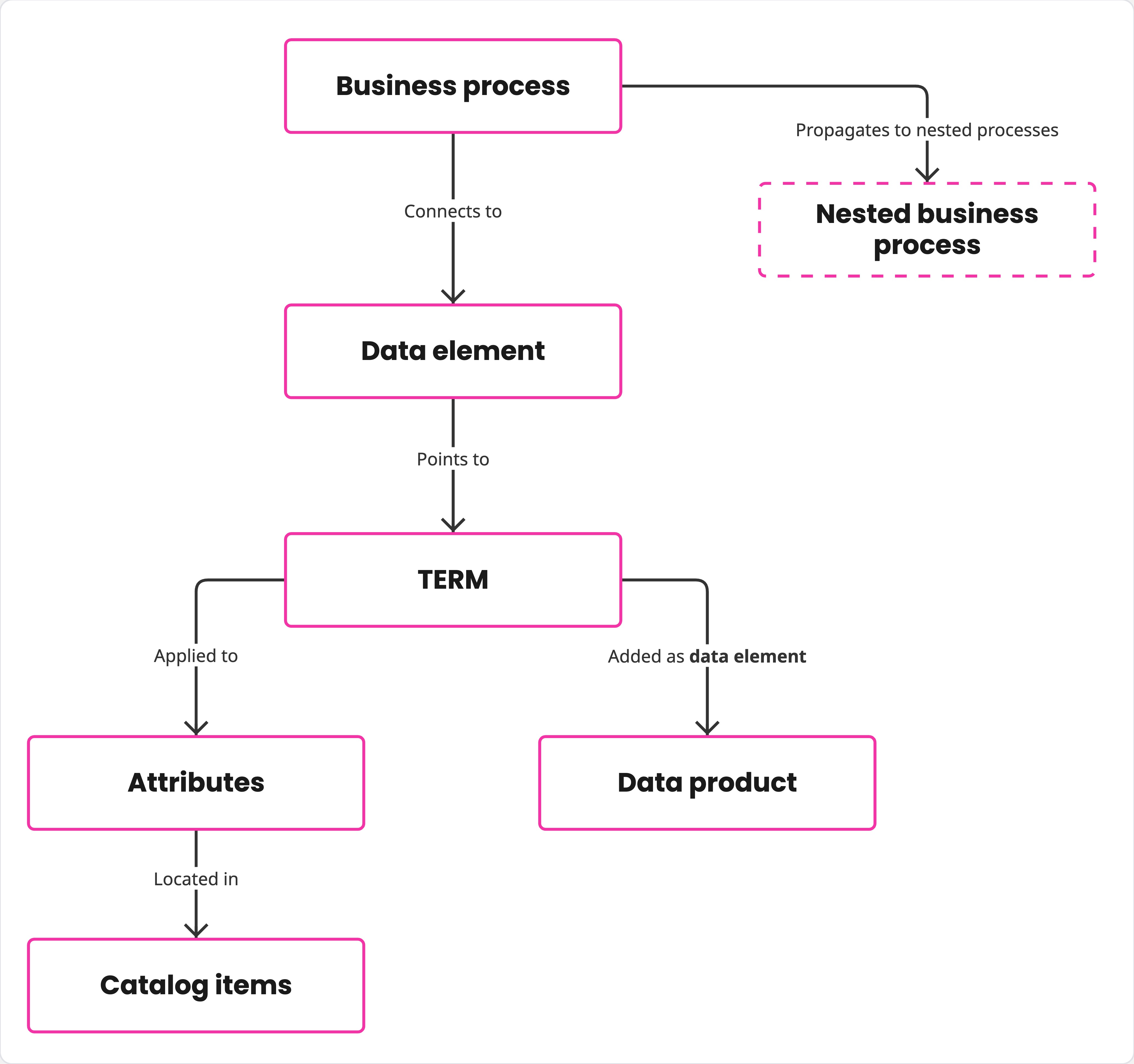
Example
-
Policy Issuance is a business process. You mark it critical.
-
Policy Number is one of the data elements on Policy Issuance and points at the term Policy Number, so the term becomes critical.
-
Term detection has applied Policy Number to five attributes across five tables, so those attributes become critical.
-
Each attribute sits in a catalog item, so the five catalog items become critical too.
-
Policy Number is one of the data elements on the Policy data product, so the data product becomes critical.
As a result, a single decision — marking Policy Issuance critical — propagates to one term, five attributes, five catalog items, and a data product, without any further manual flagging.
Set criticality on an asset
Before flagging an asset directly, consider how criticality propagates through related assets. Typically, marking a business process or term critical is more scalable and ensures better results long-term, with fewer outliers.
You can set criticality:
-
When creating a data product or business process.
-
When editing an existing asset, from its Overview tab.
The following options are available:
-
Critical: The asset is marked critical.
-
Not critical: The asset is marked explicitly non-critical. This breaks the inheritance path: even if an upstream asset is critical, this asset won’t inherit the flag.
Use this when you want to exclude an asset from a propagation path that would otherwise mark it critical. For example, a non-sensitive attribute in an otherwise critical catalog item.
-
Inherited: The asset takes its criticality from upstream assets. This is the default for a new asset with critical upstream assets.
-
None: No criticality is set, and there are no upstream critical assets to inherit from. This is the initial state for a new asset before criticality is set or inherited.
Once criticality is set (directly or inherited), it can no longer be removed. To explicitly mark an asset as not business-critical, use Not critical.
A direct value (Critical or Not critical) takes precedence over inheritance. If an asset is marked critical directly and also inherits criticality, the directly set value is what appears in search, on the asset, and on dashboards.
Be deliberate when marking an asset Not critical. Breaking inheritance now can result in a critical data element being missed later if the propagation chain changes.
Configure criticality
Edit the metadata model to configure:
-
Which asset types propagate criticality to terms.
-
Whether assets can be directly marked as critical.
| You need to be an admin user to configure the metadata model. See Identity Provider Roles. |
Configure how criticality propagates to terms
By default, business processes are the only asset type that propagates criticality to terms. You can expand this so terms inherit criticality from additional asset types.
Inheritance from a term to attributes, catalog items, and data products cannot be customized.
To make an asset propagate criticality, assign the dataProducts:criticalitySource trait to one of its embedded properties.
The asset referenced by the property inherits criticality from the asset that owns it.
-
The trait applies to embedded properties only (single or array). Reference properties are not supported.
-
The embedded property must point to an asset of type
criticalitySourceDataElement, or to one of its subtypes. Each propagating asset type typically defines its own subtype, for example, business processes usebusinessProcessDataElement. -
If the property points back at the same asset type (for example,
subProcesseson a business process), criticality propagates recursively through the hierarchy.
Configure which assets can be directly marked critical
To be able to mark an asset as critical directly and not only through inheritance, the asset requires the criticality property.
By default, the property is on term, attribute, catalogItem, dataProduct, and businessProcess.
Without this property, the asset acts as a pass-through. It inherits criticality from related assets, but it cannot be marked critical in the application.
Example: Business process
Business process assets are preconfigured to propagate criticality as follows:
-
The
dataProducts:criticalitySourcetrait is attached to thedataElementsproperty onbusinessProcess. The property is of typebusinessProcessDataElement, which is a subtype ofcriticalitySourceDataElement. A critical business process propagates to the terms its data elements point at. -
The same trait is attached to
subProcesses(a property referencing the samebusinessProcessobject), so a critical business process propagates to its sub-processes. -
The
criticalityproperty is in place, so individual processes can be marked critical.
Example: Enable criticality on a new asset type
To enable criticality on a new asset type:
-
Make sure your asset has an embedded property pointing to data elements, or to terms directly.
-
Assign the
dataProducts:criticalitySourcetrait to that property. -
Optionally, add the
criticalityproperty on your asset so individual instances can be marked critical. Without it, assets act as pass-throughs. -
Optionally, add a recursive embedded property such as
subAssetsfor your asset, and assign the same trait, so a critical parent propagates to its children.
Once configured, every term reached from a critical asset of this type inherits criticality, and propagation continues downstream into attributes, catalog items, and data products.
Was this page useful?