
Azure Data Factory Lineage Scanner
Scanned and supported objects
|
The scanner automatically generates lineage metadata for all currently supported sources and connections. However, lineage coverage might vary depending on system capabilities, dynamic transformations, or access permissions. While we strive for comprehensive lineage capture, certain dataflows and transformations might be incomplete or unavailable due to technical constraints. We continuously work to expand coverage and accuracy. |
Resources scanned
The lineage information from Azure Data Factory is available on attribute level and the metadata extracted includes the following Azure Factory resources:
-
Factories
-
Linked services
-
Pipelines
-
Datasets
-
Dataflows
Supported source technologies
The scanner supports the following Azure Data Factories linked services:
-
AzurePostgreSqlLinkedService -
AzureSqlDatabaseLinkedService -
SqlServerLinkedService -
SnowflakeV2LinkedService
Limitations
Azure Data Factory enables 12,500 requests per hour. For more details, see the official Microsoft documentation.
Supported connectivity
The scanner connects to Azure Data Factory using the following connection method:
-
Connector type: API integration using the Microsoft Azure SDK.
-
Authentication method: Azure Service Principal.
Azure Data Factory permissions
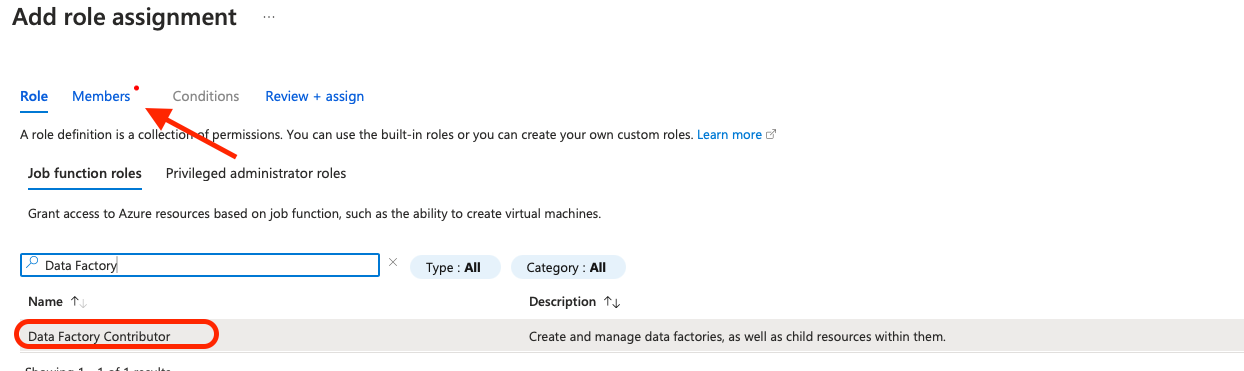
Azure Data Factory uses Azure Role-Based Access Control (RBAC) to manage permissions. To enable access to Data Factory resources using a Service Principal, assign the Data Factory Contributor role to the corresponding app registration (service principal) in Azure Active Directory.
Assign roles in Azure Data Factory
To assign a role to an App Registration (Service Principal) in Azure Data Factory, you must have one of the following roles at the appropriate scope:
-
User Access Administrator — Allows managing role assignments without granting full resource control.
-
Owner — Grants full permissions, including the ability to manage access.
-
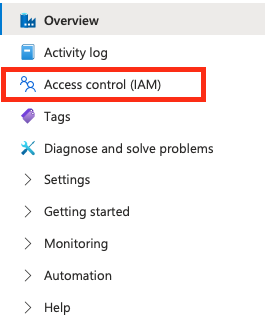
In Azure Portal, navigate to your Azure Data Factory.

-
Open Access control (IAM).
-
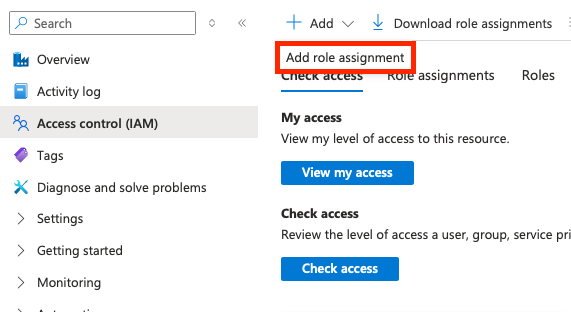
Select Add > Add permissions.
-
Select the Data Factory Contributor role and on the Members tab, assign it to the relevant user or group of users.
-
Scanner configuration
All fields marked with an asterisk (*) are mandatory.
| Property | Description |
|---|---|
|
Unique name for the scanner job. |
|
Specifies the source type to be scanned.
Must contain |
|
A human-readable description of the scan. |
|
List of Ataccama ONE connection names for future automatic pairing. |
|
Path to Data Factory Manager. |
|
Name of the factory to be processed. |
|
List of dataflow folders to be processed. |
|
Name of the container that holds related resources for an Azure solution. |
{
   "scannerConfigs":[
      {
         "name":"ADFJob1",
         "sourceType":"ADF",
         "description":"Scan Azure Data Factory",
         "oneConnections":[],
         "inputDataCatalogFilePath":null,
         "factoryName": "myfactoryName",
         "dataflowFolders": ["folder1", "folder2"],
         "resourceGroup":"MetadataExtractionGroup"
      }
   ]
}
Was this page useful?