
DQ&C 16.3.1 Upgrade Notes
Connection-timeout-property for JDBC drivers
All JDBC data source drivers now require the connection-timeout-property setting.
The property specifies the driver-level property name and unit used to enforce a socket or read timeout on JDBC connections. If it is missing, Data Processing Engine (DPE) can become completely blocked when a data source is unresponsive.
The property follows this pattern:
plugin.jdbcdatasource.ataccama.one.driver.<driverId>.connection-timeout-property = <property>, <unit>Where
-
<property>is the JDBC driver property name. -
<unit>iss(seconds) orms(milliseconds).
Set the value to NONE for drivers that do not support a timeout property.
When upgrading to 16.3.1, verify that each configured driver (default or custom) includes connection-timeout-property.
Reference values for default drivers
For full configuration details, see Data Sources Configuration.
| Driver | Value |
|---|---|
Amazon Aurora MySQL |
|
Amazon Aurora PostgreSQL |
|
Amazon Redshift |
|
Apache Cassandra |
|
Arrow Flight SQL (Dremio) |
|
AWS Athena |
|
Azure Data Explorer (ADX) |
|
Azure Synapse Analytics |
|
BigQuery |
|
IBM Db2 |
|
IBM Netezza |
|
Informix |
|
MariaDB |
|
MS SQL |
|
MySQL |
|
Oracle |
|
PostgreSQL |
|
SAP HANA |
|
Snowflake |
|
SQLite |
|
Sybase |
|
Teradata |
|
Databricks JDBC batch inserts
Starting with Simba 2.6.38 and OSS 3.0.5, the JDBC Writer inserts records one at a time, causing slow writes. Ataccama ONE now automatically restores batched inserts for Simba 2.7.0+ and OSS 3.0.5+.
If you are using Simba 2.6.38–2.6.x, manually add ;EnableNativeParameterizedQuery=0 to your connection string.
For details, see Slow write operations on Databricks JDBC connections.
Databricks library staging now uses cloud storage
Spark and Databricks processing libraries are no longer staged via DBFS by default. Instead, they are installed directly from cloud storage (ADLS or S3).
If the Databricks job cluster does not have credentials for the cloud storage account, profiling and monitoring jobs fail after the upgrade with library installation errors, such as ERROR_INVALID_STORAGE_CONFIGURATION or Invalid configuration value detected for fs.azure.account.key.
When upgrading to 16.3.x or later with Databricks and Spark processing, apply one of the following options.
Option 1: Re-enable DBFS library staging (recommended)
Update the relevant configurations as follows. Both steps are required.
-
Add the following property to
application-SPARK_DATABRICKS.propertiesand restart the Data Processing Engine (DPE):plugin.executor-launch-model.ataccama.one.launch-type-properties.SPARK.dbr.librarySourceDBFS=true -
Add the following property to the Databricks cluster Spark configuration:
spark.databricks.driver.dbfsLibraryInstallationAllowed=true
Option 2: Grant the cluster access to cloud storage
Job cluster
Grant the Databricks job cluster access to the ADLS or S3 storage account using the OAuth properties:
plugin.executor-launch-model.ataccama.one.launch-type-properties.SPARK.job-cluster.spark-conf.spark.hadoop.fs.azure.account.auth.type.<STORAGE_ACCOUNT>.dfs.core.windows.net=OAuth
plugin.executor-launch-model.ataccama.one.launch-type-properties.SPARK.job-cluster.spark-conf.spark.hadoop.fs.azure.account.oauth.provider.type.<STORAGE_ACCOUNT>.dfs.core.windows.net=org.apache.hadoop.fs.azurebfs.oauth2.ClientCredsTokenProvider
plugin.executor-launch-model.ataccama.one.launch-type-properties.SPARK.job-cluster.spark-conf.spark.hadoop.fs.azure.account.oauth2.client.id.<STORAGE_ACCOUNT>.dfs.core.windows.net=<CLIENT_ID>
plugin.executor-launch-model.ataccama.one.launch-type-properties.SPARK.job-cluster.spark-conf.spark.hadoop.fs.azure.account.oauth2.client.secret.<STORAGE_ACCOUNT>.dfs.core.windows.net=<CLIENT_SECRET>
plugin.executor-launch-model.ataccama.one.launch-type-properties.SPARK.job-cluster.spark-conf.spark.hadoop.fs.azure.account.oauth2.client.endpoint.<STORAGE_ACCOUNT>.dfs.core.windows.net=https://login.microsoftonline.com/<TENANT_ID>/oauth2/tokenplugin.executor-launch-model.ataccama.one.launch-type-properties.SPARK.job-cluster.spark-conf.spark.hadoop.fs.s3a.access.key=<ACCESS_KEY>
plugin.executor-launch-model.ataccama.one.launch-type-properties.SPARK.job-cluster.spark-conf.spark.hadoop.fs.s3a.secret.key=<SECRET_KEY>All-purpose cluster
If you are using an all-purpose cluster instead of a job cluster, grant the cluster access to cloud storage from the Databricks side.
Go to the all-purpose cluster, select Advanced > Spark, and add the following to the Spark configuration.
fs.azure.account.auth.type.<STORAGE_ACCOUNT>.dfs.core.windows.net=OAuth
fs.azure.account.oauth.provider.type.<STORAGE_ACCOUNT>.dfs.core.windows.net=org.apache.hadoop.fs.azurebfs.oauth2.ClientCredsTokenProvider
fs.azure.account.oauth2.client.id.<STORAGE_ACCOUNT>.dfs.core.windows.net=<CLIENT_ID>
fs.azure.account.oauth2.client.secret.<STORAGE_ACCOUNT>.dfs.core.windows.net=<CLIENT_SECRET>
fs.azure.account.oauth2.client.endpoint.<STORAGE_ACCOUNT>.dfs.core.windows.net=https://login.microsoftonline.com/<TENANT_ID>/oauth2/tokenspark.hadoop.fs.s3a.access.key=<ACCESS_KEY>
spark.hadoop.fs.s3a.secret.key=<SECRET_KEY>For details on the underlying Spark configuration properties, see the Databricks documentation on connecting to Azure Data Lake Storage and Blob Storage.
For configuration details, see Cluster libraries.
Advanced encryption between DPM and DPE
| Available from 16.3.1-patch7. |
Apply advanced encryption to communication channels between Data Processing Module (DPM) and Data Processing Engines (DPEs), such as gRPC messages and configuration data.
We recommend switching to advanced encryption at your earliest convenience.
Before you start, ensure there are no encryption related warnings on the Engines tab in the DPM Admin Console. If there are, update the DPE configuration to address this or remove the engine.
If advanced encryption is not configured, the environment continues to work using standard encryption, which is now considered obsolete.
| If you are using an Ataccama Cloud environment, contact Ataccama Support for configuration assistance. |
To enable advanced encryption:
-
Ensure each connected DPE has the following settings configured:
properties.encryption.keystore=<keystore_file>
properties.encryption.keystore.passwordFile=<password_file>
properties.encryption.keystore.keyAlias=<alias_for_encryption>
internal.encryption.keystore=<keystore_file>
internal.encryption.keystore.passwordFile=<password_file>
internal.encryption.keystore.keyAlias=<alias_for_encryption>
For configuration details, see Encryption Configuration.
-
Wait for the DPE instances to become ready, then check their status in the DPM Admin Console.
-
If no warning is displayed, continue to the next step.
-
If a warning appears, verify the encryption properties are configured correctly.
-
If the status is
UNKNOWN, the probe hasn’t run yet. Wait until the status changes. If it changes toINDETERMINATE, see DPE status is INDETERMINATE.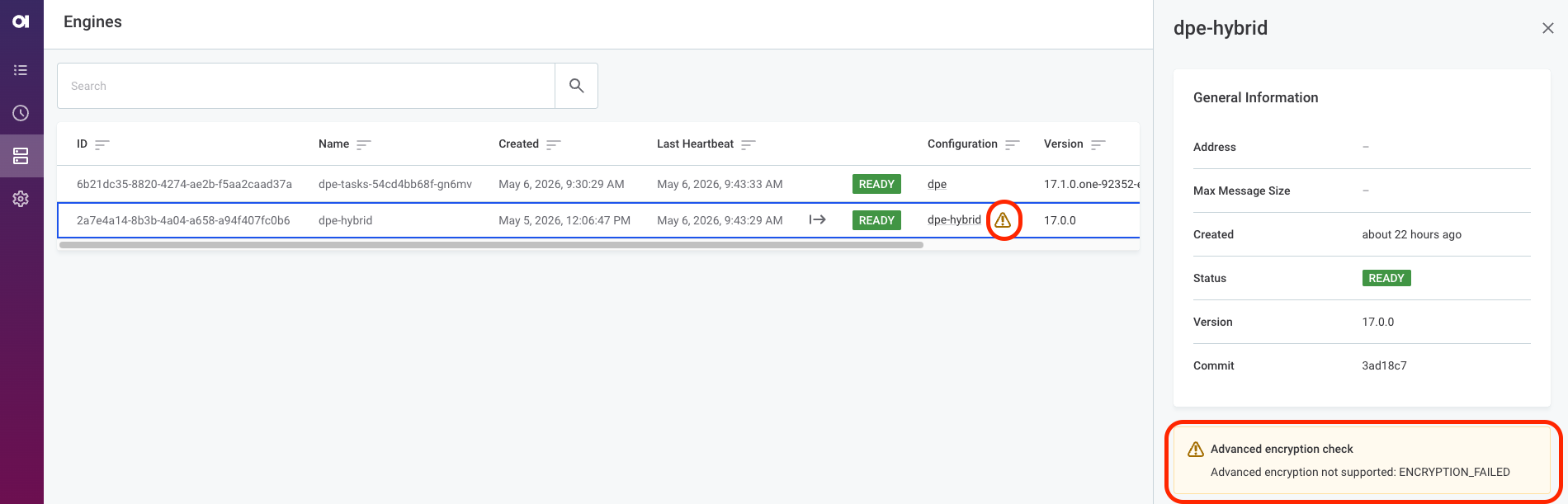
-
-
(Ataccama Cloud only) Once all DPE instances are connected and show no warnings, apply the following Helm override:
global.dataEncryption.advancedEncryptionEnabled=true
DPE status is INDETERMINATE
The INDETERMINATE status is not directly related to the advanced encryption settings.
Instead, it indicates one of the following:
-
There is a technical issue in communication between DPM and DPE. Verify the communication is correctly set up; see Authorized components.
-
There are no JDBC drivers configured for the DPE instance using advanced encryption. See Data Sources Configuration.
Was this page useful?