
Ataccama 16.3.1 Release Notes
Stability and infrastructure improvements, including MinIO routing for large profiling plans, a required JDBC connection timeout property, and streaming event handler batching for MDM.
Release date |
April 7, 2026 |
Support |
Long-Term Support (LTS) |
Upgrade notes |
|
Latest patch |
Patch 27 (October 23, 2026) |
Products |
ONE Data Quality & Catalog, ONE MDM, ONE RDM, ONE Runtime Server, ONE Desktop |
Downloads |
|
Security updates |
Release Highlights
Route Large Profiling Plans via MinIO ONE DQ&C
Route large profiling plans through ONE Object Storage (MinIO) to avoid failures caused by size limitations on environments with many applied rules or attributes.
Read more ↓
Connection Timeout Property Required for JDBC Drivers ONE DQ&C
JDBC drivers now require a connection timeout setting to prevent DPE from becoming blocked by unresponsive data sources.
Read more ↓
Streaming Event Handler Improvements ONE MDM
Batching, deduplication, and monitoring for the Streaming Event Handler, with new Admin Center views for tracking streaming latency.
Read more ↓
Improvements to Admin Center ONE MDM
Environment banners, lookup management, runtime parameter export, and license information in the MDM Admin Center.
Read more ↓
Known Issues Resolved
This version resolves the following previously reported known issues.
| Module | Issue | Reported in |
|---|---|---|
MDM |
ONE-83544: The event handler generator contains an incorrect regular expression for tables with the If you have tables whose name includes |
15.4.1 |
ONE
| For upgrade details, see DQ&C 16.3.1 Upgrade Notes. |
Route Large Profiling Plans via MinIO
You can now route large profiling plans through ONE Object Storage (MinIO) to avoid failures caused by size limitations. Use this option if profiling jobs with many applied rules or attributes fail, or if large plans are causing performance issues.
For more information, see DPM Configuration.
Multi-Word Term Search in Rich Text Editors
You can now search for multi-word terms when using the Insert term option in rich text editors.
Wrap the search query in double quotes to find terms containing spaces — for example, /"net loss".
For more information, see Rich content.
Connection Timeout Property Required for JDBC Drivers
JDBC data source drivers now require the connection-timeout-property setting that prevents Data Processing Engine (DPE) from becoming blocked when a data source is unresponsive.
This property is required for all configured drivers starting with this version. If you are upgrading, see Connection-timeout-property for JDBC drivers for configuration details.
MDM
| For upgrade details, see MDM 16.3.1 Upgrade Notes. |
Streaming Event Handler Improvements
Batching and Performance
The Streaming Event Handler now supports collecting smaller transactions into a single publishing batch, controlled by a volume (Streaming Size) threshold and a time threshold (Streaming Seconds), whichever is reached first. This increases throughput for high-volume scenarios where many small changes occur in quick succession.
All transactions collected in the same batch are assigned a common streaming ID and published together. The handler also applies deduplication: if multiple changes affect the same root entity within the streaming window, the downstream system receives a single consolidated message with the final state.
For configuration and tuning guidance, see Streaming Event Handler > Best practices and Add a Streaming Event Handler.
Monitoring
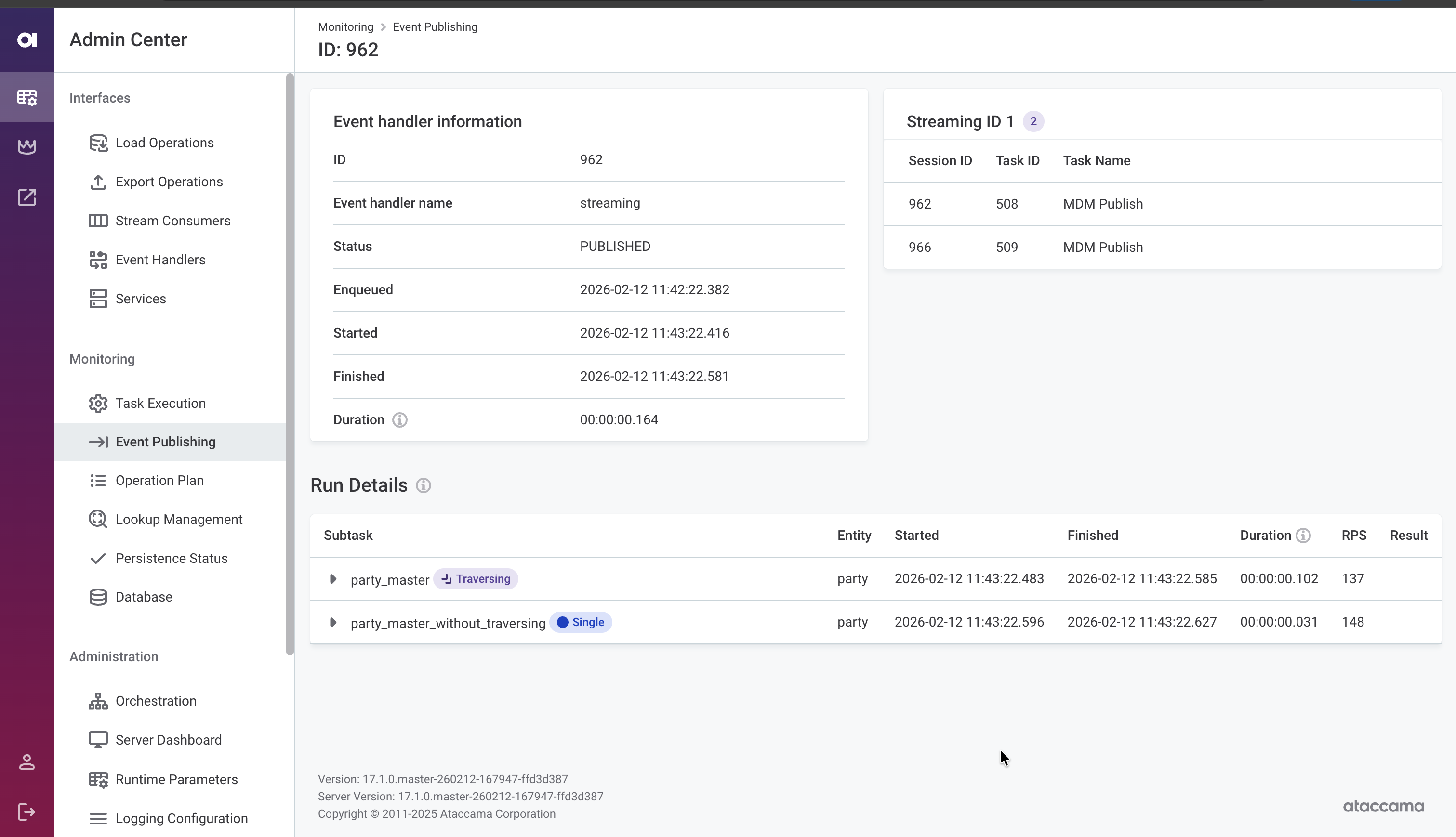
Monitor event handler activity directly in the MDM Web App Admin Center. The event publishing detail view now shows:
-
Streaming ID — Trace which transactions were published together in the same batch.
-
Enqueued, Started, and Finished timestamps — Assess streaming latency from when a change occurred to when it was delivered.
-
Per-publisher breakdown — View processing status for publishers with traversing (labeled Traversing) and without traversing (labeled Single) independently.
For details, see MDM Web App Admin Center > Monitoring > Event publishing.
State Change Notifications
Configure event handler listeners that trigger actions when an event handler changes state (activated, inactivated, or disabled). Use these to execute shell commands, run SQL statements, invoke workflows, or call external HTTP/SOAP services, enabling automated responses to publishing pipeline issues.
For configuration details, see Executor.
Improvements to Admin Center
The MDM Web App Admin Center includes several usability improvements:
-
Environment banner: Display a colored banner with the environment name (for example, DEV, TEST, PROD) to help distinguish between environments at a glance. See Environment banner.
-
Lookup management screen: View the list of file system locations configured within the Versioned File System Component. See Lookup management.
-
Runtime parameter export: Download the current runtime parameters as a
runtime.parametersfile, making it easier to migrate configuration between environments or keep it under version control. See Runtime parameters. -
License information: View license details in the Orchestration section. See Licenses.
Example Project Available on macOS
You can now set up and run the MDM example project on macOS using Docker containers. For instructions, see MDM Example Project on macOS.
Fixes
For fixes delivered in patch releases, see 16.3.1 Patch Releases.
ONE
- Rules
-
-
Filtering by attributes and applied rules on the catalog item Data Quality tab now returns all matching results.
-
Attributes no longer show unrelated DQ dimensions after pushdown DQ evaluation.
-
- Monitoring projects
-
-
Specific notifications in monitoring projects are no longer sent when data quality evaluation does not complete. Previously, a "Project run failed" email was incorrectly sent to recipients.
-
Monitoring project notifications no longer display an incorrect dash before DQ result percentages.
-
Fixed DQ evaluation failures on catalog items created from SAP S/4HANA sources.
-
- DQ firewalls
-
-
DQ firewall configuration no longer displays names of rules that the current user does not have access to. Previously, rule names were visible and the configuration banner misleadingly reported them as outdated or damaged.
-
When creating a DQ firewall from a monitoring project, attributes with unsupported data types are now skipped instead of blocking firewall creation entirely.
-
- Business glossary
-
-
The Insert Term option in the term Business definition rich text editor now correctly lists available terms instead of showing term types.
-
Terms with mandatory custom properties that allow selecting multiple values can now be published and edited as expected. Previously, validation incorrectly reported the field as empty even when values were selected.
-
- ONE Data
-
-
ONE Data tables open correctly without
TypeErrorerror notifications.
-
- Data Observability
-
-
In Data Observability, DQ evaluation no longer fails with "DataSourceClientConfig not found" error when the source connection is correctly configured.
-
- Lineage
-
-
Lineage diagram edges now display correctly after refreshing the page with All selected for the datastores field.
-
The detail panel header on the lineage diagram no longer disappears when switching between assets.
-
Power BI lineage assets are labeled with the correct icon on the lineage diagram.
-
Lineage diagram import shows descriptive error messages when the import fails, including specific details about duplicate lineage assets.
-
During lineage import, the Expand and Overwrite options now remain unavailable until the import finishes, preventing accidental re-triggers.
-
Scan plan schedule deletion is now immediately reflected without requiring a page refresh.
-
Reduced memory consumption of the BigQuery lineage scanner when scanning large environments with hundreds of thousands of objects.
-
Stability improvements to the SAP HANA lineage scanner.
-
- Data source connections
-
-
Databricks JDBC connections now use batched inserts by default, improving write performance for DQ evaluation and other export operations. For details, see Databricks JDBC batch inserts.
-
AWS Assume Role credentials can now be saved in S3 connections.
-
Metadata import from ADLS Gen2 connections no longer fails when the connection uses path conditions and ACL settings.
-
- Data processing
-
-
Snowflake pushdown profiling no longer fails with a SQL compilation error when frequency analysis is turned off.
-
Metadata import now handles schemas with leading or trailing spaces in their names.
-
Profiling on Trino JDBC connections no longer fails for columns with
TIMESTAMP(6) WITH TIME ZONEdata type. -
DPE correctly creates the job folder when a custom
TEMP_ROOTis specified in the configuration, preventing temporary file errors during profiling. -
Job submission no longer occasionally fails with a "Job already exists" exception.
-
Job submission no longer fails with an "Engine not available" error when DPE is temporarily reconnecting.
-
- Performance & stability
-
-
Fixed long-running database transactions during data observability runs that could slow down other operations.
-
Catalog item Data Quality tab loads significantly faster, especially on catalog items with a large number of attributes.
-
Fixed a memory leak during profiling jobs that could lead to
OutOfMemoryerrors on large environments. -
Faster Data Processing Module resource allocation queries, reducing database load in high-throughput environments.
-
Large profiling plans are now stored via object storage instead of the database, and job data is cleaned up after completion, reducing database load and storage usage.
-
- Usability & display
-
-
Job duration is now displayed correctly in the web application, even for jobs running longer than 24 hours.
-
Source detail screen loads correctly when reopening a previously viewed source.
-
Moving tasks on the Tasks Overview screen works as expected without freezing or requiring a page refresh.
-
- Upgradability
-
-
Username and password credentials can now be edited after migrating from 15.4.1 to 16.3. Previously, the edit page did not display these fields for migrated credentials.
-
MDM
-
Merge proposal resolution no longer fails with a "Draft doesn’t exist" error when previous drafts in the same task were discarded.
-
In the MDM Web App Admin Center, the task properties section is again visible on the task details screen.
-
Usernames are correctly displayed in MDM Web App Admin Center instead of appearing hashed.
-
When searching for records with empty values via the REST API, the filter is no longer silently ignored.
-
Filtering works as expected on fields using
WINDOWlookup type. -
Fixed incorrect matching results when using multiple matching rules with filters in a key rule.
-
Master records are no longer incorrectly marked as inactive after running a migration load.
-
During publishing, the streaming event handler now correctly populates the
meta_origincolumn as a string instead of incorrectly treating it as a number. -
The streaming event handler correctly captures events only from configured entities, preventing out-of-memory (OOM) crash loops.
-
Kafka stream consumers no longer lose messages on restart. The consumer now explicitly turns off auto-commit to ensure unprocessed messages are redelivered.
-
Fixed database connection leaks in event handlers.
-
Data load no longer fails with
IllegalStateException: Queue fullduring party matching when a large number of matched pairs are produced. -
Batch load and workflow operations no longer fail when the parallel write strategy is enabled and matching is added to an entity after initial data load.
-
Fixed intermittent
Duplicate ID encounteredfailures during parallel batch processing when two transactions write to the same instance record and one of them also inserts a child record linked to the parent viaCopyColumns. This is more likely with multiple parent-child relationships referencing the same entity. -
Improved MDM Server transaction statistics counter performance during batch processing.
-
MDM record change count metrics no longer include rolled-back records.
-
MDM stream consumers no longer occasionally fail on startup with an "Authorizator is null" error due to a security initialization race condition.
-
MDM Server no longer fails on startup with "WorkflowServerComponent not found" error when
WorkflowTaskListeneris configured innme-executor.xml. -
Snowflake JDBC connections in MDM Server no longer fail with a driver initialization error on Java 17.
-
The HTTP logging filter in MDM Server now correctly logs request payloads when enabled.
RDM
-
Save option now appears alongside Publish and Discard when creating or updating records with direct publishing configured.
-
Double-clicking a table from the Overview tab in the web application no longer throws an error.
-
The Help icon in the web application no longer returns a
401 Unauthorizederror. -
The REST API correctly formats float values of 0 as
0.0000000000. Such values were previously returned as0E-10. -
Improved table loading performance for non-admin users in environments with extensive role configurations.
-
Publishing changes from the web application correctly generates
MODIFY_TABLES_CONFIRM_ROWSaudit events. Previously, the confirm/publish step was missing from audit logs, creating a gap in the data modification audit trail. -
In summary emails, the
$environment$variable resolves as expected. -
Email notification links now work correctly in Ataccama Cloud environments. Previously, the
$detail_href$variable was incorrectly resolved, causingHTTP 401 Unauthorizederrors when opening links. -
Fixed connection leaks in RDM that were causing sessions to remain idle, potentially leading to lock or wait issues.
-
In the Admin Center, selecting Clone config repository after previously failing to apply a configuration now correctly resets the configuration status to Idle.
-
RDM now correctly handles configuration ZIP files created on macOS.
-
Improved error messaging in the Admin Center when the database schema does not match the RDM model configuration.
ONE Runtime Server
-
ONE Runtime Server now supports configurable monitoring intervals for individual data source connections, allowing metered data sources to be excluded from periodic health checks and avoid unnecessary costs. See Data source connection monitoring.
ONE Desktop
-
HTTP calls using the Json Call step no longer fail intermittently with
Auth scheme may not be nullwhen the target server returns a temporary 401 response. -
Snowflake JDBC connections using OAuth no longer fail intermittently with
Missing user namewhen a plan contains many parallel readers or writers. OAuth access tokens are now cached globally to avoid excessive token requests. -
Testing database connections that use Azure Key Vault credentials (such as Snowflake or Azure SQL) no longer fails after previously testing an SAP RFC connection in the same session.
Was this page useful?