
DQ&C 17.0.0 Upgrade Notes
Profiling maxStringLength behavior
In earlier versions, the pushdown-specific properties (com.ataccama.<source>.profiling.maxStringLength) were not set by default.
When explicitly set, values were truncated before profiling calculations, affecting internal calculations such as length statistics, masks, and patterns.
From version 17, values are truncated only when displaying samples in profiling results (for example, frequency analysis, quantiles, and other value distributions). Calculations such as length statistics, masks, and patterns are computed using the full, untruncated value.
The property is set to a default value of 10,000 characters for all profiling (standard and pushdown).
This change is related to the following properties:
-
com.ataccama.profiling.maxStringLength— All sources using non-pushdown profiling -
com.ataccama.snowflake.profiling.maxStringLength— Snowflake pushdown -
com.ataccama.bigquery.profiling.maxStringLength— BigQuery pushdown -
com.ataccama.synapse.profiling.maxStringLength— Azure Synapse pushdown -
com.ataccama.databricks.profiling.maxStringLength— Databricks pushdown -
com.ataccama.iomete.profiling.maxStringLength— Iomete pushdown
If you previously relied on maxStringLength to limit internal profiling calculations (such as maximum length statistics), be aware that this is no longer the case.
Review your profiling results and configuration to ensure they meet your expectations.
Databricks schema browsing
| Affects Databricks environments without Unity Catalog. |
In version 17.0.0, Databricks uses the driver databricks-jdbc 3.0.7 or later.
As a result, in environments without Unity Catalog, the connection browser shows "No Items" when browsing schemas.
To resolve this, add the parameter ConnCatalog=hive_metastore to your Databricks JDBC URL in /opt/ataccama/one/dpe/etc/application.properties:
plugin.metastoredatasource.ataccama.one.cluster.databricks.url=jdbc:databricks://{ DBR_JDBC_STRING };ConnCatalog=hive_metastoreDremio legacy driver no longer supported
In version 17.0.0, ONE connects to Dremio using the Arrow Flight SQL driver. The legacy Dremio driver is no longer supported.
When upgrading:
-
Ensure your Dremio instance uses version 21 or later.
-
Review and update your Dremio driver and connection settings in ONE. See Dremio configuration for Arrow Flight SQL JDBC driver and Relational Database Connection respectively.
Data quality processing steps now preserve time zones
Previously, data quality processing steps in ONE Desktop incorrectly ignored time zones in input timestamps, converting all values to UTC.
Starting in version 17.0.0, these steps correctly preserve time zones from input timestamps. The steps respect the time zone specified in the input data or use the local time zone of the execution environment where the steps run.
If you have existing transformation plans with manual workarounds to compensate for time zone conversion, update these plans to reflect the new behavior.
SSL key format change for PostgreSQL connections
The PostgreSQL JDBC driver now selects how it reads the private key configured in sslkey based on the file extension:
-
Files with the extension
.keyor.pemare handled by the new PEM key manager, which requires the key to be in PEM format. -
Files with any other extension (for example,
.pk8) are handled by the legacy key manager, which accepts DER-encoded (PKCS #8) keys, the same as in previous versions.
If your sslkey file uses the .key or .pem extension, verify the key is in PEM format before upgrading.
Open the key file in a text editor:
-
If it starts with
-----BEGIN PRIVATE KEY-----, the key is in PEM format and no action is needed. -
If the file contains binary or unreadable content, it’s likely DER-encoded. Either convert the key to PEM format, or rename the file to use a different extension (such as
.pk8) to keep using the DER-encoded key. For conversion instructions, see the OpenSSL documentation.
If your sslkey file uses any other extension, such as .pk8, you are not affected and no action is needed.
Obsolete properties removed in ONE Web Application
The following properties are no longer supported and have been removed:
-
ataccama.one.platform.config.mmm.host -
ataccama.one.platform.config.mmm.port
If you are using this for a custom project, review and adjust your configuration accordingly.
Advanced encryption between DPM and DPE
| Available from 17.0.0-patch9. |
Apply advanced encryption to communication channels between Data Processing Module (DPM) and Data Processing Engines (DPEs), such as gRPC messages and configuration data.
We recommend switching to advanced encryption at your earliest convenience.
Before you start, ensure there are no encryption related warnings on the Engines tab in the DPM Admin Console. If there are, update the DPE configuration to address this or remove the engine.
If advanced encryption is not configured, the environment continues to work using standard encryption, which is now considered obsolete.
| If you are using an Ataccama Cloud environment, contact Ataccama Support for configuration assistance. |
To enable advanced encryption:
-
Ensure each connected DPE has the following settings configured:
properties.encryption.keystore=<keystore_file>
properties.encryption.keystore.passwordFile=<password_file>
properties.encryption.keystore.keyAlias=<alias_for_encryption>
properties.encryption.keyAlias=<alias_for_encryption>
internal.encryption.keystore=<keystore_file>
internal.encryption.keystore.passwordFile=<password_file>
internal.encryption.keystore.keyAlias=<alias_for_encryption>
internal.encryption.keyAlias=<alias_for_encryption>
For configuration details, see Encryption Configuration.
-
Wait for the DPE instances to become ready, then check their status in the DPM Admin Console.
-
If no warning is displayed, continue to the next step.
-
If a warning appears, verify the encryption properties are configured correctly.
-
If the status is
UNKNOWN, the probe hasn’t run yet. Wait until the status changes. If it changes toINDETERMINATE, see DPE status is INDETERMINATE.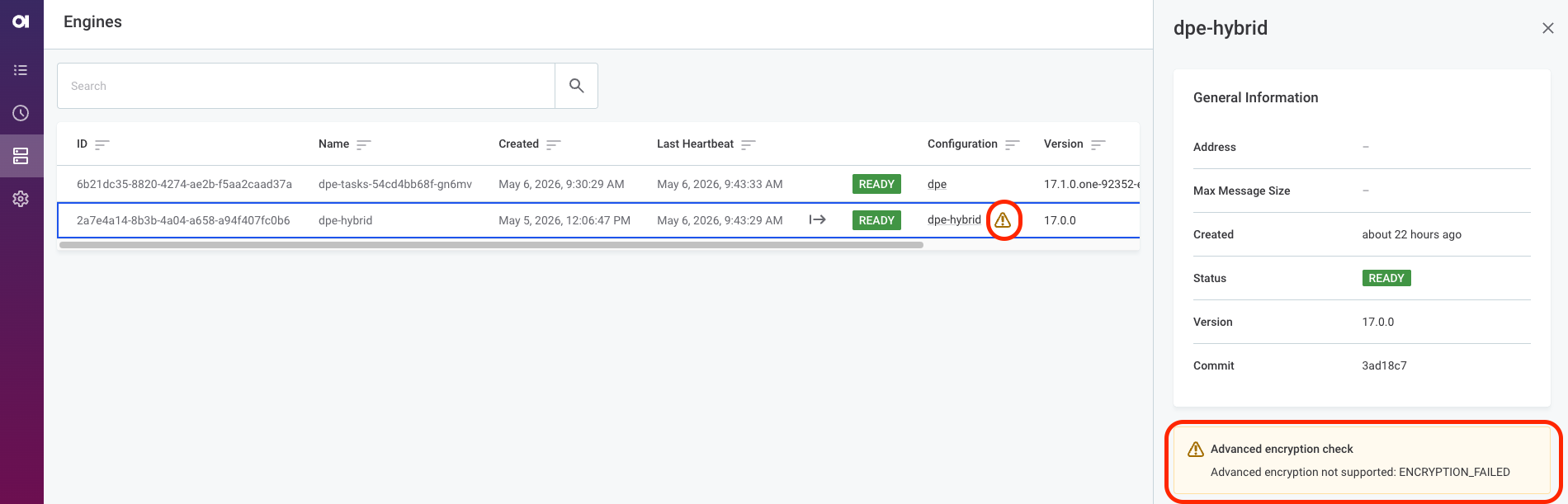
-
-
(Ataccama Cloud only) Once all DPE instances are connected and show no warnings, apply the following Helm override:
global.dataEncryption.advancedEncryptionEnabled=true
DPE status is INDETERMINATE
The INDETERMINATE status is not directly related to the advanced encryption settings.
Instead, it indicates one of the following:
-
There is a technical issue in communication between DPM and DPE. Verify the communication is correctly set up; see Authorized components.
-
There are no JDBC drivers configured for the DPE instance using advanced encryption. See Data Sources Configuration.
Secured environment: Security Manager replaced
Java 25, which self-managed Data Processing Engine (DPE), DQ Issue Tracker, RDM, and Runtime Server now run on, removes the Java Security Manager entirely. It is replaced by a narrower, server-specific mechanism that restricts file-system access only, enforced through Java instrumentation rather than the JVM’s built-in security API. It is available on Linux only.
Compared to the previous Security Manager-based policy:
-
Only file-system access is restricted. The previous policy’s network, reflection, and other runtime permissions now have no equivalent and are no longer checked at all. If you relied on the previous policy to restrict network access, enforce those restrictions at the container or cluster network level instead.
-
File-system access is denied by default and re-enabled only through explicit, narrowly scoped rules. By contrast, the previous policy granted blanket read access to entire directory trees, such as
/opt/ataccama. -
A rule can be scoped to a specific call stack, so that a sensitive file can be made readable only by the one internal component that needs it.
If you have customized the previous Security Manager policy (standard Java grant { permission …; }; syntax, supplied through a deployment’s serverPolicy Helm value), it is not compatible with the new policy format and must be rewritten.
For the new syntax, see Configuring custom policy rules.
|
If self-managed DPE custom JDBC drivers are deployed by mounting them directly to Before upgrading, ask your cluster admin to migrate any such drivers to the supported deployment process. |
Was this page useful?